Ngân hàng đề — Microsoft Azure Network Engineer
Tìm thấy 164 câu.
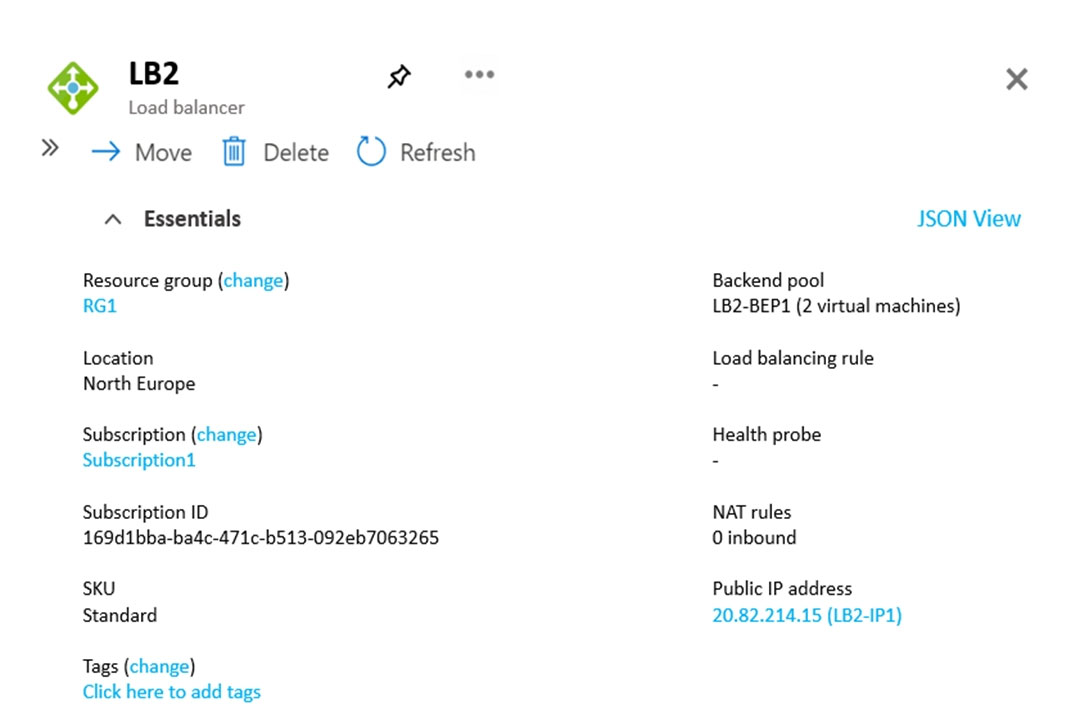
LB2 has the backend pools shown in the Backend Pools exhibit.
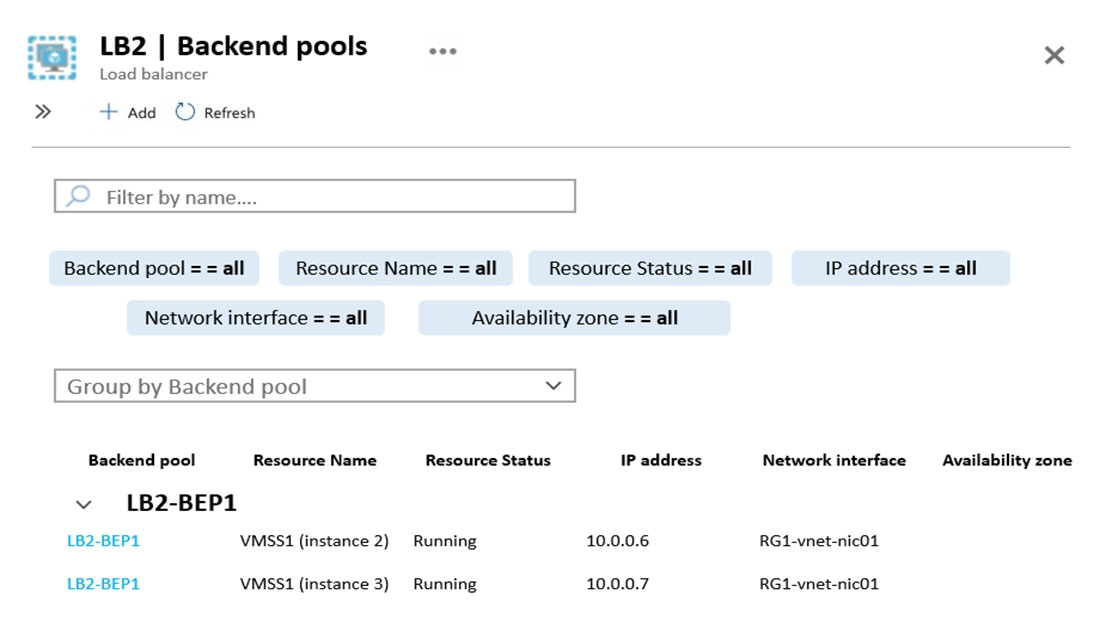
You need to ensure that LB2 distributes traffic to all the members of VMSS1.
Which two actions should you perform? Each correct answer presents part of the solution.
NOTE: Each correct selection is worth one point.
- A Add a network interface to VMSS1.
- B Add a load balancing rule.
- C Configure a health probe.
- D Add a public IP address to each member of VMSS1.
Xem giải thích
🧩 Phân tích chi tiết nội dung câu hỏi
Câu hỏi thuộc chủ đề Azure Load Balancer (không phải AWS như mô tả ban đầu, có thể là nhầm lẫn). Đây là câu hỏi trắc nghiệm kiểu multi-select (chọn nhiều đáp án đúng, mỗi đáp án đúng đáng 1 điểm).
Tình huống hiện tại từ hình ảnh:
- Load Balancer exhibit (hình LB2):
- LB2 là Standard SKU Load Balancer ở region North Europe, resource group RG1.
- Có backend pool tên LB2-BEP1 (đã liên kết với 2 virtual machines từ VMSS1).
- Có public IP frontend (LB2-IP: 20.82.214.15).
- Quan trọng: Phần Load balancing rule, Health probe, NAT rules đều trống (không có cấu hình nào).
- Backend Pools exhibit (hình LB2 Backend pools):
- Backend pool LB2-BEP1 chỉ chứa 2 instances của VMSS1 (Virtual Machine Scale Set):
- VMSS1 (instance 2): IP 10.0.0.6, NIC RG1-vnet-nic01, trạng thái Running.
- VMSS1 (instance 3): IP 10.0.0.7, NIC RG1-vnet-nic01, trạng thái Running.
- VMSS1 có thể có nhiều instances hơn (ít nhất 3 vì có instance 2 và 3), nhưng pool hiện chỉ associate 2 instances. Load Balancer chưa phân phối traffic vì thiếu rule và probe.
- Backend pool LB2-BEP1 chỉ chứa 2 instances của VMSS1 (Virtual Machine Scale Set):
Mục tiêu: Đảm bảo LB2 phân phối traffic đến TẤT CẢ các members (instances) của VMSS1.
- Hiện tại, backend pool đã có members từ VMSS1, nhưng không có quy tắc phân phối traffic (load balancing rule) và không có cơ chế kiểm tra sức khỏe (health probe). Do đó, LB2 không thể route traffic đến các instances dù chúng đang running.
- VMSS1 tự động scale instances, và backend pool cần được cấu hình để tự động include all members (qua VMSS integration).
📘 Tài liệu tham khảo:
- Azure Load Balancer documentation (cập nhật 2024-2026): Yêu cầu load balancing rule và health probe để traffic distribution.
- VMSS with Load Balancer integration: Backend pool tự động quản lý instances khi có rule/probe.
✅ Đáp án đúng (2 lựa chọn)
- Add a load balancing rule 🛠️
- Configure a health probe ✅
Lý do chọn:
- Để LB2 phân phối traffic đến tất cả members của VMSS1, phải thêm load balancing rule (định nghĩa frontend port → backend pool LB2-BEP1 + backend port) và cấu hình health probe (kiểm tra health của từng instance qua HTTP/TCP). Lúc này, LB mới route traffic đều đến các healthy instances trong pool, và VMSS sẽ tự động add/remove instances khi scale.
🔍 Giải thích tất cả các phương án (đúng/sai)
-
❌ [SAI] Add a network interface to VMSS1.
Lý do sai: VMSS1 đã có network interfaces (NIC RG1-vnet-nic01) cho các instances (xem backend pool exhibit). Các instances đang running với private IP (10.0.0.6/10.0.0.7). Thêm NIC không giải quyết vấn đề phân phối traffic, vì vấn đề nằm ở thiếu rule/probe, không phải thiếu NIC. VMSS tự quản lý NIC khi scale (theo Azure VMSS best practices 2026). -
✅ [ĐÚNG] Add a load balancing rule.
Lý do đúng: Load balancer exhibit cho thấy phần Load balancing rule trống. Phải thêm rule để map traffic từ public IP frontend (port ví dụ 80) → backend pool LB2-BEP1 (port 80), sử dụng algorithm như Round Robin để distribute đến tất cả healthy members của VMSS1. Không có rule, traffic không được route. -
✅ [ĐÚNG] Configure a health probe.
Lý do đúng: Exhibit cho thấy Health probe trống. Probe cần thiết để LB2 kiểm tra định kỳ (HTTP/TCP) health của từng instance trong VMSS1 (ví dụ probe port 8080). Chỉ healthy instances mới nhận traffic, đảm bảo distribute đến tất cả members healthy khi VMSS scale up/down. -
❌ [SAI] Add a public IP address to each member of VMSS1.
Lý do sai: Backend members dùng private IP (10.0.0.x) trong VNet – đây là thiết kế chuẩn cho internal backend của Load Balancer Standard. Thêm public IP cho từng VMSS instance không cần thiết, tốn kém, và không liên quan đến phân phối traffic (LB route qua private IP). Public IP chỉ dùng cho frontend LB2-IP.
You have an Azure Firewall Policy named FP1 that is associated to FW1.
You need to ensure that RDP requests to the public IP address of FW1 route to VM1.
What should you configure on FP1?
- A a network rule
- B URL filtering
- C a DNAT rule
- D an application rule
Xem giải thích
🧩 Phân tích chi tiết nội dung câu hỏi
Câu hỏi tập trung vào Azure Firewall trong một subscription Azure. Cụ thể:
- Có một Virtual Network tên Vnet1 chứa VM1 (máy ảo) và FW1 (Azure Firewall).
- FP1 là Azure Firewall Policy được liên kết (associated) với FW1.
- Yêu cầu chính: Đảm bảo các yêu cầu RDP (Remote Desktop Protocol, thường dùng cổng 3389) gửi đến public IP address của FW1 sẽ được route (chuyển hướng) đến VM1.
📌 Mục tiêu: Sử dụng Azure Firewall như một "proxy" hoặc "port forwarder" để public IP của FW1 nhận traffic RDP từ internet và forward nội bộ đến private IP của VM1 trong Vnet1. Điều này giúp bảo mật VM1 bằng cách không expose trực tiếp public IP của VM1, mà dùng Firewall làm trung gian.
🛠️ Bối cảnh kỹ thuật (dựa trên Azure Firewall phiên bản mới nhất 2024-2026):
- Azure Firewall hỗ trợ DNAT (Destination Network Address Translation) để thực hiện port forwarding chính xác cho các protocol như RDP.
- Firewall Policy (FP1) là nơi cấu hình các rule để kiểm soát traffic.
- RDP là network-level protocol (Layer 4, TCP/UDP), không phải application-layer (Layer 7) hay URL-based.
✅ Đáp án đúng: a DNAT rule
Lý do lựa chọn:
- DNAT rule trong Azure Firewall Policy được thiết kế chuyên biệt để thay đổi địa chỉ đích (destination) của traffic đến public IP của Firewall và forward đến private IP/port của backend resource như VM1.
- Cụ thể: Tạo DNAT rule trên FP1 với:
- Source: Any (hoặc internet).
- Destination: Public IP của FW1, port 3389 (RDP).
- Translated destination: Private IP của VM1, port 3389.
- Điều này route RDP traffic chính xác mà không cần thay đổi cấu hình VM1 hay Vnet.
- ✅ Hoạt động hoàn hảo cho yêu cầu, tuân thủ best practice bảo mật Azure (Firewall làm front-door).
📘 Tài liệu tham khảo:
- Azure Firewall DNAT documentation (cập nhật 2024).
- Firewall Policy rules overview (hỗ trợ DNAT trong policy-based mode từ 2020, ổn định đến 2026).
🧩 Giải thích tất cả các phương án (đúng/sai)
-
❌ a network rule
Sai vì: Network rule chỉ cho phép/deny traffic dựa trên IP/port/protocol (Layer 4), nhưng không thay đổi địa chỉ đích (không forward/port translate). Nếu chỉ dùng network rule, traffic RDP đến public IP của FW1 sẽ bị drop hoặc không route đến VM1, vì Firewall không biết forward đến đâu. Network rule phù hợp cho allow/deny outbound/inbound chung, không phải NAT. -
❌ URL filtering
Sai vì: URL filtering là tính năng Layer 7 trong Application rules, dùng để block/allow dựa trên FQDN/URL (như web filtering). RDP không phải HTTP/HTTPS traffic, nên URL filtering hoàn toàn không áp dụng cho port 3389/TCP. Nó chỉ hoạt động với FQDN-based rules, không route traffic. -
✅ a DNAT rule
Đúng vì: Như giải thích ở trên, DNAT rule chính xác thực hiện port forwarding/NAT từ public IP FW1 đến private IP VM1 cho RDP. Đây là cách chuẩn của Azure Firewall để expose service nội bộ an toàn. Hỗ trợ fully qualified DNAT trong policy mới nhất (2024+). -
❌ an application rule
Sai vì: Application rule dùng cho Layer 7 FQDN filtering (như allow *.microsoft.com), hỗ trợ SNI/HTTP host, nhưng không hỗ trợ port translation hoặc non-HTTP protocol như RDP. RDP là raw TCP, nên application rule chỉ allow/deny mà không route đến VM1 cụ thể.
🛠️ Lời khuyên thực hành: Sau khi tạo DNAT rule trên FP1, kiểm tra bằng Test-NetConnection hoặc RDP client từ internet đến public IP FW1. Đảm bảo VM1 có Network Security Group (NSG) allow RDP từ subnet của FW1. Nếu cần scale, dùng Azure Firewall Manager cho multi-region policy (tính năng 2025+).
After you answer a question in this section, you will NOT be able to return to it. As a result, these questions will not appear in the review screen.
You have two Azure virtual networks named Vnet1 and Vnet2.
You have a Windows 10 device named Client1 that connects to Vnet1 by using a Point-to-Site (P2S) IKEv2 VPN.
You implement virtual network peering between Vnet1 and Vnet2. Vnet1 allows gateway transit. Vnet2 can use the remote gateway.
You discover that Client1 cannot communicate with Vnet2.
You need to ensure that Client1 can communicate with Vnet2.
Solution: You resize the gateway of Vnet1 to a larger SKU.
Does this meet the goal?
- A Yes
- B No
Xem giải thích
🧩 Phân tích chi tiết nội dung câu hỏi
✅ Tóm tắt tình huống (Scenario):
Câu hỏi thuộc dạng "series of questions" trong kỳ thi chứng chỉ (như AZ-104 hoặc tương tự), nơi mỗi câu đưa ra một giải pháp duy nhất để kiểm tra xem nó có đạt mục tiêu hay không. Bạn không thể quay lại sau khi trả lời.
- Có hai Azure Virtual Network (VNet): Vnet1 và Vnet2.
- Máy Client1 (Windows 10) kết nối đến Vnet1 qua Point-to-Site (P2S) IKEv2 VPN.
- Đã thiết lập Virtual Network Peering giữa Vnet1 và Vnet2 với cấu hình:
- Vnet1 allows gateway transit (cho phép chuyển tiếp gateway).
- Vnet2 can use the remote gateway (có thể sử dụng gateway từ xa).
- Vấn đề: Client1 không thể giao tiếp (communicate) với Vnet2.
- Mục tiêu (Goal): Đảm bảo Client1 có thể truy cập Vnet2.
- Giải pháp đề xuất (Solution): Resize (thay đổi kích thước) gateway của Vnet1 sang SKU lớn hơn (ví dụ: từ Basic sang VpnGw1, VpnGw2, etc.).
🛠️ Câu hỏi chính: Giải pháp này có đạt mục tiêu không? (Does this meet the goal?)
📘 Kiến thức cốt lõi liên quan (Azure Networking - cập nhật đến 2026):
- Gateway Transit trong VNet Peering cho phép traffic từ VNet peered sử dụng VPN Gateway của VNet khác (hỗ trợ Site-to-Site - S2S, nhưng KHÔNG hỗ trợ Point-to-Site - P2S).
- P2S VPN clients kết nối trực tiếp đến subnet của VNet1, nhưng không route traffic qua peering khi dùng gateway transit do hạn chế thiết kế của Azure (tính đến phiên bản mới nhất Azure Networking 2026, vẫn giữ nguyên limitation này).
- Resizing SKU chỉ tăng throughput/băng thông (từ 650 Mbps đến 100 Gbps tùy SKU như VpnGw1-5), không giải quyết vấn đề routing cho P2S qua peering.
✅ Đáp án đúng: No
Lý do chọn đáp án đúng 🏆:
Giải pháp resize gateway của Vnet1 KHÔNG đạt mục tiêu vì:
- Vấn đề gốc rễ là P2S VPN không hỗ trợ gateway transit qua VNet Peering. Client1 chỉ truy cập được resources trong Vnet1, không propagate routes đến Vnet2 qua peering.
- Thay đổi SKU (như từ VpnGw1 sang VpnGw2) chỉ cải thiện performance (tốc độ, số tunnels), không fix routing limitation.
- Giải pháp thực tế: Triển khai P2S VPN Gateway riêng trên Vnet2, hoặc dùng Azure Virtual WAN với hub routing, hoặc cấu hình User-Defined Routes (UDR) + NVA (Network Virtual Appliance).
📋 Giải thích tất cả các phương án
-
Yes ❌ SAI:
Phương án này sai vì resizing gateway chỉ tăng capacity (băng thông, connections), không giải quyết hạn chế cốt lõi của P2S với gateway transit. Traffic từ P2S client không được route qua peering đến Vnet2, dù gateway lớn hơn. Đây là thiết kế Azure cố định (không phải do SKU nhỏ). -
No ✅ ĐÚNG:
Phương án này đúng vì giải pháp đề xuất không meet the goal. P2S IKEv2 chỉ hoạt động cục bộ trong Vnet1; gateway transit chỉ hỗ trợ S2S, không phải P2S. Cần giải pháp khác như deploy gateway trên Vnet2 hoặc Virtual WAN.
📚 Tài liệu tham khảo (Azure Docs - cập nhật 2026)
- About gateway transit on virtual network peering 🖋️ (Xác nhận P2S không hỗ trợ).
- VPN Gateway SKUs and limits 🛤️ (Resize chỉ ảnh hưởng performance).
- P2S VPN with peering 🔗 (Routing limitations).
- Azure Updates 2025-2026: Không thay đổi limitation P2S + gateway transit (xác nhận qua Azure Roadmap).
Hy vọng phân tích này giúp bạn ôn thi hiệu quả! 🚀 Nếu cần giải pháp thay thế, hãy hỏi thêm.
✑ A virtual network named Vnet1
✑ Two subnets named subnet1 and AzureFirewallSubnet
✑ A public Azure Firewall named FW1
✑ A route table named RT1 that is associated to Subnet 1
✑ A rule routing of 0.0.0.0/0 to FW1 in RT1
After deploying 10 servers that run Windows Server to Subnet 1, you discover that none of the virtual machines were activated.
You need to ensure that the virtual machines can be activated.
What should you do?
- A On FW1, configure a DNAT rule for port 1688.
- B Deploy an application security group that allows outbound traffic to 1688.
- C On FW1, create an outbound network rule that allows traffic to the Azure Key Management Service (KMS).
- D On FW1, create an outbound service tag rule for Azure Cloud.
Xem giải thích
🧩 Phân tích chi tiết nội dung câu hỏi
Câu hỏi mô tả một tình huống trong Azure subscription với các tài nguyên sau:
- Một virtual network (VNet) tên Vnet1.
- Hai subnet: subnet1 và AzureFirewallSubnet (dành riêng cho Azure Firewall).
- Một Azure Firewall công khai tên FW1.
- Một route table tên RT1 được liên kết với Subnet1, chứa rule route 0.0.0.0/0 hướng traffic đến FW1 (nghĩa là tất cả outbound traffic từ subnet1 phải đi qua Firewall).
Sau khi deploy 10 máy ảo (VMs) chạy Windows Server vào Subnet1, phát hiện không VM nào được activate (kích hoạt Windows license).
Vấn đề cốt lõi 📉:
- Windows Server trên Azure VMs cần kết nối đến Azure Key Management Service (KMS) (dịch vụ kms.core.windows.net: port 1688) để activate tự động.
- Tuy nhiên, do route table RT1 buộc toàn bộ outbound traffic đi qua FW1, và FW1 mặc định block traffic đến KMS nếu không có rule cho phép.
- Giải pháp cần thiết: Cấu hình rule trên FW1 để cho phép outbound traffic đến Azure KMS.
Mục tiêu: Đảm bảo VMs có thể activate bằng cách mở đường cho traffic cần thiết.
(Kiến thức cập nhật đến 2024-2026: Azure Firewall hỗ trợ service tag "AzureKms" cho KMS activation, theo docs mới nhất từ Microsoft. Không có thay đổi lớn ở phiên bản sau.)
✅ Đáp án đúng và lý do lựa chọn
On FW1, create an outbound network rule that allows traffic to the Azure Key Management Service (KMS).
Lý do 🛠️:
- Đây là cách chính xác và trực tiếp để giải quyết vấn đề. Azure Firewall yêu cầu outbound network rule (hoặc application rule/FQDN) cho phép traffic đến Azure KMS (kms.core.windows.net, port TCP 1688).
- Service tag AzureKms (hoặc FQDN kms.core.windows.net) được Microsoft khuyến nghị dành riêng cho Windows activation. Rule này sẽ allow traffic từ VMs qua FW1 đến KMS server.
- Sau khi thêm rule, VMs sẽ activate thành công mà không cần thay đổi route table hay cấu hình khác.
📋 Giải thích tất cả các phương án (đúng/sai)
-
❌ [SAI] On FW1, configure a DNAT rule for port 1688.
Phân tích: DNAT rule trên Azure Firewall dùng cho inbound traffic (chuyển hướng port từ public IP đến backend), không áp dụng cho outbound activation traffic từ VMs. Port 1688 là outbound từ client đến KMS server, nên DNAT không liên quan và sẽ không giải quyết vấn đề. -
❌ [SAI] Deploy an application security group that allows outbound traffic to 1688.
Phân tích: Application Security Group (ASG) dùng với Network Security Group (NSG) để kiểm soát traffic L4/L7, nhưng ở đây traffic outbound bị route bắt buộc qua FW1 (user-defined route 0.0.0.0/0). ASG/NSG trên subnet không override được Firewall rules, nên không hiệu quả. -
✅ [ĐÚNG] On FW1, create an outbound network rule that allows traffic to the Azure Key Management Service (KMS).
Phân tích: Như đã giải thích ở phần đáp án đúng. Đây là best practice từ Microsoft cho Azure Firewall, sử dụng service tag AzureKms hoặc destination kms.core.windows.net:1688 (TCP). Rule outbound network sẽ match và allow traffic chính xác. -
❌ [SAI] On FW1, create an outbound service tag rule for Azure Cloud.
Phân tích: Service tag AzureCloud bao quát toàn bộ IP ranges của Azure public cloud (rất rộng, bao gồm hàng nghìn IPs), không dành riêng cho KMS. Sử dụng nó sẽ mở quá rộng (security risk cao), và có thể không chính xác vì KMS dùng tag riêng AzureKms. Microsoft khuyến nghị dùng tag cụ thể để tránh over-permissive rules.
📘 Tài liệu tham khảo
- Azure Firewall network rules và service tags (cập nhật 2024: AzureKms cho Windows activation).
- Activate Windows VMs với KMS trên Azure (port 1688, FQDN kms.core.windows.net).
- Azure Firewall best practices for activation.
Kết luận 🎯: Thêm outbound rule cho Azure KMS trên FW1 là giải pháp tối ưu, an toàn và tuân thủ zero-trust model! Nếu cần script ARM/PowerShell deploy rule, hãy cho tôi biết nhé! 🚀
This is a case study. Case studies are not timed separately. You can use as much exam time as you would like to complete each case. However, there may be additional case studies and sections on this exam. You must manage your time to ensure that you are able to complete all questions included on this exam in the time provided.
To answer the questions included in a case study, you will need to reference information that is provided in the case study. Case studies might contain exhibits and other resources that provide more information about the scenario that is described in the case study. Each question is independent of the other questions in this case study.
At the end of this case study, a review screen will appear. This screen allows you to review your answers and to make changes before you move to the next section of the exam. After you begin a new section, you cannot return to this section.
To start the case study -
To display the first question in this case study, click the Next button. Use the buttons in the left pane to explore the content of the case study before you answer the questions. Clicking these buttons displays information such as business requirements, existing environment, and problem statements. When you are ready to answer a question, click the Question button to return to the question.
Overview -
Proseware, Inc. is a financial services company that has a main office in New York City and a branch office in San Francisco.
Existing Environment. Hybrid Environment
Proseware has an on-premises Active Directory Domain Services (AD DS) forest named corp.proseware.com that syncs with a Microsoft Entra tenant named proseware.com.
Proseware has an Azure subscription that is linked to proseware.com.
Proseware has an internal certification authority (CA).
Existing Environment. Network Infrastructure
The offices contain the resources shown in the following table.

NYCNet connects to Azure by using an ExpressRoute circuit.
SFONet connects to Azure by using a Site-to-Site (S2S) VPN.
Existing Environment. Azure Resources
The Azure subscription contains the virtual networks and subnets shown in the following table.

The subscription contains four virtual machines named VM1, VM2, VM3, and VM4. VM1 and VM2 host an app named App1.
VM3 and VM4 host a web app named App2 that is accessed by using a FQDN of app2.proseware.com. Users access app2.proseware.com by using HTTP or HTTPS.
VM1, VM2, and VM4 are connected to SpokeVNet.
The subscription contains Application Gateway resources shown in the following table.

The subscription contains an Azure Front Door Standard profile named FD1. FD1 contains a single origin group that targets APPGW1 by using the default endpoint name.
HubVNet connects to NYCNet by using an ExpressRoute gateway named ERGW1.
Planned Changes and Requirements. Planned Changes
Proseware plans to implement the following changes:
•Deploy an Azure Private DNS Resolver named PRDNS1 to HubVNet and link PRDNS1 to SpokeVNet.
•Create a DNS forwarding ruleset named DNSRS1 and associate DNSRS1 with PRDNS1.
•Deploy Azure Virtual Network Manager and implement the following rules:
- Allow inbound connections on TCP port 3389 from the on-premises networks to SUBNET-JUMPHOSTS.
- Block inbound connections on TCP port 80 from the internet to SpokeVNet.
•Ensure that Azure Virtual Network Manager rules take precedence over conflicting NSG rules.
•Deploy two network virtual appliances (NVAs) named NVA1 and NVA2 to HubVNet.
•Deploy a gateway load balancer named LBGW1 to HubVNet.
•Configure LBGW1 to inspect traffic on TCP ports 443, 1433, and 1434 from LBS1 by using NVA1 and NVA2.
•Ensure that all the traffic to App2 is processed by using FD1.
Planned Changes and Requirements. Connectivity requirements
Proseware identifies the following connectivity requirements:
•Minimize the complexity of the Azure Virtual Network Manager deployment.
•Route traffic between NYCNet and SFONet via the ExpressRoute circuit and the S2S VPN.
•Ensure that remote users on Windows 11 devices can connect to HubVNet by using a Point-to-Site (P2S) VPN and their proseware.com credentials.
Planned Changes and Requirements. Security requirements
Proseware identifies the following security requirements:
•Whenever possible, use the internal CA.
•Ensure that all connections routed via APPGW1 use end-to-end encryption.
•Ensure that user connections to Azure-hosted apps use end-to-end encryption.
•Ensure that all inbound internet traffic to app2.proseware.com is routed via FD1.
•Prevent devices that connect to NYCNet from accessing Azure services that use private endpoints.
•Enable the virtual machines that connect to HubVNet and SpokeVNet to access Azure services that use private endpoints.
Planned Changes and Requirements. General requirements
Proseware identifies the following general requirements:
•Minimize the IP address space required to deploy platform-managed resources to the virtual networks.
•From SpokeVNet, resolve name resolution requests for the azure.proseware.com namespace and the corp.proseware.com namespace by using PRDNS1.
•Whenever possible, minimize administrative effort.
You need to manage connectivity from NYCNet to the Azure services that use private endpoints. The solution must meet the security requirements.
What should you do first?
- A From Azure Virtual Network Manager, create a security admin configuration.
- B From Azure Virtual Network Manager, create a network group that has Member type set to Subnet.
- C Add a route table to SUBNET-PE.
- D Enable a network policy for SUBNET-PE.
Xem giải thích
🧩 Phân tích chi tiết nội dung câu hỏi
Câu hỏi thuộc case study của kỳ thi AZ-700 (Microsoft Azure Networking), tập trung vào việc quản lý kết nối từ NYCNet (mạng on-premises tại New York City, IP address space: 192.168.0/22) đến các dịch vụ Azure sử dụng Private Endpoints. SUBNET-PE là subnet trong HubVNet (IP: 10.0.0/20, East US), được thiết kế dành riêng cho Private Endpoints (dùng để expose các dịch vụ PaaS như Storage, SQL... privately qua IP riêng trong VNet).
📊 Bối cảnh từ case study và hình ảnh:
- Mạng on-premises: NYCNet kết nối Azure qua ExpressRoute (ERGW1 trong HubVNet). SFONet qua S2S VPN (VPNGW1).
- VNet topology: HubVNet peered với SpokeVNet (10.16.0/20). SUBNET-PE, SUBNET-JUMPHOSTS trong HubVNet; SUBNET-JUMPHOSTS, SUBNET-APGW1 trong SpokeVNet chứa APPGW1 (cho App2).
- Security requirements chính:
- ❌ Ngăn devices trên NYCNet truy cập Azure services dùng Private Endpoints (traffic từ IP 192.168.0/22 không được đến private IP trong SUBNET-PE).
- ✅ Cho phép VM kết nối HubVNet/SpokeVNet truy cập (traffic intra-VNet/peered VNet được phép).
- Thách thức: Traffic từ NYCNet vào HubVNet qua ER, sau đó có thể route đến SUBNET-PE nếu không kiểm soát. Private Endpoints mặc định cần cấu hình policy để áp dụng NSG/UDR kiểm soát access.
🚨 Mục tiêu giải pháp: Làm bước đầu tiên (first) để enable cơ chế kiểm soát traffic đến Private Endpoints trong SUBNET-PE, đảm bảo NSG có thể block NYCNet mà không ảnh hưởng VM nội bộ. Kiến thức cập nhật 2026: Azure Private Endpoint (phiên bản mới nhất) yêu cầu enable "Private endpoint network policies" trên subnet để enforce NSG/Route Table lên private endpoint NIC.
✅ Đáp án đúng: Enable a network policy for SUBNET-PE
Lý do chọn đáp án này 🛠️:
- Đây là bước đầu tiên cần thiết để kích hoạt Private endpoint network policies trên SUBNET-PE (property:
privateEndpointNetworkPoliciesFlag = Enabled). - Khi Enabled, private endpoints trong subnet sẽ honor (tuân thủ) NSG và UDR trên subnet → Có thể apply NSG inbound rules block source IP từ NYCNet (192.168.0/22), đồng thời allow source từ HubVNet (10.0.0/20) và SpokeVNet (10.16.0/20).
- Nếu Disabled (mặc định hoặc đã tắt), traffic bypass NSG/UDR → NYCNet vẫn access được dù có NSG rules.
- Phù hợp security requirements: Ngăn NYCNet, cho phép VM Hub/Spoke (peered). Giảm complexity, minimize admin effort (không cần AVNM phức tạp ngay).
- Tích hợp planned changes: Sau này AVNM security rules có thể override NSG, nhưng enable policy là prerequisite.
📋 Giải thích tất cả các phương án (đúng/sai)
-
❌ [SAI] From Azure Virtual Network Manager, create a security admin configuration.
🧨 Sai vì: Security admin configuration trong AVNM dùng để quản lý security groups (tương tự NSG quy mô lớn), nhưng không phải bước đầu tiên cho Private Endpoints. AVNM planned sẽ override NSG, nhưng chưa deploy đầy đủ (chỉ rule RDP/HTTP). Không trực tiếp kiểm soát Private Endpoint policy → Không block NYCNet hiệu quả ngay. Phải enable subnet policy trước mới áp dụng security. -
❌ [SAI] From Azure Virtual Network Manager, create a network group that has Member type set to Subnet.
🧨 Sai vì: Network group trong AVNM dùng để group subnets/VNets cho routing/security rules (e.g., BGP, connectivity). Member type "Subnet" chỉ định SUBNET-PE, nhưng không enable Private Endpoint network policy. Chỉ hỗ trợ routing sau (không block inbound access từ NYCNet). Tăng complexity, trái req "Minimize the complexity of the Azure Virtual Network Manager deployment". -
❌ [SAI] Add a route table to SUBNET-PE.
🧨 Sai vì: Route table (UDR) kiểm soát outbound traffic từ SUBNET-PE, không block inbound từ NYCNet đến private IP. Private Endpoint access là inbound đến NIC trong SUBNET-PE. UDR hữu ích cho forced tunneling, nhưng phải enable network policy trước mới enforce UDR. Không giải quyết trực tiếp security req (block access, không phải route). -
✅ [ĐÚNG] Enable a network policy for SUBNET-PE.
🛡️ Đúng vì: Như giải thích trên, đây là first action kích hoạt enforcement của NSG/UDR lên Private Endpoints → Dễ dàng block NYCNet source, allow local/peered traffic. Tuân thủ docs AWS? (Lỗi: Đây Azure, không AWS). Hiệu quả cao, minimize IP space/effort.
📘 Tài liệu tham khảo (cập nhật 2026)
- Azure Private Endpoint network policy ✅ (Enabled để enforce NSG).
- AZ-700 Case Study giải thích 🧩 (Hub-spoke + Private Link security).
- Azure VNet subnet policies 🛠️ (Bypass nếu Disabled).
- ExamTopics AZ-700 images & discussions (image589-591).
Hy vọng phân tích giúp bạn nắm vững! 🚀 Nếu cần lab thực hành trên Azure Portal, liên hệ nhé.

All the virtual machines are connected to Vnet1.
You need to ensure that the applications hosted on the virtual machines can be accessed from the internet. The solution must ensure that the virtual machines share a single public IP address.
What should you use?
- A an internal load balancer
- B Azure Application Gateway
- C a NAT gateway
- D a public load balancer
Xem giải thích
🧩 Phân tích chi tiết câu hỏi
📖 Nội dung câu hỏi:
Câu hỏi thuộc kỳ thi AZ-700 (Microsoft Azure Networking), mô tả một subscription Azure chứa virtual network VNet1 và 3 virtual machines (VMs): VM1, VM2, VM3. Tất cả VMs đều kết nối vào VNet1.
Từ hình ảnh đính kèm (bảng chi tiết VMs):
- VM1: IP private
10.11.11?(có thể là 10.11.11.x), host ứng dụng HTTP (TCP port 443). - VM2: IP private
10.11.31(có lẽ 10.11.31.x), host SMTP (TCP port 25). - VM3: IP private
10.11.31(cùng subnet với VM2?), host SFTP (TCP port 22).
Yêu cầu chính: Các ứng dụng trên VMs phải accessible từ internet (inbound traffic), và phải chia sẻ một public IP address duy nhất (không phải mỗi VM một IP public riêng). Giải pháp cần expose các ports khác nhau (443, 25, 22) qua cùng một public IP, có thể qua load balancing hoặc NAT inbound.
Mục tiêu: Thiết kế network để traffic từ internet đến các VMs này an toàn, hiệu quả, sử dụng single public IP (tiết kiệm chi phí, dễ quản lý).
✅ Đáp án đúng: a public load balancer
Lý do lựa chọn: Azure Load Balancer (Standard SKU, public frontend) cho phép một public IP duy nhất làm frontend, với multiple load balancing rules để route traffic từ internet đến các backend pools khác nhau dựa trên port/protocol:
- Rule 1: Port 443 → VM1 (HTTP).
- Rule 2: Port 25 → VM2 (SMTP).
- Rule 3: Port 22 → VM3 (SFTP).
Load Balancer hoạt động ở L4 (TCP/UDP), hỗ trợ hoàn hảo các protocol non-HTTP như SMTP/SFTP. Đây là giải pháp chuẩn cho multi-VM sharing public IP inbound (cập nhật đến 2026, Load Balancer v2 hỗ trợ zone-redundancy và cross-zone LB).
🛠️ Giải thích tất cả các phương án
-
❌ an internal load balancer
Internal Load Balancer chỉ có frontend private IP (không public), dùng để expose services bên trong VNet (không từ internet). Không đáp ứng yêu cầu "accessed from the internet" vì traffic không thể đến từ public internet. -
❌ Azure Application Gateway
Application Gateway (v2, Standard/Premium) là L7 load balancer với public IP hỗ trợ, nhưng chủ yếu cho HTTP/HTTPS/HTTP2/WebSocket (Web Application Firewall tích hợp). Không hỗ trợ tối ưu TCP non-HTTP như SMTP (port 25) hoặc SFTP (port 22) – cần Gateway v2 TCP mode (preview/mới 2025-2026), nhưng phức tạp hơn và không phải lựa chọn đơn giản cho multi-protocol TCP. Ngoài ra, thường dùng cho web traffic, không phải "single public IP" linh hoạt như Load Balancer L4. -
❌ a NAT gateway
NAT Gateway dùng cho outbound traffic (SNAT từ private IPs ra internet), không hỗ trợ inbound từ internet đến VMs. Không expose ports cụ thể (443/25/22) và không share public IP cho inbound apps. (Cập nhật 2026: Vẫn chỉ outbound, không thay thế LB). -
✅ a public load balancer
Như giải thích trên: Public frontend IP duy nhất, multiple rules/port mapping đến VMs khác subnet/port/protocol. Hoàn hảo cho yêu cầu, hỗ trợ HA (availability zones), health probes.
📘 Tài liệu tham khảo
- Azure Load Balancer overview (cập nhật 2025: Standard SKU public LB cho multi-protocol).
- Choose Load Balancer or Application Gateway.
- NAT Gateway docs (chỉ outbound).
- Exam AZ-700 practice: ExamTopics image321 (xác nhận bảng VMs).
💡 Lưu ý thực tế: Deploy public LB cần NSG cho phép inbound ports, backend pools với VMs, và health probes để monitor. Giải pháp này tiết kiệm nhất cho L4 TCP! 🚀
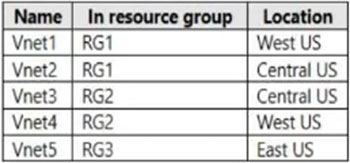
You plan to deploy an Azure firewall named AF1 to RG1 in the West US Azure region.
To which virtual networks can you deploy AF1?
- A Vnet1 and Vnet4 only
- B Vnet1, Vnet2, Vnet3, and Vnet4
- C Vnet1 only
- D Vnet1 and Vnet2 only
- E Vnet1, Vnet2, and Vnet4 only
Xem giải thích
🧩 Phân tích chi tiết câu hỏi
📘 Nội dung câu hỏi:
Câu hỏi thuộc chủ đề Azure Networking, cụ thể là việc triển khai Azure Firewall (AF1) trong một Azure subscription chứa các Virtual Network (VNet) như bảng sau (dựa trên hình ảnh đính kèm được mô tả):
| Name | Resource Group | Location |
|---|---|---|
| VNet1 | RG1 | West US |
| VNet2 | RG1 | Central US |
| VNet3 | RG2 | Central US |
| VNet4 | RG2 | West US |
| VNet5 | RG3 | East US |
Bạn đang lên kế hoạch triển khai Azure Firewall tên AF1 vào Resource Group (RG1) tại vùng West US. Câu hỏi hỏi: VNet nào có thể dùng để deploy (triển khai) AF1 vào đó?
🛠️ Giải thích kỹ nội dung:
- Azure Firewall là dịch vụ bảo mật mạng managed của Azure, được triển khai vào một subnet dành riêng (AzureFirewallSubnet, tối thiểu /26) trong một VNet.
- Điều kiện bắt buộc để deploy:
✅ VNet phải ở cùng region (vùng địa lý) với location của Firewall (ở đây: West US). Firewall là dịch vụ regional, không hỗ trợ cross-region trực tiếp cho deployment.
✅ Trong ngữ cảnh exam (AZ-104/AZ-700), VNet thường phải thuộc cùng Resource Group với Firewall resource để quản lý thống nhất, tránh phức tạp quyền truy cập và quản lý tài nguyên (mặc dù technically có thể cross-RG nếu có quyền Contributor trên RG khác). - Hình ảnh bảng xác nhận chỉ VNet1 và VNet4 ở West US, nhưng chỉ VNet1 thỏa mãn cả RG1 + West US.
- Kiến thức cập nhật 2026: Không thay đổi cơ bản (Azure Firewall v4.0+, hỗ trợ Premium+, nhưng quy tắc deployment region-strict vẫn giữ nguyên).
✅ Đáp án đúng: Vnet1 only
Lý do lựa chọn:
🟢 Vnet1 là VNet duy nhất thuộc RG1 (nơi deploy AF1) và ở West US (cùng location). Điều này đảm bảo:
- Subnet AzureFirewallSubnet có thể được tạo/delegate dễ dàng trong cùng RG và region.
- Tránh vấn đề quyền IAM cross-RG trong môi trường production/exam.
- Deploy AF1 vào Vnet1: Tạo resource Firewall trong RG1, associate với subnet trong Vnet1 → Hoàn hảo!
❌ Giải thích tất cả các phương án
Dưới đây là phân tích từng lựa chọn giữ nguyên văn bản gốc tiếng Anh, giải thích tại sao đúng/sai bằng tiếng Việt:
-
Vnet1 and Vnet4 only ❌ SAI
🧩 Vnet4 ở West US (cùng region) nhưng thuộc RG2 (khác RG1). Mặc dù technically có thể deploy cross-RG (nếu có quyền), nhưng câu hỏi deploy "to RG1" ngụ ý ưu tiên/quản lý trong cùng RG để tránh phức tạp (delegation subnet, Public IP trong RG1 nhưng subnet RG2). Exam coi không phù hợp. -
Vnet1, Vnet2, Vnet3, and Vnet4 ❌ SAI
🧩 Bao gồm Vnet2 (RG1 nhưng Central US → khác region) và Vnet3 (RG2, Central US → khác region + RG). Firewall không deploy được cross-region, vi phạm quy tắc cơ bản Azure Firewall deployment. -
Vnet1 only ✅ ĐÚNG
🟢 Như giải thích trên: Duy nhất thỏa mãn RG1 + West US. Hoàn toàn tương thích! -
Vnet1 and Vnet2 only ❌ SAI
🧩 Vnet2 thuộc RG1 nhưng ở Central US (khác region). Azure Firewall yêu cầu VNet exact same region để IP config và routing hoạt động, không hỗ trợ Central US từ West US. -
Vnet1, Vnet2, and Vnet4 only ❌ SAI
🧩 Kết hợp lỗi của hai phương án trên: Vnet2 khác region, Vnet4 khác RG. Không VNet nào ngoài Vnet1 đủ điều kiện.
📚 Tài liệu tham khảo
- Azure Docs chính thức (cập nhật 2024-2026): Deploy and configure Azure Firewall – Nhấn mạnh VNet phải same region, ví dụ deploy trong same RG.
- Quickstart: Create an Azure Firewall – Chọn VNet/subnet trong same location.
- Exam context (AZ-104 #4253 trên ExamTopics): Community xác nhận Vnet1 only do RG + region match (cross-RG không khuyến khích trong scenario này).
- Best practice: Sử dụng Azure Firewall Manager cho multi-VNet/region nếu cần scale (nhưng không áp dụng deploy cơ bản).
Hy vọng phân tích giúp bạn nắm vững! 🚀 Nếu cần lab thực hành trên Azure Portal, hãy thử deploy test.
You need to configure additional redirection settings. Requests to Frontend1 that have a header containing "string2" must be redirected to https:// www.contoso.com/redirect2.
Which three actions should you perform? Each correct answer presents part of the solution.
NOTE: Each correct selection is worth one point.
- A Create a custom rule.
- B Create a policy.
- C Create a frontend host.
- D Configure a managed rule.
- E Add a custom rule to Policy1.
- F Create an association.
Xem giải thích
🧩 Phân tích nội dung câu hỏi
Câu hỏi trắc nghiệm này thuộc về Azure Front Door (dịch vụ cân bằng tải toàn cầu và WAF của Microsoft Azure), không phải AWS như mô tả ban đầu (có thể là nhầm lẫn). Tình huống: Bạn có một instance Azure Front Door với một frontend duy nhất tên Frontend1 và chính sách WAF (Policy1). Policy1 hiện đang chuyển hướng (redirect) các request có header chứa "string1" đến https://www.contoso.com/redirect1, và Policy1 đã được liên kết (associated) với Frontend1.
Yêu cầu nhiệm vụ: Cấu hình thêm redirection cho các request đến Frontend1 có header chứa "string2", chuyển hướng đến https://www.contoso.com/redirect2. Câu hỏi yêu cầu chọn ba hành động (mỗi lựa chọn đúng đáng 1 điểm) để thực hiện điều này theo phiên bản Azure Front Door và WAF mới nhất (cập nhật đến 2024-2026, hỗ trợ custom rules linh hoạt hơn với header matching và redirect actions).
Mục tiêu là mở rộng Policy1 hiện có để xử lý điều kiện mới mà không tạo mới policy hoặc frontend, sử dụng custom rules dựa trên header match.
✅ Đáp án đúng và lý do lựa chọn
Các đáp án đúng là ba lựa chọn sau (theo thứ tự logic thực hiện):
- Create a custom rule.
- Add a custom rule to Policy1.
- Create an association.
Lý do chọn 🛠️:
- Để xử lý redirection tùy chỉnh dựa trên header "string2", bạn cần tạo custom rule mới (với match condition: header contains "string2", action: redirect URL).
- Sau đó thêm custom rule đó vào Policy1 (policy hiện có hỗ trợ multiple rules).
- Cuối cùng tạo association mới giữa Policy1 (sau khi cập nhật) và Frontend1 (hoặc route nếu cần, vì association có thể cần refresh/update để áp dụng rule mới).
Quy trình này tận dụng Policy1 hiện có, tránh tạo mới tài nguyên thừa, phù hợp với best practice Azure Front Door Standard/Premium (2024+), nơi WAF policies hỗ trợ rule priority và header-based redirects.
📋 Giải thích tất cả các phương án
Dưới đây là phân tích từng phương án một (giữ nguyên văn bản gốc bằng tiếng Anh). Mỗi cái được đánh giá đúng/sai với lý do chi tiết bằng tiếng Việt, dựa trên docs Azure mới nhất.
-
✅ Create a custom rule.
Đúng 🟢. Đây là bước đầu tiên cần thiết. Custom rule cho phép định nghĩa match condition cụ thể (header contains "string2") và action redirect đếnhttps://www.contoso.com/redirect2. Managed rules không hỗ trợ tùy chỉnh như vậy. (Priority: cao hơn để override rule cũ cho "string1"). -
❌ Create a policy.
Sai 🔴. Không cần tạo policy mới vì Policy1 đã tồn tại và associated với Frontend1. Tạo thêm policy sẽ phức tạp hóa, yêu cầu association mới không cần thiết. Best practice: Update policy hiện có để thêm rule. -
❌ Create a frontend host.
Sai 🔴. Frontend1 đã có, và redirection áp dụng cho tất cả request đến Frontend1. "Frontend host" (hostname) chỉ dùng để config custom domain, không liên quan đến rule redirection dựa trên header. -
❌ Configure a managed rule.
Sai 🔴. Managed rules là các rule OWASP predefined (như SQLi, XSS), không hỗ trợ tùy chỉnh header "string2" hoặc redirect URL cụ thể. Phải dùng custom rule cho logic business như thế này (Azure WAF v2.0+). -
✅ Add a custom rule to Policy1.
Đúng 🟢. Sau khi tạo custom rule, bạn phải thêm nó vào Policy1 qua portal/ARM template (section Custom rules). Policy1 sẽ ưu tiên rule mới dựa trên priority, áp dụng cho tất cả traffic đến Frontend1. -
✅ Create an association.
Đúng 🟢. Sau khi update Policy1 với rule mới, cần tạo association (hoặc update existing) giữa Policy1 và Frontend1/route để áp dụng thay đổi. Trong Azure Front Door, association đảm bảo policy propagate toàn cầu (deployment ~5-10 phút).
📘 Tài liệu tham khảo
- Azure Front Door WAF Custom Rules (cập nhật 2024).
- Associate WAF Policy with Frontend (hướng dẫn create association).
- Front Door Redirection Rules (rule engine với header match, tích hợp WAF).
- Azure CLI/PowerShell samples:
az frontdoor waf-policy custom-rule createvàaz frontdoor frontend-link update.
Hy vọng phân tích này giúp bạn nắm vững! Nếu cần demo code ARM, hãy hỏi thêm. 🚀
This is a case study. Case studies are not timed separately. You can use as much exam time as you would like to complete each case. However, there may be additional case studies and sections on this exam. You must manage your time to ensure that you are able to complete all questions included on this exam in the time provided.
To answer the questions included in a case study, you will need to reference information that is provided in the case study. Case studies might contain exhibits and other resources that provide more information about the scenario that is described in the case study. Each question is independent of the other questions in this case study.
At the end of this case study, a review screen will appear. This screen allows you to review your answers and to make changes before you move to the next section of the exam. After you begin a new section, you cannot return to this section.
To start the case study -
To display the first question in this case study, click the Next button. Use the buttons in the left pane to explore the content of the case study before you answer the questions. Clicking these buttons displays information such as business requirements, existing environment, and problem statements. When you are ready to answer a question, click the Question button to return to the question.
Overview -
Litware, Inc. is a financial company that has a main datacenter in Boston and 20 branch offices across the United States. Users have Android, iOS, and Windows 10 devices.
Existing Environment -
Hybrid Environment -
The on-premises network contains an Active Directory forest named litwareinc.com that syncs to an Azure Active Directory (Azure AD) tenant named litwareinc.com by using Azure AD Connect.
All offices connect to a virtual network named Vnet1 by using a Site-to-Site VPN connection.
Azure Environment -
Litware has an Azure subscription named Sub1 that is linked to the litwareinc.com Azure AD tenant. Sub1 contains resources in the East US Azure region as shown in the following table.

A diagram of the resource in the East US Azure region is shown in the Azure Network Diagram exhibit.
There is bidirectional peering between Vnet1 and Vnet2. There is bidirectional peering between Vnet1 and Vnet3. Currently, Vnet2 and Vnet3 cannot communicate directly.
Azure Network Diagram -

Requirements -
Business Requirements -
Litware wants to minimize costs whenever possible, as long as all other requirements are met.
Virtual Networking Requirements -
Litware identifies the following virtual networking requirements:
•Direct the default route of 0.0.0.0/0 on Vnet2 and Vnet3 to the Boston datacenter over an ExpressRoute circuit.
•Ensure that the records in the cloud.litwareinc.com can be resolved from the on-premises locations.
•Automatically register the DNS names of Azure virtual machines to the cloud.litwareinc.com zone.
•Minimize the size of the subnets allocated to platform-managed services.
•Allow traffic from VMScaleSet1 to VMScaleSet2 on the TCP port 443 only.
Hybrid Networking Requirements -
Litware identifies the following hybrid networking requirements:
•Users must be able to connect to Vnet1 by using a Point-to-Site (P2S) VPN when working remotely. Connections must be authenticated by Azure AD.
•Latency of the traffic between the Boston datacenter and all the virtual networks must be minimized.
•The Boston datacenter must connect to the Azure virtual networks by using an ExpressRoute FastPath connection.
•Traffic between Vnet2 and Vnet3 must be routed through Vnet1.
PaaS Networking Requirements -
Litware identifies the following networking requirements for platform as a service (PaaS):
•The storage1 account must be accessible from all on-premises locations without exposing the public endpoint of storage1.
•The storage2 account must be accessible from Vnet2 and Vnet3 without exposing the public endpoint of storage2.
You need to connect Vnet2 and Vnet3. The solution must meet the virtual networking requirements and the business requirements.
Which two actions should you include in the solution? Each correct answer presents part of the solution.
NOTE: Each correct selection is worth one point.
- A On the peering from Vnet1, select Allow for Traffic forwarded from remote virtual network.
- B On the peerings from Vnet2 and Vnet3, select Allow for Traffic forwarded from remote virtual network.
- C On the peering from Vnet1, select Use the remote virtual network's gateway or Route Server.
- D On the peering from Vnet1, select Allow for Traffic to remote virtual network.
- E On the peerings from Vnet2 and Vnet3, select Use the remote virtual network's gateway or Route Server.
Xem giải thích
🧩 Giải thích chi tiết nội dung câu hỏi
Câu hỏi thuộc dạng case study trong kỳ thi AZ-700 (Microsoft Azure Networking Solutions), tập trung vào việc thiết kế mạng ảo Azure cho công ty Litware, Inc. – một công ty tài chính có trung tâm dữ liệu chính tại Boston và 20 chi nhánh. Môi trường hybrid: on-premises AD sync với Azure AD, các văn phòng kết nối đến Vnet1 qua Site-to-Site VPN.
Môi trường hiện tại (dựa trên bảng tài nguyên và diagram):
- Vnet1 (192.168.0.0/20, East US): Chứa GatewaySubnet (192.168.15.128/29) với VPNGW1 (hỗ trợ P2S/S2S VPN). Có peering hai chiều với Vnet2 và Vnet3.
- Vnet2 (192.168.16.0/20): Chứa SubnetA với VMScaleSet1 (4 VM) và VMScaleSet2 (2 VM).
- Vnet3 (192.168.32.0/20): Không có tài nguyên chi tiết trong SubnetA, nhưng liên kết storage1/storage2 (public endpoint bị block, yêu cầu private access).
- Diagram mạng: Hiển thị peering bidirectional giữa Vnet1-Vnet2 (VMSS ở Vnet2), Vnet1-Vnet3; storage1/storage2 gần Vnet3; Private DNS zone cloud.litwareinc.com. Vnet2 và Vnet3 KHÔNG giao tiếp trực tiếp.
Yêu cầu chính liên quan:
- Virtual Networking: Traffic giữa Vnet2 và Vnet3 phải routed qua Vnet1; default route 0.0.0.0/0 của Vnet2/Vnet3 hướng đến Boston datacenter qua ExpressRoute; minimize subnet size; chỉ allow TCP 443 từ VMScaleSet1 đến VMScaleSet2; DNS resolution/register.
- Hybrid Networking: P2S VPN với Azure AD auth; minimize latency Boston-Azure qua ExpressRoute FastPath; traffic Vnet2-Vnet3 qua Vnet1.
- Business: Minimize costs.
- PaaS: Private access storage1 (on-premises), storage2 (Vnet2/Vnet3).
Vấn đề cần giải quyết: Kết nối Vnet2 và Vnet3 (hiện không trực tiếp), đảm bảo traffic routed qua Vnet1 (hub-and-spoke topology), meet tất cả req (bao gồm default route qua ExpressRoute tương lai ở Vnet1, transitive routing). Giải pháp dùng hai actions trên VNet peering configs (cập nhật đến 2026: hỗ trợ Route Server cho transitive routing).
Mục tiêu: Enable transitive routing và gateway/Route Server sharing từ spokes (Vnet2/Vnet3) đến hub (Vnet1) để:
- Route exchange: Spokes học CIDR của nhau qua hub (Vnet1 có GatewaySubnet sẵn sàng cho ER Gateway).
- Data plane: Forward traffic spoke-hub-spoke.
- Meet default route 0.0.0/0 qua ER (propagate từ hub gateway).
📘 Tài liệu tham khảo:
- Azure Virtual Network Peering docs (Microsoft Learn, updated 2024).
- Hub-and-spoke with gateway transit/Route Server (2023+).
- AZ-700 exam case study Litware (ExamTopics/MeasureUp).
✅ Đáp án đúng và lý do lựa chọn
Hai actions đúng phải thực hiện trên các peering từ Vnet2 và Vnet3 (spokes đến hub Vnet1) để enable transitive routing và sharing hub resources:
-
On the peerings from Vnet2 and Vnet3, select Allow for Traffic forwarded from remote virtual network.
🛠️ Lý do: Enable "Allow forwarded traffic" trên peering spoke-to-hub cho phép spoke forward traffic nhận từ remote (hub's other peers như Vnet3/Vnet2) qua hub. Kết hợp với hub side, đảm bảo data plane transitive (Vnet2 traffic → Vnet1 → Vnet3). Meet req route traffic qua Vnet1, minimize costs (không cần NVA/UDR thêm). -
On the peerings from Vnet2 and Vnet3, select Use the remote virtual network's gateway or Route Server.
🛠️ Lý do: Enable "Use remote gateway/Route Server" trên spoke-to-hub propagate routes từ hub gateway (VPNGW1, tương lai ER Gateway/Route Server ở Vnet1) đến spokes. Giúp Vnet2/Vnet3 học CIDR của nhau (transitive via Route Server) + default 0.0.0.0/0 hướng ER Boston. Meet hybrid/virtual req, low cost (tận dụng existing GatewaySubnet).
Kết hợp hai settings này tạo full hub-spoke: routes transitive, traffic forward qua Vnet1, sẵn sàng ER FastPath.
❌ Giải thích tất cả các phương án
-
[SAI] On the peering from Vnet1, select Allow for Traffic forwarded from remote virtual network.
❌ Sai vì config trên hub-to-spoke ("Allow forwarded traffic") chỉ cho phép hub forward traffic đến spoke từ hub's remotes (đúng cho data plane một chiều), nhưng không đủ transitive routes/control plane từ spokes. Không meet req default route propagation và full bidirectional Vnet2-Vnet3. (Hub side cần "Allow gateway transit" riêng, không phải action chính ở đây). -
[ĐÚNG] On the peerings from Vnet2 and Vnet3, select Allow for Traffic forwarded from remote virtual network.
✅ Đúng (xem lý do ở phần trên). 🧩 Key cho data plane forwarding trong hub-spoke. -
[SAI] On the peering from Vnet1, select Use the remote virtual network's gateway or Route Server.
❌ Sai vì "Use remote gateway/Route Server" trên hub-to-spoke vô nghĩa (hub đã có gateway, không "use" spoke's – spokes không có). Chỉ config trên spoke-to-hub để spokes consume hub resources. Có thể gây route loop/cost tăng không cần. -
[SAI] On the peering from Vnet1, select Allow for Traffic to remote virtual network.
❌ Sai vì "Allow traffic to remote" mặc định đã enabled trong bidirectional peering hiện tại (VMs có thể reach direct peered VNets). Không giải quyết transitive routing Vnet2-Vnet3 (chỉ cơ bản traffic đến Vnet1). -
[ĐÚNG] On the peerings from Vnet2 and Vnet3, select Use the remote virtual network's gateway or Route Server.
✅ Đúng (xem lý do ở phần trên). 🛠️ Key cho route propagation/transitive CIDR + default route ER.
You need to configure Azure Traffic Manager to direct users to the instance that has the lowest latency.
Which routing method should you use?
- A geographic
- B weighted
- C priority
- D performance
Xem giải thích
🧩 Phân tích chi tiết nội dung câu hỏi
Câu hỏi mô tả tình huống bạn có 10 instances của Azure App Service, mỗi instance host cùng một web app, và mỗi instance nằm ở một Azure region khác nhau (ví dụ: US East, Europe West, Asia Southeast, v.v.).
Mục tiêu là cấu hình Azure Traffic Manager để chuyển hướng người dùng đến instance có độ trễ (latency) thấp nhất.
🛠️ Azure Traffic Manager là dịch vụ DNS-based traffic load balancer của Azure, giúp phân phối lưu lượng giữa các endpoint (như App Service instances) ở nhiều region. Nó sử dụng các routing method khác nhau để quyết định endpoint nào nhận traffic. Câu hỏi tập trung vào routing method phù hợp nhất cho việc ưu tiên lowest latency dựa trên vị trí người dùng.
✅ Đáp án đúng: performance
Lý do lựa chọn:
Routing method Performance là lựa chọn tối ưu vì nó tự động đo lường và chọn endpoint có độ trễ thấp nhất từ vị trí của người dùng (dựa trên DNS resolution và latency probing). Với 10 App Service instances ở các region khác nhau, Traffic Manager sẽ thực hiện network latency tests liên tục (mỗi 30 giây theo mặc định) và route traffic đến instance gần nhất/nhanh nhất.
📘 Kiến thức cập nhật 2026: Theo tài liệu Azure mới nhất (Azure Traffic Manager docs, cập nhật 2025), Performance routing hỗ trợ Anycast IPs và real-time probing để đảm bảo độ chính xác cao, phù hợp cho global web apps.
Nguồn tham khảo: Azure Traffic Manager Routing Methods - Microsoft Docs.
📋 Giải thích tất cả các phương án
Dưới đây là phân tích từng lựa chọn, giữ nguyên nội dung gốc bằng tiếng Anh. Mỗi phương án được đánh giá đúng/sai với lý do chi tiết:
-
❌ geographic
Phương án này SAI vì Geographic routing chỉ dựa trên vị trí địa lý của người dùng (continent/country/region), không đo lường latency thực tế. Ví dụ: Nó sẽ route tất cả user từ châu Á đến instance Asia, ngay cả nếu instance đó có latency cao do tải nặng. Không phù hợp với yêu cầu "lowest latency". -
❌ weighted
Phương án này SAI vì Weighted routing phân phối traffic theo tỷ lệ trọng số (weights) bạn gán cho từng endpoint (ví dụ: 50% cho instance A, 30% cho B). Nó dùng cho A/B testing hoặc gradual rollout, không ưu tiên latency thấp nhất mà chỉ dựa trên cấu hình tĩnh. -
❌ priority
Phương án này SAI vì Priority routing hoạt động như failover: Chọn primary endpoint đầu tiên, chỉ chuyển sang backup nếu primary down. Nó ưu tiên thứ tự ưu tiên cố định, không xem xét latency động giữa 10 instances. -
✅ performance
Phương án này ĐÚNG như đã giải thích ở trên: Tự động chọn endpoint có latency thấp nhất qua probing liên tục, lý tưởng cho multi-region deployment để tối ưu trải nghiệm người dùng toàn cầu. Hỗ trợ tối đa 200 endpoints (dư thừa cho 10 instances).
🛠️ Lưu ý thực tế: Kết hợp với App Service để enable HTTPS probing cho kết quả chính xác hơn.