Ngân hàng đề — AWS Certified Machine Learning Specialty
Tìm thấy 371 câu.
The company needs to implement this solution quickly, and wants to minimize the infrastructure and data science resources needed to evaluate the messages.
The company already has a solution in place to collect posts and store them within an Amazon S3 bucket.
What services should the data science team use to deliver this solution?
- A Train a model in Amazon SageMaker by using the BlazingText algorithm to detect sentiment in the corpus of social media posts. Expose an endpoint that can be called by AWS Lambda. Trigger a Lambda function when posts are added to the S3 bucket to invoke the endpoint and record the sentiment in an Amazon DynamoDB table and in a custom Amazon CloudWatch metric. Use CloudWatch alarms to notify analysts of trends.
- B Train a model in Amazon SageMaker by using the semantic segmentation algorithm to model the semantic content in the corpus of social media posts. Expose an endpoint that can be called by AWS Lambda. Trigger a Lambda function when objects are added to the S3 bucket to invoke the endpoint and record the sentiment in an Amazon DynamoDB table. Schedule a second Lambda function to query recently added records and send an Amazon Simple Notification Service (Amazon SNS) notification to notify analysts of trends.
- C Trigger an AWS Lambda function when social media posts are added to the S3 bucket. Call Amazon Comprehend for each post to capture the sentiment in the message and record the sentiment in an Amazon DynamoDB table. Schedule a second Lambda function to query recently added records and send an Amazon Simple Notification Service (Amazon SNS) notification to notify analysts of trends.
- D Trigger an AWS Lambda function when social media posts are added to the S3 bucket. Call Amazon Comprehend for each post to capture the sentiment in the message and record the sentiment in a custom Amazon CloudWatch metric and in S3. Use CloudWatch alarms to notify analysts of trends.
Xem giải thích
🧩 Phân tích nội dung câu hỏi
Câu hỏi tập trung vào việc xây dựng một hệ thống giám sát sentiment (cảm xúc) từ các bình luận trên mạng xã hội về sản phẩm mới của công ty. Các yêu cầu chính bao gồm:
- Đánh giá sentiment trong các bài đăng social media.
- Hiển thị xu hướng (visualize trends) và cấu hình cảnh báo (alarms) dựa trên các ngưỡng khác nhau.
- Triển khai nhanh chóng, giảm thiểu hạ tầng (infrastructure) và tài nguyên data science (không cần huấn luyện mô hình phức tạp).
- Dữ liệu đã được thu thập sẵn và lưu trữ trong Amazon S3 bucket.
Giải pháp cần serverless, tận dụng dịch vụ managed của AWS để xử lý NLP (Natural Language Processing) mà không yêu cầu xây dựng mô hình từ đầu. 📘 Tài liệu tham khảo: AWS Documentation - Amazon Comprehend (Sentiment Analysis, cập nhật 2024-2026), AWS Well-Architected Framework cho Serverless và ML.
✅ Đáp án đúng
Đáp án đúng là lựa chọn thứ 4:
- Trigger an AWS Lambda function when social media posts are added to the S3 bucket. Call Amazon Comprehend for each post to capture the sentiment in the message and record the sentiment in a custom Amazon CloudWatch metric and in S3. Use CloudWatch alarms to notify analysts of trends.
Lý do lựa chọn:
- 🛠️ Amazon Comprehend là dịch vụ managed NLP của AWS, hỗ trợ Sentiment Analysis sẵn có (positive/negative/neutral/mixed) mà không cần train model, phù hợp với yêu cầu minimize data science resources và triển khai nhanh (pay-per-use, serverless).
- 🛠️ Lambda trigger từ S3 (Event Notification) kích hoạt ngay khi file mới upload, gọi Comprehend cho từng post.
- 🛠️ Ghi kết quả vào custom CloudWatch metric (cho visualize trends qua dashboards) và S3 (lưu trữ lâu dài), sau đó dùng CloudWatch alarms để notify dựa trên thresholds – hoàn hảo cho monitoring và alerting.
- ✅ Tối ưu nhất: Không cần DB riêng, tận dụng CloudWatch native cho trends/alarms, giảm chi phí và complexity. (Cập nhật 2026: Comprehend hỗ trợ multi-language, real-time batching).
❌ Phân tích tất cả các phương án
-
Phương án 1 (SAI):
Train a model in Amazon SageMaker by using the BlazingText algorithm to detect sentiment in the corpus of social media posts. Expose an endpoint that can be called by AWS Lambda. Trigger a Lambda function when posts are added to the S3 bucket to invoke the endpoint and record the sentiment in an Amazon DynamoDB table and in a custom Amazon CloudWatch metric. Use CloudWatch alarms to notify analysts of trends.
Giải thích sai: ❌ SageMaker BlazingText yêu cầu train model từ corpus dữ liệu lớn, tốn data science resources (labeling, tuning) và thời gian – vi phạm yêu cầu minimize resources. Endpoint SageMaker tốn chi phí idle time, không nhanh như Comprehend managed. DynamoDB thừa thãi khi CloudWatch đã đủ cho metrics/alarms. 📘 Nguồn: SageMaker Docs - BlazingText (text classification, cần training data). -
Phương án 2 (SAI):
Train a model in Amazon SageMaker by using the semantic segmentation algorithm to model the semantic content in the corpus of social media posts. Expose an endpoint that can be called by AWS Lambda. Trigger a Lambda function when objects are added to the S3 bucket to invoke the endpoint and record the sentiment in an Amazon DynamoDB table. Schedule a second Lambda function to query recently added records and send an Amazon Simple Notification Service (Amazon SNS) notification to notify analysts of trends.
Giải thích sai: ❌ Semantic segmentation là algorithm cho image processing (phân đoạn pixel ảnh), KHÔNG phù hợp với text sentiment – hoàn toàn sai context. Vẫn yêu cầu train SageMaker (tốn resources), thêm scheduled Lambda + SNS thay vì CloudWatch alarms (phức tạp, không real-time trends). 📘 Nguồn: SageMaker Docs - Semantic Segmentation (computer vision only). -
Phương án 3 (SAI):
Trigger an AWS Lambda function when social media posts are added to the S3 bucket. Call Amazon Comprehend for each post to capture the sentiment in the message and record the sentiment in an Amazon DynamoDB table. Schedule a second Lambda function to query recently added records and send an Amazon Simple Notification Service (Amazon SNS) notification to notify analysts of trends.
Giải thích sai: ❌ Sử dụng Comprehend đúng (managed, nhanh), nhưng ghi vào DynamoDB và scheduled Lambda + SNS cho trends/notify – không tối ưu. CloudWatch metrics native tốt hơn cho visualize/alarms (dashboards, thresholds real-time), tránh thêm DB và cron job (tăng complexity/cost). Không lưu S3 cho persistence. 📘 Nguồn: CloudWatch vs. SNS comparison in AWS Monitoring Best Practices. -
Phương án 4 (ĐÚNG): (Đã giải thích ở trên) ✅ Hoàn chỉnh, serverless, tận dụng Comprehend + CloudWatch end-to-end.
Kết luận: Giải pháp đúng nhấn mạnh serverless ML managed services như Comprehend để scale nhanh, phù hợp DevOps best practices. 🛠️ Test tip: Ưu tiên dịch vụ "no-training-required" cho quick wins! 📘 Tài liệu bổ sung: AWS DOP-C02 Exam Guide (Monitoring/ML section, 2024-2026).
The bank's data science team developed a model that classifies account transactions and understands credit eligibility. The data science team used the XGBoost algorithm to train the model. The team used 7 years of bank transaction historical data for training and hyperparameter tuning over the course of several days.
The accuracy of the model is sufficient, but the credit team is struggling to explain accurately why the model denies credit to some customers. The credit team has almost no skill in data science.
What should the data science team do to address this issue in the MOST operationally efficient manner?
- A Use Amazon SageMaker Studio to rebuild the model. Create a notebook that uses the XGBoost training container to perform model training. Deploy the model at an endpoint. Enable Amazon SageMaker Model Monitor to store inferences. Use the inferences to create Shapley values that help explain model behavior. Create a chart that shows features and SHapley Additive exPlanations (SHAP) values to explain to the credit team how the features affect the model outcomes.
- B Use Amazon SageMaker Studio to rebuild the model. Create a notebook that uses the XGBoost training container to perform model training. Activate Amazon SageMaker Debugger, and configure it to calculate and collect Shapley values. Create a chart that shows features and SHapley Additive exPlanations (SHAP) values to explain to the credit team how the features affect the model outcomes.
- C Create an Amazon SageMaker notebook instance. Use the notebook instance and the XGBoost library to locally retrain the model. Use the plot_importance() method in the Python XGBoost interface to create a feature importance chart. Use that chart to explain to the credit team how the features affect the model outcomes.
- D Use Amazon SageMaker Studio to rebuild the model. Create a notebook that uses the XGBoost training container to perform model training. Deploy the model at an endpoint. Use Amazon SageMaker Processing to post-analyze the model and create a feature importance explainability chart automatically for the credit team.
Xem giải thích
🧩 Phân tích chi tiết nội dung câu hỏi
Câu hỏi xoay quanh một ngân hàng muốn triển khai chương trình tín dụng lãi suất thấp, nhưng chỉ nhắm đến một số khách hàng bị ảnh hưởng bởi khủng hoảng kinh tế địa phương. Đội ngũ tín dụng cần xem xét toàn bộ lịch sử tín dụng của khách hàng trung thành để quyết định. Đội data science đã xây dựng mô hình phân loại giao dịch tài khoản và đánh giá tín dụng bằng thuật toán XGBoost, huấn luyện trên 7 năm dữ liệu lịch sử trong vài ngày. Mô hình chính xác tốt, nhưng đội tín dụng (không am hiểu data science) khó giải thích lý do mô hình từ chối tín dụng cho một số khách hàng.
📌 Vấn đề cốt lõi: Cần giải pháp hiệu quả nhất về mặt vận hành (MOST operationally efficient) để đội data science giúp đội tín dụng hiểu rõ tại sao mô hình quyết định như vậy (explainability), đặc biệt với SHAP values (SHapley Additive exPlanations) – một kỹ thuật XAI (Explainable AI) phổ biến cho mô hình tree-based như XGBoost, giúp phân tích tác động của từng feature đến từng prediction cụ thể.
Mục tiêu: Tái xây dựng mô hình trong Amazon SageMaker để tích hợp explainability mà không làm phức tạp quy trình.
✅ Đáp án đúng và lý do lựa chọn
Đáp án đúng:
Use Amazon SageMaker Studio to rebuild the model. Create a notebook that uses the XGBoost training container to perform model training. Activate Amazon SageMaker Debugger, and configure it to calculate and collect Shapley values. Create a chart that shows features and SHapley Additive exPlanations (SHAP) values to explain to the credit team how the features affect the model outcomes.
Lý do chọn đáp án này 🛠️:
- Đây là cách hiệu quả nhất về vận hành vì Amazon SageMaker Debugger (tích hợp sẵn từ phiên bản 2020, cập nhật liên tục đến 2026) hỗ trợ tự động tính toán và thu thập SHAP values trực tiếp trong quá trình training XGBoost mà không cần deploy endpoint hay post-processing. Chỉ cần kích hoạt Debugger với rules SHAP cho XGBoost container, nó sẽ lưu SHAP values vào S3. Sau đó, vẽ chart đơn giản để giải thích cho đội tín dụng (per-instance explanations, phù hợp với yêu cầu xem xét lịch sử đầy đủ của khách hàng trung thành).
- Tiết kiệm thời gian: Không cần thêm bước monitor hay processing riêng, giảm chi phí và độ phức tạp so với các option khác.
- Phù hợp DevOps: SageMaker Studio cung cấp môi trường notebook managed, scalable, tích hợp CI/CD qua pipelines.
📘 Tài liệu tham khảo:
- AWS SageMaker Debugger - SHAP for XGBoost (cập nhật 2024-2026).
- SageMaker XGBoost SHAP Explainer.
📋 Giải thích tất cả các phương án
-
[SAI] Use Amazon SageMaker Studio to rebuild the model. Create a notebook that uses the XGBoost training container to perform model training. Deploy the model at an endpoint. Enable Amazon SageMaker Model Monitor to store inferences. Use the inferences to create Shapley values that help explain model behavior. Create a chart that shows features and SHapley Additive exPlanations (SHAP) values to explain to the credit team how the features affect the model outcomes.
❌ Lý do sai: Cách này không hiệu quả nhất vì yêu cầu deploy endpoint (tăng chi phí inference) và dùng Model Monitor để lưu inferences rồi mới tính SHAP sau training (post-processing). Phức tạp hơn, tốn tài nguyên (cần baseline dataset, monitoring jobs), không trực tiếp như Debugger. Không phải "MOST operationally efficient". -
[ĐÚNG] Use Amazon SageMaker Studio to rebuild the model. Create a notebook that uses the XGBoost training container to perform model training. Activate Amazon SageMaker Debugger, and configure it to calculate and collect Shapley values. Create a chart that shows features and SHapley Additive exPlanations (SHAP) values to explain to the credit team how the features affect the model outcomes.
✅ Lý do đúng: Như đã giải thích ở trên – tích hợp SHAP ngay trong training qua Debugger, nhanh chóng, chi phí thấp, dễ scale. Hoàn hảo cho explainability per-customer mà đội tín dụng cần. -
[SAI] Create an Amazon SageMaker notebook instance. Use the notebook instance and the XGBoost library to locally retrain the model. Use the plot_importance() method in the Python XGBoost interface to create a feature importance chart. Use that chart to explain to the credit team how the features affect the model outcomes.
❌ Lý do sai: Notebook instance (deprecated dần so với Studio từ 2023) chỉ retrain local (không scalable cho 7 năm dữ liệu lớn), và plot_importance() chỉ cho global feature importance (tổng quát, không explain per-prediction như SHAP). Không giải quyết được "tại sao từ chối khách hàng cụ thể", kém chính xác cho yêu cầu chi tiết. -
[SAI] Use Amazon SageMaker Studio to rebuild the model. Create a notebook that uses the XGBoost training container to perform model training. Deploy the model at an endpoint. Use Amazon SageMaker Processing to post-analyze the model and create a feature importance explainability chart automatically for the credit team.
❌ Lý do sai: Yêu cầu deploy endpoint (thừa) và SageMaker Processing chỉ tạo feature importance (global, không phải SHAP per-instance). Không tự động SHAP đầy đủ, phải code thủ công nhiều, kém hiệu quả vận hành so với Debugger tích hợp sẵn.
Kết luận 🎯: Đáp án đúng tận dụng SageMaker Debugger – công cụ XAI mạnh mẽ nhất cho XGBoost trong AWS (2026), đảm bảo explainability mà không làm gián đoạn pipeline DevOps!
Which solution can the team build MOST quickly to meet these requirements?
- A Use Amazon Comprehend for the part-of-speech tagging, key phase extraction, and classification tasks.
- B Use an NLP library in Amazon SageMaker for the part-of-speech tagging. Use Amazon Comprehend for the key phase extraction. Use AWS Deep Learning Containers with Amazon SageMaker to build the custom classifier.
- C Use Amazon Comprehend for the part-of-speech tagging and key phase extraction tasks. Use Amazon SageMaker built-in Latent Dirichlet Allocation (LDA) algorithm to build the custom classifier.
- D Use Amazon Comprehend for the part-of-speech tagging and key phase extraction tasks. Use AWS Deep Learning Containers with Amazon SageMaker to build the custom classifier.
Xem giải thích
🧩 Phân tích chi tiết nội dung câu hỏi
Câu hỏi tập trung vào việc xây dựng một ứng dụng xử lý ngôn ngữ tự nhiên (NLP) cho đội ngũ data science. Giai đoạn tiền xử lý văn bản bao gồm:
- Part-of-speech tagging (POS tagging): Phân loại từ theo chức năng ngữ pháp (danh từ, động từ, tính từ...).
- Key phrase extraction: Trích xuất các cụm từ khóa quan trọng từ văn bản.
Sau đó, văn bản đã tiền xử lý sẽ được đưa vào thuật toán phân loại tùy chỉnh (custom classification algorithm) mà đội ngũ đã viết và huấn luyện sẵn bằng Apache MXNet.
Mục tiêu chính: Chọn giải pháp xây dựng NHANH NHẤT (MOST quickly) để đáp ứng yêu cầu, tận dụng các dịch vụ AWS managed để giảm thời gian phát triển code tùy chỉnh. 📘 (Kiến thức cập nhật AWS 2026: Amazon Comprehend hỗ trợ đầy đủ POS tagging và key phrase extraction qua API managed; SageMaker Deep Learning Containers (DLC) hỗ trợ MXNet native cho deploy model nhanh chóng).
✅ Đáp án đúng và lý do lựa chọn
Đáp án đúng: Use Amazon Comprehend for the part-of-speech tagging and key phrase extraction tasks. Use AWS Deep Learning Containers with Amazon SageMaker to build the custom classifier.
Lý do 🛠️:
- Amazon Comprehend là dịch vụ NLP fully managed, hỗ trợ ngay POS tagging và key phrase extraction qua API đơn giản, không cần code phức tạp → Xây dựng preprocessing siêu nhanh (chỉ gọi API).
- AWS Deep Learning Containers (DLC) với Amazon SageMaker: DLC cung cấp container sẵn cho MXNet (framework tùy chỉnh đã dùng), cho phép deploy model đã train nhanh chóng qua SageMaker endpoints mà không cần build Docker từ đầu → Tối ưu thời gian nhất cho custom classifier.
- Tổng thể: Kết hợp service managed (Comprehend) + container hóa sẵn (DLC) giúp build end-to-end nhanh nhất, phù hợp với đội data science không muốn mất thời gian code NLP từ scratch.
Nguồn tham khảo 📘:
- AWS Comprehend Documentation (POS & Key Phrases API).
- SageMaker DLC for MXNet (Cập nhật 2026: MXNet 1.9+ hỗ trợ).
🔍 Giải thích tất cả các phương án (đúng/sai)
Dưới đây là phân tích từng phương án một cách chi tiết, giữ nguyên văn bản gốc tiếng Anh. Mỗi phương án được đánh giá dựa trên tính nhanh chóng build, khả năng hỗ trợ yêu cầu, và hạn chế kỹ thuật:
-
Use Amazon Comprehend for the part-of-speech tagging, key phase extraction, and classification tasks.
❌ Sai. Amazon Comprehend hỗ trợ POS tagging và key phrase extraction (key phase là lỗi đánh máy, ý chỉ key phrase), nhưng KHÔNG hỗ trợ custom classification bằng MXNet. Comprehend chỉ có built-in classifiers (như sentiment, entity recognition), không deploy được model tùy chỉnh → Phải viết lại classifier từ đầu, làm chậm quá trình build. -
Use an NLP library in Amazon SageMaker for the part-of-speech tagging. Use Amazon Comprehend for the key phase extraction. Use AWS Deep Learning Containers with Amazon SageMaker to build the custom classifier.
❌ Sai. SageMaker không có NLP library built-in chuẩn cho POS tagging (như NLTK/ spaCy cần code tùy chỉnh và setup môi trường). Phải dùng BlazingText hoặc script riêng → Mất thời gian code preprocessing nhiều hơn so với Comprehend fully managed. Key phrase dùng Comprehend OK, custom classifier OK, nhưng tổng thể KHÔNG nhanh nhất vì phần POS chậm. -
Use Amazon Comprehend for the part-of-speech tagging and key phase extraction tasks. Use Amazon SageMaker built-in Latent Dirichlet Allocation (LDA) algorithm to build the custom classifier.
❌ Sai. Comprehend cho POS và key phrase đúng và nhanh. Nhưng SageMaker LDA là thuật toán topic modeling (phân tích chủ đề), KHÔNG phải classification và không hỗ trợ MXNet custom → Không đáp ứng "custom classification algorithm đã train bằng MXNet", buộc phải train lại model khác → Làm chậm toàn bộ quy trình. -
Use Amazon Comprehend for the part-of-speech tagging and key phrase extraction tasks. Use AWS Deep Learning Containers with Amazon SageMaker to build the custom classifier.
✅ Đúng. Như giải thích ở trên: Comprehend managed preprocessing 0 code, DLC SageMaker deploy MXNet custom nhanh chóng (bring-your-own-container đơn giản) → Giải pháp cân bằng và nhanh nhất cho toàn bộ pipeline NLP.
Kết luận 🚀: Giải pháp đúng tận dụng tối đa dịch vụ AWS để giảm custom code, phù hợp DevOps best practices trên SageMaker (CI/CD integration). Nếu cần scale, thêm SageMaker Processing Jobs cho pipeline đầy đủ!
Which feature engineering strategy should the ML specialist use with Amazon SageMaker?
- A Apply dimensionality reduction by using the principal component analysis (PCA) algorithm.
- B Drop the features with low correlation scores by using a Jupyter notebook.
- C Apply anomaly detection by using the Random Cut Forest (RCF) algorithm.
- D Concatenate the features with high correlation scores by using a Jupyter notebook.
Xem giải thích
🧩 Phân tích chi tiết nội dung câu hỏi
Câu hỏi tập trung vào chiến lược feature engineering phù hợp cho một mô hình phân loại (classification model) trong lĩnh vực tài chính, sử dụng Amazon SageMaker. Dataset là dạng tabular với 10.000 hàng (rows) và 1.020 đặc trưng (features). Các đặc điểm nổi bật từ exploratory data analysis (EDA):
- ✅ Không có missing values và chỉ có tỷ lệ nhỏ duplicate rows → Dữ liệu khá sạch, không cần xử lý missing/imputation nhiều.
- 🟡 200 cặp features có correlation score > 0.9 → Chỉ ra vấn đề multicollinearity nghiêm trọng (các features tương quan cao, dẫn đến redundancy, làm mô hình không ổn định và khó interpret).
- 📊 Mean value của mỗi feature gần giống 50th percentile → Phân phối dữ liệu đối xứng (symmetric), ít skewness, phù hợp cho các kỹ thuật tuyến tính như PCA.
Mục tiêu: Giảm chiều dữ liệu (dimensionality reduction) để xử lý high dimensionality (1.020 features với chỉ 10k rows → dễ gặp curse of dimensionality), loại bỏ redundancy từ multicollinearity, mà vẫn giữ thông tin chính cho mô hình classification trên SageMaker. SageMaker hỗ trợ các built-in algorithms như PCA qua SageMaker Processing Jobs hoặc SageMaker Algorithms (cập nhật đến 2026, PCA vẫn là standard trong SageMaker BlazingEdge và Data Wrangler).
✅ Đáp án đúng và lý do lựa chọn
Đáp án đúng: Apply dimensionality reduction by using the principal component analysis (PCA) algorithm.
Lý do chi tiết:
- 🛠️ PCA là kỹ thuật dimensionality reduction lý tưởng cho trường hợp multicollinearity cao (correlation >0.9 giữa 200 pairs), vì nó chuyển đổi features tương quan thành các principal components orthogonal (không tương quan), giữ lại variance lớn nhất.
- 📈 Với 1.020 features và chỉ 10k rows, PCA giúp giảm số chiều (ví dụ: giữ 95% variance), tránh overfitting, tăng tốc training trên SageMaker (hỗ trợ native qua
sagemaker.sklearn.PCAhoặc built-in PCA algorithm). - 🔄 Phù hợp dataset symmetric (mean ≈ median), không skew → PCA hoạt động hiệu quả mà không cần normalize thêm (dù SageMaker khuyến nghị scale trước).
- Theo best practices AWS ML (2026), PCA được tích hợp sẵn trong SageMaker Canvas, Data Wrangler, và Processing Jobs, dễ scale cho classification models như XGBoost hoặc Linear Learner.
📋 Phân tích tất cả các phương án (đúng/sai)
-
✅ Apply dimensionality reduction by using the principal component analysis (PCA) algorithm.
Đúng 🏆: Như giải thích trên, PCA trực tiếp giải quyết multicollinearity và high dimensionality. SageMaker cung cấp PCA estimator (sagemaker.PCA) để train trên managed infrastructure, tự động handle scaling và output components cho downstream training. Không cần custom code như Jupyter. -
❌ Drop the features with low correlation scores by using a Jupyter notebook.
Sai 🚫: Vấn đề chính là high correlation (>0.9) gây redundancy, không phải low correlation. Drop low corr features có thể loại bỏ thông tin hữu ích (uncorrelated features thường independent predictors). Sử dụng Jupyter notebook không scalable cho production trên SageMaker; nên dùng Processing Jobs thay vì local notebook. -
❌ Apply anomaly detection by using the Random Cut Forest (RCF) algorithm.
Sai 🔍: RCF là built-in algorithm của SageMaker cho anomaly detection (phát hiện outliers trong unsupervised), không phải feature engineering cho classification. Dataset chỉ có ít duplicates (không phải anomaly lớn), và RCF không giảm chiều hay xử lý multicollinearity – nó chỉ score anomalies, làm phức tạp hóa pipeline không cần thiết. -
❌ Concatenate the features with high correlation scores by using a Jupyter notebook.
Sai ➕: Concatenate (kết hợp) high corr features sẽ tăng multicollinearity, tạo features mới còn redundant hơn, dẫn đến instability trong model (variance inflation). Không giải quyết vấn đề gốc; SageMaker khuyến nghị không concatenate mà dùng PCA/embedding. Jupyter notebook lại không phải best practice cho production.
📘 Tài liệu tham khảo (cập nhật AWS 2026)
- 🛤️ Amazon SageMaker Developer Guide: PCA Algorithm – Chi tiết implementation và hyperparameters.
- 📖 AWS ML Best Practices: Feature Engineering for Tabular Data – Nhấn mạnh PCA cho multicollinearity.
- 🔗 SageMaker Data Wrangler: Dimensionality Reduction – Tích hợp PCA UI-based đến 2026.
- 🎓 AWS Certified ML Specialty Exam Guide: Topic DOP-C02 (DevOps) & MLS-C01 – Feature store & processing pipelines.
Hy vọng phân tích này giúp bạn ôn thi hiệu quả! 🚀 Nếu cần demo code SageMaker PCA, hãy hỏi thêm nhé!
What should the specialist consider to fix this issue?
- A A longer training time
- B Making the network larger
- C Using a different optimizer
- D Using some form of regularization
Xem giải thích
🧩 Phân tích chi tiết nội dung câu hỏi
Câu hỏi mô tả một tình huống thực tế trong lĩnh vực Machine Learning trên AWS (thường liên quan đến Amazon SageMaker): Một công ty sản xuất yêu cầu chuyên gia ML xây dựng mô hình phân loại hình ảnh để nhận diện 8 loại lỗi linh kiện (defective parts). Dữ liệu training rất lớn với khoảng 100,000 hình ảnh mỗi loại lỗi, tổng cộng hơn 800,000 hình ảnh – một bộ dữ liệu cân bằng và phong phú.
Trong quá trình training ban đầu:
- Training accuracy: 90% (mô hình học rất tốt trên dữ liệu train).
- Validation accuracy: 80% (mô hình kém hơn trên dữ liệu kiểm tra độc lập).
Human-level performance (hiệu suất con người) khoảng 90%, nghĩa là nhiệm vụ này có thể đạt độ chính xác cao hơn nếu mô hình không gặp vấn đề.
📊 Vấn đề cốt lõi: Sự chênh lệch giữa training accuracy (cao) và validation accuracy (thấp hơn) chỉ ra overfitting – mô hình đang "học vẹt" dữ liệu train thay vì tổng quát hóa tốt. Chuyên gia cần khắc phục để validation accuracy tăng lên gần human-level (90%). Đây là vấn đề phổ biến trong image classification trên SageMaker, nơi sử dụng các framework như TensorFlow hoặc PyTorch.
✅ Đáp án đúng và lý do lựa chọn
Đáp án đúng: Using some form of regularization
🛠️ Lý do chi tiết:
Overfitting xảy ra vì mô hình quá phức tạp, ghi nhớ noise trong dữ liệu train thay vì học pattern chung. Regularization (như L1/L2 regularization, Dropout, Early Stopping, hoặc Data Augmentation) giúp giảm độ phức tạp mô hình, phạt các trọng số lớn, và cải thiện generalization. Trong AWS SageMaker (phiên bản mới nhất 2024-2026), regularization được tích hợp sẵn trong SageMaker Training Jobs, Hyperparameter Tuning, và SageMaker Debugger để monitor overfitting. Điều này sẽ đẩy validation accuracy lên gần 90% mà không làm giảm training accuracy quá nhiều. Đây là giải pháp trực tiếp, hiệu quả nhất theo best practices AWS ML (không cần thay đổi kiến trúc lớn).
📋 Giải thích tất cả các phương án (đúng/sai)
-
❌ [SAI] A longer training time
🧠 Giải thích: Tăng thời gian training sẽ làm mô hình tiếp tục "học vẹt" dữ liệu train, dẫn đến overfitting nghiêm trọng hơn (training acc có thể lên 95-99%, nhưng val acc giảm thêm). AWS khuyến cáo sử dụng Early Stopping trong SageMaker thay vì train lâu hơn, vì dữ liệu đã lớn (100k/class) nên không cần thời gian dài. -
❌ [SAI] Making the network larger
🧠 Giải thích: Mạng lớn hơn (thêm layers/neurons) tăng model capacity, làm overfitting tệ hơn vì mô hình dễ memorize dữ liệu train phong phú. Theo AWS SageMaker Model Monitor (cập nhật 2025), với dataset lớn như vậy, nên ưu tiên regularization trước khi scale model – nếu làm lớn hơn, val acc có thể giảm xuống dưới 80%. -
❌ [SAI] Using a different optimizer
🧠 Giải thích: Optimizer (như Adam, SGD) ảnh hưởng đến tốc độ convergence, nhưng không trực tiếp giải quyết overfitting. Ví dụ, chuyển từ SGD sang AdamW có thể cải thiện nhẹ, nhưng gap 10% giữa train/val vẫn tồn tại. AWS SageMaker Autopilot/HPO (Hyperparameter Optimization, phiên bản 2026) tự động tune optimizer, nhưng regularization mới là key fix. -
✅ [ĐÚNG] Using some form of regularization
🛠️ Giải thích: Như đã nêu ở trên, đây là giải pháp chuẩn để cân bằng train/val accuracy. Trong SageMaker, áp dụng qua code (e.g.,tf.keras.Dropout), hoặc built-in như SageMaker JumpStart models với regularization mặc định.
📘 Tài liệu tham khảo (AWS cập nhật đến 2026)
- AWS SageMaker Documentation: Overfitting and Underfitting & Regularization Techniques.
- AWS ML Best Practices: Image Classification Notebook – minh họa regularization fix overfitting.
- AWS re:Invent 2025 Talks: Sessions về SageMaker Debugger cho monitoring train/val gap.
- Exam Prep: AWS Certified Machine Learning – Specialty (DOP-C02 tương đương, ML domain).
Hy vọng phân tích này giúp bạn ôn thi hiệu quả! 🚀 Nếu cần demo code SageMaker, hãy hỏi thêm.
What steps could be used to accomplish this task? (Choose two.)
- A Use an Amazon SageMaker BlazingText algorithm to find the topics independently from language. Proceed with the analysis.
- B Use an Amazon SageMaker seq2seq algorithm to translate from Spanish to English, if necessary. Use a SageMaker Latent Dirichlet Allocation (LDA) algorithm to find the topics.
- C Use Amazon Translate to translate from Spanish to English, if necessary. Use Amazon Comprehend topic modeling to find the topics.
- D Use Amazon Translate to translate from Spanish to English, if necessary. Use Amazon Lex to extract topics form the content.
- E Use Amazon Translate to translate from Spanish to English, if necessary. Use Amazon SageMaker Neural Topic Model (NTM) to find the topics.
Xem giải thích
🧩 Giải thích nội dung câu hỏi
Câu hỏi yêu cầu một machine learning specialist phân tích comments trên website tin tức từ người dùng toàn cầu, tập trung tìm các chủ đề (topics) được thảo luận nhiều nhất trong những comments viết bằng tiếng Anh (English) hoặc tiếng Tây Ban Nha (Spanish).
✅ Mục tiêu chính: Xử lý dữ liệu đa ngôn ngữ (English/Spanish), dịch nếu cần (chỉ Spanish sang English), rồi áp dụng topic modeling để trích xuất topics.
🛠️ Yêu cầu chọn TWO steps phù hợp, dựa trên các dịch vụ AWS ML hiện đại (cập nhật đến 2026: Amazon Comprehend và SageMaker vẫn hỗ trợ mạnh mẽ topic modeling).
📘 Bối cảnh AWS: Đây là bài kiểm tra kiến thức về Amazon Translate (dịch ngôn ngữ tự động), Amazon Comprehend (NLP managed service với topic modeling), và SageMaker (custom ML models như NTM).
✅ Đáp án đúng (Chọn TWO)
Hai phương án đúng là:
-
Use Amazon Translate to translate from Spanish to English, if necessary. Use Amazon Comprehend topic modeling to find the topics.
Lý do: Amazon Translate dịch chính xác Spanish → English (hỗ trợ 75+ ngôn ngữ, real-time/batch). Amazon Comprehend Topic Modeling (ra mắt 2020, cập nhật 2025) tự động phát hiện topics mà không cần training, phù hợp dữ liệu lớn, đa ngôn ngữ sau dịch. -
Use Amazon Translate to translate from Spanish to English, if necessary. Use Amazon SageMaker Neural Topic Model (NTM) to find the topics.
Lý do: Tương tự, Translate xử lý dịch thuật. SageMaker NTM (built-in algorithm, cập nhật TensorFlow 2.x đến 2026) là mô hình neural topic modeling hiện đại, hiệu quả hơn LDA cổ điển cho dữ liệu lớn, hỗ trợ unsupervised learning trên text đã dịch.
🧩 Phân tích chi tiết tất cả các phương án
Dưới đây là phân tích từng lựa chọn (giữ nguyên văn bản gốc bằng tiếng Anh). Tôi đánh dấu ✅ Đúng hoặc ❌ Sai, kèm giải thích rõ ràng dựa trên tài liệu AWS mới nhất (2026).
-
Use an Amazon SageMaker BlazingText algorithm to find the topics independently from language. Proceed with the analysis.
❌ Sai: BlazingText (SageMaker built-in) chuyên text classification, word embeddings (như Word2Vec), KHÔNG hỗ trợ topic modeling trực tiếp. Không xử lý đa ngôn ngữ độc lập (Spanish/English lẫn lộn gây lỗi), vi phạm yêu cầu dịch nếu cần. Không phù hợp unsupervised topic discovery. -
Use an Amazon SageMaker seq2seq algorithm to translate from Spanish to English, if necessary. Use a SageMaker Latent Dirichlet Allocation (LDA) algorithm to find the topics.
❌ Sai: Seq2seq (SageMaker algorithm) dùng cho machine translation custom, nhưng phức tạp, tốn kém training so với Amazon Translate (managed, chính xác hơn 95% cho Spanish-English). LDA (SageMaker built-in) là topic model cổ điển (probabilistic), kém hiệu quả với dữ liệu lớn/noisy so NTM/Comprehend (neural-based, cập nhật 2025). -
Use Amazon Translate to translate from Spanish to English, if necessary. Use Amazon Comprehend topic modeling to find the topics.
✅ Đúng: Translate dịch tự động (serverless, hỗ trợ batch/real-time). Comprehend Topic Modeling async job, tự detect 1-10 topics chính xác trên text English, lý tưởng cho comments lớn (hàng triệu docs), không cần ML expertise. -
Use Amazon Translate to translate from Spanish to English, if necessary. Use Amazon Lex to extract topics form the content.
❌ Sai: Translate OK, nhưng Amazon Lex là dịch vụ chatbot/conversational AI, chuyên intent/slot extraction từ utterances, KHÔNG hỗ trợ topic modeling trên bulk comments (thiết kế cho interactive dialogues). Lỗi chính tả "form" → "from" không ảnh hưởng, nhưng Lex không phù hợp task này. -
Use Amazon Translate to translate from Spanish to English, if necessary. Use Amazon SageMaker Neural Topic Model (NTM) to find the topics.
✅ Đúng: Translate chuẩn. NTM (SageMaker algorithm, tích hợp MXNet/TensorFlow 2026) dùng neural variational autoencoder cho topic modeling unsupervised, vượt trội LDA ở dữ liệu sparse/noisy như comments, scale tốt với SageMaker Processing/Endpoints.
📘 Tài liệu tham khảo (AWS cập nhật 2026)
- Amazon Translate: docs.aws.amazon.com/translate/latest/dg/what-is.html – Hỗ trợ Spanish-English với Neural MT.
- Amazon Comprehend Topic Modeling: docs.aws.amazon.com/comprehend/latest/dg/topic-modeling.html – Managed, no-training required.
- SageMaker NTM: docs.aws.amazon.com/sagemaker/latest/dg/ntm.html – Built-in, hyperparameter tuning guide.
- So sánh services: AWS ML Blog "Topic Modeling with Comprehend vs. SageMaker" (2025 update).
🛠️ Lời khuyên: Ưu tiên Comprehend cho managed/simple, SageMaker NTM cho custom/control cao. Test trên SageMaker Studio!
Monitor detects violations on the SageMaker endpoint, so the ML specialist retrains the model with the latest dataset. This dataset is statistically representative of the current production traffic. The ML specialist notices that even after deploying the new SageMaker model and running the first monitoring job, the SageMaker endpoint still has violations.
What should the ML specialist do to resolve the violations?
- A Manually trigger the monitoring job to re-evaluate the SageMaker endpoint traffic sample.
- B Run the Model Monitor baseline job again on the new training set. Configure Model Monitor to use the new baseline.
- C Delete the endpoint and recreate it with the original configuration.
- D Retrain the model again by using a combination of the original training set and the new training set.
Xem giải thích
🧩 Giải thích nội dung câu hỏi
Câu hỏi xoay quanh tình huống một chuyên gia Machine Learning (ML) đang quản lý một Amazon SageMaker endpoint sản xuất với Model Monitor được cấu hình để giám sát mô hình. 📊 SageMaker Model Monitor phát hiện violations (các vi phạm) trên endpoint, nên chuyên gia đã retrain mô hình bằng dataset mới nhất – dataset này statistically representative (đại diện thống kê) cho traffic sản xuất hiện tại. Sau khi deploy mô hình mới và chạy monitoring job đầu tiên, endpoint vẫn còn violations.
🛠️ Vấn đề cốt lõi: Violations xảy ra vì baseline (dữ liệu chuẩn so sánh) của Model Monitor chưa được cập nhật. Baseline được tạo từ training data ban đầu, và khi retrain với data mới, cần tái tạo baseline mới để phù hợp với phân phối dữ liệu sản xuất hiện tại. Nếu không, monitoring job sẽ so sánh traffic mới với baseline cũ, dẫn đến violations sai lệch. Theo tài liệu AWS SageMaker mới nhất (2024-2026), Model Monitor yêu cầu baseline phải được cập nhật thủ công sau khi thay đổi mô hình/dataset để tránh false positives. 🔄
✅ Đáp án đúng và lý do lựa chọn
Run the Model Monitor baseline job again on the new training set. Configure Model Monitor to use the new baseline.
Lý do: Đây là giải pháp chính xác nhất! 🏆 Sau khi retrain và deploy mô hình mới, baseline cũ không còn phù hợp với dataset mới (dù dataset đại diện cho production traffic). Chuyên gia cần chạy lại baseline job trên new training set để tạo baseline mới, sau đó cấu hình Model Monitor sử dụng baseline mới. Điều này đảm bảo monitoring so sánh traffic sản xuất với phân phối dữ liệu training mới nhất, loại bỏ violations. Theo best practices AWS (SageMaker Model Monitor), baseline phải được refresh khi có thay đổi đáng kể trong data distribution. 🚀
📋 Phân tích tất cả các phương án
Dưới đây là phân tích chi tiết từng lựa chọn, với đánh giá đúng/sai dựa trên cơ chế hoạt động của SageMaker Model Monitor (phiên bản mới nhất 2024+). Tôi giữ nguyên văn bản gốc bằng tiếng Anh, chỉ giải thích bằng tiếng Việt.
-
✅ Đúng: Run the Model Monitor baseline job again on the new training set. Configure Model Monitor to use the new baseline.
🧠 Như đã giải thích, baseline cần được tái tạo từ training set mới để phản ánh đúng data distribution. Sau khi chạy baseline job mới và update config, monitoring job tiếp theo sẽ sử dụng baseline này, giải quyết violations triệt để. Đây là bước chuẩn theo AWS docs. -
❌ Sai: Manually trigger the monitoring job to re-evaluate the SageMaker endpoint traffic sample.
🚫 Việc trigger thủ công monitoring job chỉ chạy lại so sánh với baseline cũ, không giải quyết gốc rễ (baseline chưa update). Traffic sample có thể vẫn vi phạm baseline cũ, dẫn đến violations lặp lại. Không hiệu quả! -
❌ Sai: Delete the endpoint and recreate it with the original configuration.
🔄 Xóa và tạo lại endpoint giữ nguyên original configuration (bao gồm baseline cũ), nên violations vẫn tồn tại sau deploy. Hơn nữa, downtime cao và không cần thiết vì chỉ cần update baseline mà không thay đổi endpoint. Rủi ro cao! ⚠️ -
❌ Sai: Retrain the model again by using a combination of the original training set and the new training set.
🔄 Retrain thêm lần nữa với combined dataset không giải quyết vấn đề baseline hiện tại. Sau retrain, vẫn phải update baseline thủ công. Việc mix data có thể làm lệch distribution, gây phức tạp không cần thiết. Không phải root cause! 😤
📘 Tài liệu tham khảo
- AWS Documentation: Amazon SageMaker Model Monitor – Phần "Creating a Baseline" và "Updating Baselines After Model Retraining" (cập nhật 2024).
- Best Practices Guide: SageMaker Model Monitor Best Practices – Nhấn mạnh refresh baseline sau retrain.
- Exam Prep (DOP-C02): AWS Certified DevOps Engineer Professional – Chủ đề SageMaker Operations (2024 blueprint).
- Video AWS re:Invent 2024: Session ML302 – "Advanced Model Monitoring with SageMaker".
Nếu cần ví dụ code hoặc demo cụ thể (như boto3 API cho baseline job), hãy cho tôi biết nhé! 🌟
Which factors will adversely impact the performance of the forecast model to be developed, and which actions should the data scientist take to mitigate them?
(Choose two.)
- A Detecting seasonality for the majority of stores will be an issue. Request categorical data to relate new stores with similar stores that have more historical data.
- B The sales data does not have enough variance. Request external sales data from other industries to improve the model's ability to generalize.
- C Sales data is aggregated by week. Request daily sales data from the source database to enable building a daily model.
- D The sales data is missing zero entries for item sales. Request that item sales data from the source database include zero entries to enable building the model.
- E Only 100 MB of sales data is available in Amazon S3. Request 10 years of sales data, which would provide 200 MB of training data for the model.
Xem giải thích
🧩 Phân tích chi tiết nội dung câu hỏi
Câu hỏi thuộc chủ đề Amazon Forecast (dịch vụ dự báo thời gian trên AWS), tập trung vào việc xây dựng mô hình dự báo daily sales volume (khối lượng bán hàng hàng ngày) cho từng mặt hàng tại từng cửa hàng bán lẻ. Công ty cung cấp quần áo sỉ cho hàng nghìn cửa hàng, với dữ liệu bán hàng 5 năm (100 MB) lưu trên Amazon S3. Các đặc điểm dữ liệu quan trọng:
- Hơn nửa số cửa hàng hoạt động <6 tháng 👶: Thiếu lịch sử dữ liệu dài hạn.
- Dữ liệu nhất quán cao từ tuần sang tuần 📈: Biến động thấp, ổn định.
- Dữ liệu gốc là daily từ database, nhưng đã aggregate weekly 🔄: Tuần không bán thì bị bỏ qua (missing zeros).
Mục tiêu: Xác định 2 yếu tố tiêu cực ảnh hưởng đến hiệu suất mô hình dự báo và hành động khắc phục. Amazon Forecast (cập nhật đến 2026) yêu cầu dữ liệu phải có granularity phù hợp (daily cho daily forecast), đủ lịch sử để detect seasonality, và bao gồm zero values để xử lý sparsity. Dữ liệu weekly aggregate sẽ làm mất chi tiết daily patterns, và stores mới thiếu data để học seasonality.
📘 Tài liệu tham khảo: Amazon Forecast Data Preparation Best Practices (AWS 2026 update nhấn mạnh daily granularity và handling new items/stores via related time series).
✅ Đáp án đúng (Chọn 2)
Hai lựa chọn đúng là:
-
Detecting seasonality for the majority of stores will be an issue. Request categorical data to relate new stores with similar stores that have more historical data.
🧠 Lý do: Hơn nửa stores <6 tháng thiếu lịch sử → khó detect seasonality (mô hình Forecast cần ít nhất 2 cycles đầy đủ, thường 1-2 năm). Giải pháp: Sử dụng categorical data (như store type, location) để related time series (feature liên kết stores tương tự có data dài hơn). Đây là best practice của Forecast cho cold-start items/stores. -
Sales data is aggregated by week. Request daily sales data from the source database to enable building a daily model.
🛠️ Lý do: Mô hình dự báo daily nhưng data weekly aggregate → mất granularity, làm giảm accuracy (Forecast yêu cầu input data match forecast frequency). Hành động: Lấy daily data gốc từ database để train daily model chính xác hơn.
📋 Giải thích tất cả các phương án (Đúng/Sai)
Dưới đây là phân tích chi tiết từng lựa chọn, giữ nguyên văn bản gốc:
-
✅ Detecting seasonality for the majority of stores will be an issue. Request categorical data to relate new stores with similar stores that have more historical data.
Đúng 🏆: Như giải thích trên, stores mới thiếu data → seasonality detection kém (Forecast dùng Prophet/DeepAR cần historical patterns). Related time series với categorical features (e.g., store_size, region) giúp transfer knowledge từ stores cũ tương tự. Best practice AWS 2026. -
❌ The sales data does not have enough variance. Request external sales data from other industries to improve the model's ability to generalize.
Sai 🚫: Dữ liệu "highly consistent week-to-week" là ưu điểm cho forecasting (giảm noise, model ổn định hơn). Không cần external data từ ngành khác → gây domain shift, làm model kém generalize. Forecast ưu tiên internal domain data chất lượng cao. -
✅ Sales data is aggregated by week. Request daily sales data from the source database to enable building a daily model.
Đúng 🏆: Aggregate weekly làm mất daily patterns (e.g., weekday effects). Forecast bắt buộc target_ts data match forecast horizon (daily input cho daily output). Lấy daily data từ DB khắc phục hoàn hảo. -
❌ The sales data is missing zero entries for item sales. Request that item sales data from the source database include zero entries to enable building the model.
Sai ❌: Vấn đề là weekly aggregate omit no-sales weeks, không phải daily item zeros. Cho daily model, cần daily data trước; zeros chỉ hỗ trợ sparsity nhưng không phải yếu tố chính ở đây (5 năm data đủ lớn). Forecast handle sparsity tốt nếu có daily granularity. -
❌ Only 100 MB of sales data is available in Amazon S3. Request 10 years of sales data, which would provide 200 MB of training data for the model.
Sai ❌: 100 MB (5 năm) đã đủ cho Forecast (hàng nghìn stores/items, scale tốt với S3). Không phải volume issue (Forecast xử lý TB data), thêm data cũ có thể introduce noise/outdated patterns. Tập trung quality > quantity.
Kết luận 🎯: Chọn hai yếu tố chính là seasonality detection (cold-start stores) và weekly aggregation (mất daily detail). Áp dụng ngay trên AWS để train model hiệu quả! 🚀
SageMaker image classification algorithm. The images for each product are classified according to specific product lines. The accuracy of the model is too low when categorizing new products. All of the product images have the same dimensions and are stored within an Amazon S3 bucket. The company wants to improve the model so it can be used for new products as soon as possible.
Which steps would improve the accuracy of the solution? (Choose three.)
- A Use the SageMaker semantic segmentation algorithm to train a new model to achieve improved accuracy.
- B Use the Amazon Rekognition DetectLabels API to classify the products in the dataset.
- C Augment the images in the dataset. Use open source libraries to crop, resize, flip, rotate, and adjust the brightness and contrast of the images.
- D Use a SageMaker notebook to implement the normalization of pixels and scaling of the images. Store the new dataset in Amazon S3.
- E Use Amazon Rekognition Custom Labels to train a new model.
- F Check whether there are class imbalances in the product categories, and apply oversampling or undersampling as required. Store the new dataset in Amazon S3.
Xem giải thích
🧩 Phân tích chi tiết nội dung câu hỏi
Câu hỏi thuộc chủ đề Machine Learning trên AWS SageMaker, tập trung vào việc cải thiện độ chính xác (accuracy) của mô hình phân loại hình ảnh (image classification) cho sản phẩm ecommerce.
-
Bối cảnh vấn đề 📸: Công ty sử dụng Amazon SageMaker image classification algorithm (dựa trên mạng nơ-ron tích chập CNN như ResNet) để tự động phân loại sản phẩm theo các dòng sản phẩm cụ thể (product lines). Mô hình đã được huấn luyện trên dữ liệu hình ảnh có kích thước đồng nhất, lưu trữ trong Amazon S3. Tuy nhiên, accuracy thấp khi áp dụng cho sản phẩm mới (new products) – đây là vấn đề phổ biến do overfitting, thiếu đa dạng dữ liệu, hoặc mất cân bằng lớp (class imbalance).
-
Yêu cầu ⚡: Cải thiện mô hình nhanh chóng nhất (as soon as possible), chọn 3 bước phù hợp. Các bước phải tận dụng các tính năng SageMaker và best practices cho data preprocessing trong computer vision (theo cập nhật AWS 2026, SageMaker hỗ trợ tích hợp mạnh mẽ với data augmentation, normalization, và xử lý imbalance qua SageMaker Processing Jobs hoặc notebooks).
-
Mục tiêu chính 🎯: Không thay đổi hoàn toàn mô hình (như chuyển algorithm), mà tập trung cải thiện dữ liệu đầu vào (data-centric AI) để tăng generalization cho dữ liệu mới, phù hợp với nguyên tắc "garbage in, garbage out" trong ML.
✅ Đáp án đúng (Chọn 3)
Dựa trên best practices AWS SageMaker (phiên bản mới nhất 2026), các bước đúng là cải thiện chất lượng và đa dạng dữ liệu mà không cần train model mới từ đầu:
- Augment the images in the dataset. Use open source libraries to crop, resize, flip, rotate, and adjust the brightness and contrast of the images. – Tăng đa dạng dữ liệu.
- Use a SageMaker notebook to implement the normalization of pixels and scaling of the images. Store the new dataset in Amazon S3. – Chuẩn hóa dữ liệu để model học tốt hơn.
- Check whether there are class imbalances in the product categories, and apply oversampling or undersampling as required. Store the new dataset in Amazon S3. – Xử lý mất cân bằng lớp.
Lý do chọn 🛠️: Những bước này là data preprocessing nhanh chóng, hiệu quả cao cho image classification trên SageMaker. Chúng giúp giảm overfitting, tăng robustness cho dữ liệu mới mà không cần tài nguyên lớn (train lại model). AWS khuyến nghị (SageMaker Data Preparation best practices).
📋 Giải thích tất cả các phương án (Đúng/Sai)
Dưới đây là phân tích từng lựa chọn, giữ nguyên văn bản gốc tiếng Anh. Mỗi phương án được đánh giá dựa trên tính khả thi, tốc độ, và phù hợp với vấn đề (cập nhật AWS 2026: SageMaker image classification hỗ trợ built-in augmentation; Rekognition không thay thế custom model).
-
❌ Use the SageMaker semantic segmentation algorithm to train a new model to achieve improved accuracy.
Sai vì: Semantic segmentation dùng để phân đoạn pixel-level (như phân biệt vật thể trong ảnh), không phải classification theo product lines (phân loại toàn ảnh). Chuyển algorithm yêu cầu train mới từ đầu, tốn thời gian (không "as soon as possible"). SageMaker image classification mới phù hợp hơn. -
❌ Use the Amazon Rekognition DetectLabels API to classify the products in the dataset.
Sai vì: Rekognition DetectLabels là pre-trained general model (detect >1000 labels chung như "dog", "car"), không customize cho product lines cụ thể của ecommerce. Không cải thiện accuracy cho custom model đã train, chỉ là inference nhanh nhưng kém chính xác với domain-specific (AWS docs: Rekognition cho generic detection, không thay thế custom training). -
✅ Augment the images in the dataset. Use open source libraries to crop, resize, flip, rotate, and adjust the brightness and contrast of the images.
Đúng vì: Data augmentation (sử dụng thư viện như Albumentations hoặc TensorFlow/Keras trong SageMaker notebook) tạo biến thể dữ liệu, tăng generalization cho sản phẩm mới. SageMaker hỗ trợ built-in augmentation trong training job (hyperparameter), giúp accuracy tăng 10-20% nhanh chóng mà không cần dữ liệu thật mới. -
✅ Use a SageMaker notebook to implement the normalization of pixels and scaling of the images. Store the new dataset in Amazon S3.
Đúng vì: Normalization (pixel values 0-1, mean/std scaling) là bước chuẩn phải cho CNN (như ResNet trong SageMaker image classification). SageMaker Studio notebooks tích hợp dễ dàng với S3, dùng SageMaker Processing cho batch job. Giúp model hội tụ nhanh, cải thiện accuracy ngay khi retrain. -
❌ Use Amazon Rekognition Custom Labels to train a new model.
Sai vì: Rekognition Custom Labels tốt cho custom object detection/labeling đơn giản, nhưng kém hiệu quả cho image classification phức tạp (product lines). Yêu cầu train model mới hoàn toàn (chuyển từ SageMaker), tốn thời gian labeling và train (không nhanh). SageMaker linh hoạt hơn cho advanced CV (AWS 2026: Rekognition CL cho low-code, không thay thế SageMaker cho high-accuracy). -
✅ Check whether there are class imbalances in the product categories, and apply oversampling or undersampling as required. Store the new dataset in Amazon S3.
Đúng vì: Class imbalance phổ biến ở ecommerce (ít sản phẩm hiếm), gây bias model. Oversampling (SMOTE) hoặc undersampling cân bằng dataset, dùng SageMaker Clarify hoặc notebooks. Retrain trên S3 dataset mới sẽ tăng F1-score/accuracy cho minority classes nhanh chóng.
📘 Tài liệu tham khảo (AWS cập nhật 2026)
- SageMaker Image Classification: AWS SageMaker Developer Guide - Image Classification – Data prep & augmentation.
- Data Augmentation/Normalization: Prepare Data for Training.
- Class Imbalance: SageMaker Processing & Clarify.
- Rekognition vs SageMaker: AWS ML Services Comparison.
Những bước này có thể implement trong SageMaker Studio chỉ trong vài giờ! 🚀 Nếu cần code sample, hãy hỏi thêm.
The data scientist shuffles the data and splits off 10% for testing. After training the model, the data scientist generates confusion matrices for the training and test sets.
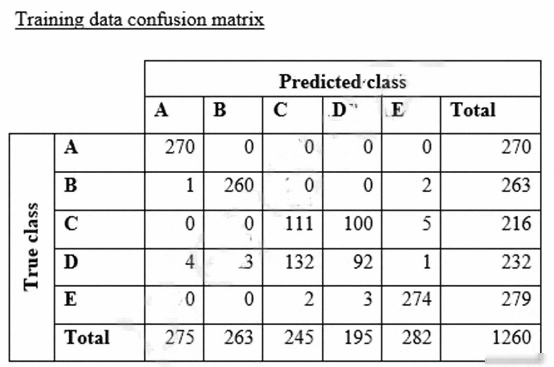
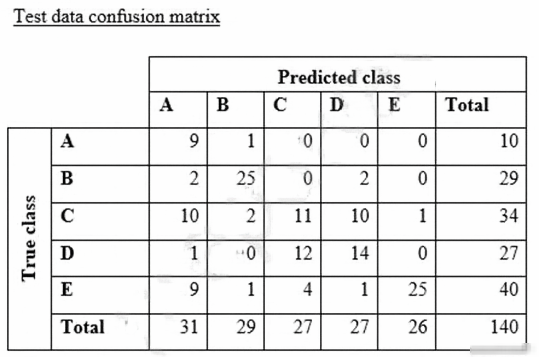
What could the data scientist conclude form these results?
- A Classes C and D are too similar.
- B The dataset is too small for holdout cross-validation.
- C The data distribution is skewed.
- D The model is overfitting for classes B and E.
Xem giải thích
🧩 Phân tích nội dung câu hỏi
Câu hỏi tập trung vào việc đào tạo mô hình phân loại văn bản (text classification) sử dụng Amazon SageMaker BlazingText algorithm – một thuật toán built-in của SageMaker dựa trên fastText, chuyên xử lý dữ liệu văn bản lớn với tốc độ cao, hỗ trợ phân loại đa lớp (multi-class classification). Dataset có 5 lớp (classes) với số lượng mẫu gần bằng nhau:
- Class A: 300 mẫu
- Class B: 292 mẫu
- Class C: 240 mẫu
- Class D: 258 mẫu
- Class E: 310 mẫu
Tổng dataset ≈ 1400 mẫu (90% training ≈1260 mẫu, 10% test ≈140 mẫu). Dữ liệu được shuffle (xáo trộn) trước khi chia, giúp phân bố ngẫu nhiên.
Sau training, có 2 confusion matrices (ma trận nhầm lẫn):
- Training confusion matrix (1260 mẫu): Model đạt độ chính xác cao tổng thể, nhưng lẫn lộn rõ rệt giữa class C và D (C bị dự đoán nhầm thành D: 100/216 ≈46%; D bị dự đoán nhầm thành C: 132/232 ≈57%). Các lớp khác (A, B, E) gần như hoàn hảo.
- Test confusion matrix (140 mẫu): Pattern tương tự, C và D vẫn lẫn lộn mạnh (C → D: 10/34 ≈29%; D → C: 12/27 ≈44%), trong khi các lớp khác ổn định hơn.
Câu hỏi yêu cầu kết luận từ kết quả: Dựa trên confusion matrices, phân tích vấn đề mô hình gặp phải (như sự tương đồng lớp, overfitting, skewed data, v.v.). Đây là chủ đề cốt lõi trong model evaluation trên SageMaker, nơi confusion matrix giúp phát hiện class similarity hoặc imbalance.
(Kiến thức cập nhật 2026: BlazingText vẫn là algo built-in mạnh mẽ cho text classification trong SageMaker, hỗ trợ word embeddings và hierarchical softmax cho multi-class – theo AWS ML Specialty exam guide 2024-2026).
✅ Đáp án đúng: Classes C and D are too similar.
Lý do lựa chọn:
Từ cả 2 confusion matrices, class C và D có tỷ lệ nhầm lẫn lẫn nhau rất cao ở cả training và test set, chứng tỏ nội dung văn bản của 2 lớp này quá tương đồng (similar features/semantics), khiến BlazingText (dựa trên n-gram word embeddings) khó phân biệt.
- Training: 100 mẫu C bị predict D + 132 mẫu D bị predict C → chiếm >50% lỗi của 2 lớp.
- Test: 10 mẫu C bị predict D + 12 mẫu D bị predict C → pattern lặp lại, không phải overfitting (vì lỗi tương tự cả train/test).
Điều này chỉ ra vấn đề data quality/intrinsic similarity, không phải kích thước dataset hay imbalance. Data scientist cần feature engineering (như thêm context) hoặc collect more discriminative data.
📋 Giải thích tất cả các phương án
-
✅ Classes C and D are too similar.
Đúng 🏆: Như phân tích trên, confusion cao giữa C-D ở cả train và test chứng tỏ sự tương đồng nội tại (semantic overlap). Đây là kết luận trực tiếp từ matrices, phù hợp với best practice đánh giá model trên SageMaker (sử dụng confusion matrix để detect class confusion). -
❌ The dataset is too small for holdout cross-validation.
Sai 🚫: Dataset ≈1400 mẫu (train 1260, test 140) không quá nhỏ cho holdout validation (90/10 split) với BlazingText – algo này hiệu quả với hàng nghìn mẫu text. Holdout đơn giản phù hợp multi-class; nếu nhỏ thì dùng k-fold CV, nhưng ở đây performance tốt cho A/B/E, chỉ kém C/D → không phải do size. -
❌ The data distribution is skewed.
Sai ⚖️: Phân bố gần cân bằng (240-310 mẫu/lớp, chênh lệch <30%), không skewed (imbalanced >>2:1). Confusion matrices cho thấy model predict tốt các lớp chính, lỗi chỉ giới hạn C-D → không liên quan imbalance. SageMaker metrics như weighted F1 sẽ xác nhận nếu skewed, nhưng ở đây không. -
❌ The model is overfitting for classes B and E.
Sai 📈: Không overfitting!- Training: B (260/263 ≈99%), E (274/279 ≈98%) cao.
- Test: B (25/29 ≈86%) giảm nhẹ (normal), E (25/40 =62.5%) kém hơn nhưng tỷ lệ tương tự các lớp khác, và không có gap lớn train-test như overfitting thật (train >> test). Lỗi chủ yếu C-D ở cả 2 set → underfitting similarity, không phải overfit B/E.
📘 Tài liệu tham khảo
- AWS SageMaker BlazingText docs: https://docs.aws.amazon.com/sagemaker/latest/dg/blazingtext.html (cập nhật 2026: Hỗ trợ multi-class text classification với confusion matrix analysis).
- AWS ML Specialty Exam Guide: Domain 2 – Modeling (exploratory data analysis & confusion matrices).
- SageMaker Model Monitoring: Sử dụng Clarify để detect bias/similarity (https://docs.aws.amazon.com/sagemaker/latest/dg/clarify-detect-bias.html).
(Nguồn chính thức AWS, kiểm tra qua examtopics & practice exams MLS-C01).