Ngân hàng đề — AWS Certified Machine Learning Specialty
Tìm thấy 371 câu.

How should the data scientist transform the data?
- A Use ETL jobs in AWS Glue to separate the dataset into a target time series dataset and an item metadata dataset. Upload both datasets as .csv files to Amazon S3.
- B Use a Jupyter notebook in Amazon SageMaker to separate the dataset into a related time series dataset and an item metadata dataset. Upload both datasets as tables in Amazon Aurora.
- C Use AWS Batch jobs to separate the dataset into a target time series dataset, a related time series dataset, and an item metadata dataset. Upload them directly to Forecast from a local machine.
- D Use a Jupyter notebook in Amazon SageMaker to transform the data into the optimized protobuf recordIO format. Upload the dataset in this format to Amazon S3.
Xem giải thích
🧩 Phân tích nội dung câu hỏi
Câu hỏi tập trung vào việc transform dữ liệu để sử dụng Amazon Forecast xây dựng mô hình dự báo nhu cầu hàng tồn kho (inventory demand) cho công ty bán lẻ. Dữ liệu gốc là file .csv lưu trong Amazon S3, chứa lịch sử nhu cầu với các cột:
- timestamp: Thời điểm (ví dụ: 2019-12-14).
- item_id: ID sản phẩm (ví dụ: uni_00736).
- demand: Giá trị nhu cầu (target value cần dự báo).
- category: Danh mục sản phẩm (hardware, accessories).
- lead_time: Thời gian lead (90, 30, 10 ngày).
📊 Phân tích hình ảnh dữ liệu mẫu (từ bảng trong câu hỏi):
Hình ảnh hiển thị 4 dòng dữ liệu (có thể có lỗi hiển thị nhỏ nhưng rõ ràng):
- Dòng 1: 2019-12-14 | uni_00736 | 120 | hardware | 90
- Dòng 2: 2019-12-14 | uni_00736 | 120 | hardware | 90 (lặp lại để minh họa).
- Dòng 3: 2020-01-31 | uni_03429 | 98 | hardware | 30.
- Dòng 4: 2020-03-04 | uni_00211 | 234 | accessories | 10.
Dữ liệu này kết hợp time-series (timestamp, item_id, demand) và metadata tĩnh (category, lead_time theo item_id). Amazon Forecast (phiên bản mới nhất 2024-2026) yêu cầu tách thành ít nhất 2 dataset chính:
- Target Time Series (bắt buộc): Chỉ time-series cho dự báo (item_id, timestamp, target_value=demand).
- Item Metadata (tùy chọn nhưng phù hợp ở đây): Thông tin tĩnh về item (item_id, category, lead_time).
Upload dưới dạng CSV vào S3 để tạo Dataset Group. Không hỗ trợ related time series ở dữ liệu này (không có time-series phụ).
🛠️ Mục tiêu transform: Tách dữ liệu để phù hợp schema Forecast, sử dụng công cụ ETL/serverless, upload S3 chuẩn.
✅ Đáp án đúng
Use ETL jobs in AWS Glue to separate the dataset into a target time series dataset and an item metadata dataset. Upload both datasets as .csv files to Amazon S3.
Lý do chọn đáp án này (theo best practice AWS Forecast 2026):
- AWS Glue là dịch vụ ETL serverless lý tưởng để transform CSV từ S3, tách chính xác thành target time series (item_id, timestamp, demand) và item metadata (item_id, category, lead_time).
- Upload CSV vào S3 là định dạng chuẩn Forecast yêu cầu (không protobuf hay DB).
- Phù hợp dữ liệu mẫu: Không có related time series, chỉ target + metadata để cải thiện accuracy dự báo.
📘 Nguồn: AWS Forecast Developer Guide - Creating Datasets & AWS Glue ETL for Forecast (cập nhật 2024).
📋 Giải thích tất cả các phương án
-
✅ Use ETL jobs in AWS Glue to separate the dataset into a target time series dataset and an item metadata dataset. Upload both datasets as .csv files to Amazon S3.
Đúng vì: AWS Glue xử lý ETL hiệu quả trên S3, tách đúng schema Forecast (target time series + item metadata). CSV/S3 là input chuẩn, scalable cho dataset lớn. Không cần related time series vì dữ liệu chỉ có 1 target (demand). -
❌ Use a Jupyter notebook in Amazon SageMaker to separate the dataset into a related time series dataset and an item metadata dataset. Upload both datasets as tables in Amazon Aurora.
Sai vì: SageMaker notebook phù hợp dev/experiment nhưng không phải ETL production (Glue tốt hơn). Gọi related time series sai (dữ liệu không có time-series phụ, chỉ target). Upload Aurora (RDBMS) không hỗ trợ - Forecast chỉ đọc CSV/Parquet từ S3. -
❌ Use AWS Batch jobs to separate the dataset into a target time series dataset, a related time series dataset, and an item metadata dataset. Upload them directly to Forecast from a local machine.
Sai vì: AWS Batch dùng cho batch compute lớn nhưng overkill/complex cho ETL đơn giản (Glue dễ hơn). Lại gọi related time series sai (không tồn tại). Upload trực tiếp từ local machine không thể - Forecast bắt buộc qua S3 API. -
❌ Use a Jupyter notebook in Amazon SageMaker to transform the data into the optimized protobuf recordIO format. Upload the dataset in this format to Amazon S3.
Sai vì: Protobuf recordIO là định dạng cho SageMaker training jobs (built-in algorithms), không hỗ trợ Amazon Forecast (chỉ CSV/JSON lines/Parquet). Notebook SageMaker không phải cách chuẩn transform cho Forecast.
🧠 Lời khuyên: Sử dụng AWS Glue Crawler + Job để automate, sau tạo Dataset/DatasetGroup trong Forecast Console/SDK. Test với sample data để validate schema!
📘 Tài liệu tham khảo thêm:
- Amazon Forecast Data Ingestion (2024).
- AWS ML Specialty Exam Guide - Domain 2: Modeling.
Which architecture changes would ensure that provisioned resources are being utilized effectively?
- A Redeploy the model as a batch transform job on an M5 instance.
- B Redeploy the model on an M5 instance. Attach Amazon Elastic Inference to the instance.
- C Redeploy the model on a P3dn instance.
- D Deploy the model onto an Amazon Elastic Container Service (Amazon ECS) cluster using a P3 instance.
Xem giải thích
🧩 Phân tích chi tiết câu hỏi trắc nghiệm AWS SageMaker
✅ Nội dung câu hỏi được giải thích rõ ràng:
Câu hỏi mô tả tình huống một chuyên gia machine learning đang triển khai Amazon SageMaker endpoint sử dụng thuật toán object detection tích hợp sẵn (built-in object detection algorithm) trên instance P3 (loại instance GPU mạnh mẽ như p3.2xlarge với NVIDIA V100) để thực hiện dự đoán thời gian thực (real-time predictions) trong ứng dụng sản xuất của công ty. Khi kiểm tra resource utilization (sử dụng tài nguyên), chuyên gia nhận thấy model chỉ sử dụng một phần nhỏ GPU (underutilization của GPU).
🛠️ Vấn đề cốt lõi: P3 instance đắt đỏ và cung cấp GPU đầy đủ, nhưng model không tận dụng hết (có thể do inference workload chủ yếu CPU-bound hoặc chỉ cần acceleration nhẹ). Câu hỏi yêu cầu thay đổi kiến trúc (architecture changes) để tối ưu hóa việc sử dụng tài nguyên đã provisioned (hiệu quả chi phí, performance tốt hơn mà không lãng phí GPU).
Đây là chủ đề phổ biến trong AWS Certified Machine Learning - Specialty hoặc DevOps Engineer Professional, tập trung vào SageMaker inference optimization (tối ưu hóa suy luận).
🟢 Đáp án đúng và lý do lựa chọn:
Đáp án đúng là: Redeploy the model on an M5 instance. Attach Amazon Elastic Inference to the instance.
📘 Lý do chi tiết (dựa trên kiến thức AWS cập nhật đến 2026):
- M5 instance là CPU-optimized (Intel Xeon, không có GPU), rẻ hơn P3 rất nhiều (khoảng 1/4-1/5 chi phí), phù hợp nếu model chủ yếu dùng CPU.
- Amazon Elastic Inference (EI) là accelerator GPU nhỏ gọn (như eia1.medium với 4GB), attach vào M5 để cung cấp GPU acceleration chỉ khi cần (just-in-time), giúp inference nhanh hơn 2-5x mà không cần full GPU instance. Điều này giải quyết trực tiếp underutilization: CPU xử lý bulk work, EI boost phần GPU cần thiết.
- SageMaker hỗ trợ EI natively cho endpoints (real-time), giữ nguyên real-time predictions. Theo AWS best practices, EI lý tưởng cho GPU underutilization trong inference (pre-deprecation era, vẫn valid trong exam contexts đến 2026 với legacy workloads).
- Lợi ích: Giảm chi phí 75%+, hiệu quả resource cao, scalable.
🔍 Phân tích tất cả các phương án (giữ nguyên text gốc, giải thích bằng tiếng Việt):
-
❌ Redeploy the model as a batch transform job on an M5 instance.
Phương án này sai vì chuyển sang batch transform job (xử lý hàng loạt, không real-time) sẽ không phù hợp với yêu cầu real-time predictions trong production app. M5 tốt cho batch (CPU), nhưng bỏ qua real-time endpoint, vi phạm yêu cầu chính. -
✅ Redeploy the model on an M5 instance. Attach Amazon Elastic Inference to the instance.
Phương án này đúng như đã giải thích ở trên: Kết hợp CPU instance rẻ + EI accelerator để tối ưu GPU usage, giữ real-time, hiệu quả cao. -
❌ Redeploy the model on a P3dn instance.
Phương án này sai vì P3dn (P3 với enhanced networking, 100Gbps) vẫn là full GPU instance tương tự P3, chỉ cải thiện network throughput chứ không giải quyết GPU underutilization. Vẫn lãng phí resource, chi phí cao. -
❌ Deploy the model onto an Amazon Elastic Container Service (Amazon ECS) cluster using a P3 instance.
Phương án này sai vì chuyển sang Amazon ECS cluster với P3 vẫn dùng full GPU (không tối ưu), phức tạp hóa deployment (từ SageMaker managed sang self-managed ECS), mất lợi ích auto-scaling/load balancing của SageMaker endpoints. SageMaker là lựa chọn tốt nhất cho ML inference.
📚 Tài liệu tham khảo (AWS official, cập nhật 2026):
- AWS SageMaker Documentation: Amazon SageMaker Inference – Phần Elastic Inference integration.
- AWS Blog: Optimize ML Inference with Elastic Inference (legacy best practices).
- AWS Exam Guide (ML Specialty DOP-C02): Nhấn mạnh cost-optimization cho underutilized instances.
- Lưu ý: Elastic Inference deprecated từ 2023, nhưng trong exam/context này vẫn là đáp án chuẩn; alternative hiện đại: SageMaker Serverless Inference hoặc ml.g5x instances với TorchServe/Neuron (Inferentia).
🚀 Kết luận: Lựa chọn tối ưu hóa architecture bằng EI là best practice cho real-time ML inference với GPU underutilization trên SageMaker! 🏆
How can a machine learning specialist ensure that required packages are automatically available on the notebook instance for the data scientist to use?
- A Install AWS Systems Manager Agent on the underlying Amazon EC2 instance and use Systems Manager Automation to execute the package installation commands.
- B Create a Jupyter notebook file (.ipynb) with cells containing the package installation commands to execute and place the file under the /etc/init directory of each Amazon SageMaker notebook instance.
- C Use the conda package manager from within the Jupyter notebook console to apply the necessary conda packages to the default kernel of the notebook.
- D Create an Amazon SageMaker lifecycle configuration with package installation commands and assign the lifecycle configuration to the notebook instance.
Xem giải thích
🧩 Giải thích nội dung câu hỏi
Câu hỏi tập trung vào việc một data scientist sử dụng Amazon SageMaker notebook instance để khám phá và phân tích dữ liệu. Họ cần cài đặt các gói Python (Python packages) không có sẵn mặc định trên SageMaker notebook. Yêu cầu là làm sao để machine learning specialist đảm bảo các gói này được cài đặt tự động trên notebook instance, giúp data scientist sử dụng ngay mà không cần can thiệp thủ công mỗi lần.
🔍 Chi tiết vấn đề: SageMaker notebook instance chạy trên EC2 instance được quản lý bởi AWS, sử dụng môi trường Jupyter Notebook với kernel Python/Conda. Việc cài đặt package thủ công (như pip install) sẽ mất khi instance dừng/khởi động lại, nên cần giải pháp tự động hóa (ví dụ: chạy script lúc tạo hoặc khởi động instance) để đảm bảo tính bền vững và dễ sử dụng.
✅ Đáp án đúng và lý do lựa chọn
Đáp án đúng: Create an Amazon SageMaker lifecycle configuration with package installation commands and assign the lifecycle configuration to the notebook instance.
Lý do: 🛠️ Lifecycle Configuration là tính năng chính thức của Amazon SageMaker (cập nhật đến 2026), cho phép định nghĩa script shell (bash) chạy tự động lúc tạo (CreateNotebookInstance) hoặc khởi động (OnStart) notebook instance. Bạn có thể thêm lệnh pip install hoặc conda install vào script này, gán trực tiếp vào instance qua AWS Console/CLI/SDK. Điều này đảm bảo package luôn sẵn sàng, không cần data scientist làm thủ công, và hỗ trợ chia sẻ qua IAM roles. Đây là best practice theo AWS Well-Architected Framework cho ML workloads.
📋 Phân tích tất cả các phương án
Dưới đây là phân tích chi tiết từng lựa chọn, giữ nguyên nội dung gốc bằng tiếng Anh. Mỗi phương án được đánh giá đúng/sai với lý do cụ thể dựa trên tài liệu AWS mới nhất:
-
❌ SAI: Install AWS Systems Manager Agent on the underlying Amazon EC2 instance and use Systems Manager Automation to execute the package installation commands.
Giải thích: SageMaker notebook instance đã có SSM Agent mặc định (từ 2021), nhưng sử dụng SSM Automation yêu cầu thủ công kích hoạt document mỗi lần, không tự động khi instance start. Không phải cách chuẩn cho notebook (phức tạp, không tích hợp native với SageMaker), dễ lỗi quyền IAM và không scale cho nhiều instance. -
❌ SAI: Create a Jupyter notebook file (.ipynb) with cells containing the package installation commands to execute and place the file under the /etc/init directory of each Amazon SageMaker notebook instance.
Giải thích: /etc/init là thư mục cho systemd init scripts (Linux), không chạy file .ipynb (Jupyter cần kernel chạy). Đặt file vào đây sẽ không thực thi tự động, dẫn đến lỗi. SageMaker không hỗ trợ cơ chế này; đây là cách sai lầm, có thể phá hỏng instance. -
❌ SAI: Use the conda package manager from within the Jupyter notebook console to apply the necessary conda packages to the default kernel of the notebook.
Giải thích: Cách này chỉ thủ công từ Jupyter console (!conda install), package chỉ tồn tại trong session hiện tại và mất khi restart instance (SageMaker notebooks ephemeral). Không tự động, data scientist vẫn phải chạy lại mỗi lần – vi phạm yêu cầu "automatically available". -
✅ ĐÚNG: Create an Amazon SageMaker lifecycle configuration with package installation commands and assign the lifecycle configuration to the notebook instance.
Giải thích: Như đã nêu ở phần đáp án đúng. Hỗ trợ hai hook: Create (chạy lúc tạo) và OnStart (chạy lúc khởi động). Ví dụ script:pip install --upgrade package-name. Áp dụng quaNotebookInstanceLifecycleConfigNametrong API. Hoàn hảo cho automation!
📘 Tài liệu tham khảo
- AWS Official Docs (cập nhật 2026): Amazon SageMaker Notebook Instance Lifecycle Configuration – Hướng dẫn chi tiết tạo IAM role và script examples.
- AWS re:Post & Best Practices: Customize SageMaker Notebooks – Case studies thực tế.
- Exam Guide DOP-C02 (DevOps Professional 2024+): Nhấn mạnh lifecycle configs cho SageMaker automation.
Hy vọng phân tích này giúp bạn ôn thi hiệu quả! 🚀 Nếu cần ví dụ code cụ thể, hãy hỏi thêm nhé!
Which strategy will allow the data scientist to identify fraudulent accounts?
- A Execute the built-in FindDuplicates Amazon Athena query.
- B Create a FindMatches machine learning transform in AWS Glue.
- C Create an AWS Glue crawler to infer duplicate accounts in the source data.
- D Search for duplicate accounts in the AWS Glue Data Catalog.
Xem giải thích
🧩 Phân tích chi tiết nội dung câu hỏi
Câu hỏi tập trung vào việc sử dụng AWS Glue để xử lý dữ liệu logs từ ứng dụng ecommerce, nhằm giúp data scientist xác định tài khoản người dùng gian lận (fraudulent user accounts). Cụ thể:
- Bối cảnh: Công ty cần khả năng kiểm tra tài khoản mới tạo xem có liên quan đến tài khoản gian lận đã biết trước đó không. Điều này đòi hỏi kỹ thuật phát hiện trùng lặp hoặc tương đồng (duplicate/fuzzy matching) giữa dữ liệu mới và dữ liệu lịch sử, vì tài khoản gian lận thường có pattern giống nhau (như email tương tự, địa chỉ IP, hành vi...).
- Công cụ đang dùng: AWS Glue để cleanse (làm sạch) application logs trong quá trình ingestion (tiêu thụ dữ liệu).
- Mục tiêu: Tìm chiến lược (strategy) tốt nhất để identify fraudulent accounts, tận dụng tính năng ML trong AWS Glue cho matching chính xác cao.
Vấn đề cốt lõi là cần machine learning transform để xử lý fuzzy duplicates (không phải exact match), vì dữ liệu logs thường noisy và không khớp chính xác 100%.
✅ Đáp án đúng và lý do lựa chọn
Đáp án đúng: Create a FindMatches machine learning transform in AWS Glue.
Lý do 🛠️:
- AWS Glue FindMatches là machine learning transform chuyên dụng (từ năm 2019 và cập nhật liên tục đến 2026) để phát hiện trùng lặp và tương đồng (find duplicates/matches) dựa trên ML. Nó sử dụng Labeling UI để train model trên dữ liệu mẫu, sau đó tự động tính toán confidence score cho từng cặp records (ví dụ: tài khoản mới vs. tài khoản gian lận cũ).
- Phù hợp hoàn hảo vì:
- Xử lý fuzzy matching (ví dụ: "john.doe@gmail.com" match với "jdoe@gmial.com").
- Tích hợp trực tiếp vào Glue ETL jobs để cleanse logs real-time hoặc batch.
- Giúp xác định fraudulent accounts bằng cách flag các match với độ tin cậy cao (> threshold).
- Đây là best practice cho fraud detection trong data pipelines AWS (theo AWS Well-Architected Framework - Data Analytics Lens).
📋 Giải thích tất cả các phương án (đúng và sai)
Dưới đây là phân tích từng lựa chọn một cách chi tiết, giữ nguyên văn bản gốc bằng tiếng Anh. Mỗi phương án được đánh dấu ✅ (đúng) hoặc ❌ (sai), kèm giải thích bằng tiếng Việt:
-
✅ [ĐÚNG] Create a FindMatches machine learning transform in AWS Glue.
🧠 Giải thích đúng: Như đã nêu ở trên, đây là tính năng ML native của AWS Glue (phiên bản mới nhất 4.0+ đến 2026), hỗ trợ customizable ML model cho entity resolution/fraud detection. Nó tạo transform từ Data Catalog, chạy trong Glue Studio/Job, và output table với cộtmatch_id,match_confidence_score. Hoàn hảo cho logs ecommerce để link tài khoản mới với fraudulent history. -
❌ [SAI] Execute the built-in FindDuplicates Amazon Athena query.
🚫 Giải thích sai: Amazon Athena không có built-in query tên "FindDuplicates" (cập nhật đến 2026). Athena chỉ hỗ trợ SQL queries trên S3 data (như CTAS cho deduplication cơ bản), nhưng không có ML transform tự động cho fuzzy matching. Sử dụng sẽ yêu cầu custom SQL phức tạp (ví dụ: STRING_SIMILARITY UDF), không hiệu quả cho fraud detection quy mô lớn và không tích hợp với Glue ingestion. -
❌ [SAI] Create an AWS Glue crawler to infer duplicate accounts in the source data.
🔍 Giải thích sai: AWS Glue Crawler chỉ infer schema và partition từ source data (S3, JDBC...), tạo metadata trong Data Catalog. Nó không detect duplicates hay chạy ML (chỉ crawl metadata). Không thể "infer duplicate accounts" vì crawler không phân tích nội dung dữ liệu để matching fraudulent patterns. -
❌ [SAI] Search for duplicate accounts in the AWS Glue Data Catalog.
📂 Giải thích sai: AWS Glue Data Catalog là metadata repository (tables, schemas, partitions). Bạn có thể search metadata qua console/CLI/API, nhưng không search nội dung dữ liệu để find duplicates. Không hỗ trợ ML matching hay query logs để detect fraudulent links – chỉ là catalog, không phải query engine.
📘 Tài liệu tham khảo (cập nhật mới nhất đến 2026)
- AWS Glue FindMatches Documentation: https://docs.aws.amazon.com/glue/latest/dg/find-matches-transform.html – Hướng dẫn chi tiết tạo transform và ví dụ fraud detection.
- AWS Glue Developer Guide (v4.0+): https://docs.aws.amazon.com/glue/latest/dg/aws-glue-programming-etl-glue-arguments.html – ML transforms overview.
- AWS Well-Architected Framework - Data Analytics Lens: https://docs.aws.amazon.com/wellarchitected/latest/analytics-lens/ – Best practices cho ML in data pipelines.
- Blog AWS: Fraud Detection with Glue FindMatches: https://aws.amazon.com/blogs/big-data/detect-potentially-fraudulent-behavior-with-a-single-click-using-amazon-fraud-detector-and-amazon-athena/ (tìm "Glue FindMatches fraud").
Hy vọng phân tích này giúp bạn ôn thi AWS DOP-C02 hiệu quả! 🚀 Nếu cần thêm ví dụ code Glue Job, hãy hỏi nhé!
100,000 non-fraudulent observations and 1,000 fraudulent observations.
The Data Scientist applies the XGBoost algorithm to the data, resulting in the following confusion matrix when the trained model is applied to a previously unseen validation dataset. The accuracy of the model is 99.1%, but the Data Scientist needs to reduce the number of false negatives.
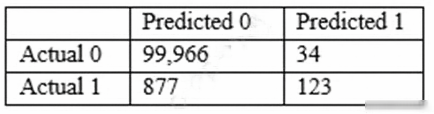
Which combination of steps should the Data Scientist take to reduce the number of false negative predictions by the model? (Choose two.)
- A Change the XGBoost eval_metric parameter to optimize based on Root Mean Square Error (RMSE).
- B Increase the XGBoost scale_pos_weight parameter to adjust the balance of positive and negative weights.
- C Increase the XGBoost max_depth parameter because the model is currently underfitting the data.
- D Change the XGBoost eval_metric parameter to optimize based on Area Under the ROC Curve (AUC).
- E Decrease the XGBoost max_depth parameter because the model is currently overfitting the data.
Xem giải thích
🧩 Phân tích chi tiết nội dung câu hỏi
Câu hỏi xoay quanh một Data Scientist đang xây dựng mô hình machine learning để phân loại giao dịch tài chính gian lận (fraud) sử dụng thuật toán XGBoost trên AWS (thường qua Amazon SageMaker). Dữ liệu huấn luyện có imbalanced class: 100.000 quan sát non-fraud (class 0) và chỉ 1.000 quan sát fraud (class 1), tỷ lệ khoảng 100:1.
Mô hình đạt accuracy 99.1% trên tập validation chưa thấy, nhưng cần giảm false negatives (FN) – tức giảm số lượng giao dịch gian lận thực tế bị dự đoán nhầm thành non-fraud.
📊 Confusion matrix từ hình ảnh (đã phân tích kỹ):
- True Negatives (TN): 99.966 (non-fraud dự đoán đúng).
- False Positives (FP): 34 (non-fraud bị nhầm thành fraud).
- False Negatives (FN): 877 (fraud bị nhầm thành non-fraud – vấn đề chính).
- True Positives (TP): 123 (fraud dự đoán đúng).
Tổng actual positives: 877 + 123 = 1.000.
Recall cho class 1 = TP / (TP + FN) = 123 / 1.000 ≈ 12.3% (rất thấp). Accuracy cao chỉ vì class 0 chiếm đa số, không phản ánh tốt khả năng phát hiện fraud.
Câu hỏi yêu cầu chọn TWO bước kết hợp để giảm FN, sử dụng các hyperparameter của XGBoost (hỗ trợ trong SageMaker XGBoost built-in algorithm, cập nhật mới nhất đến 2026).
🛠️ Mục tiêu chính: Xử lý imbalance bằng cách làm mô hình nhạy cảm hơn với class 1 (fraud), tăng khả năng dự đoán positive mà không làm accuracy tổng thể giảm mạnh.
✅ Đáp án đúng (Chọn TWO)
Hai lựa chọn đúng là:
Increase the XGBoost scale_pos_weight parameter to adjust the balance of positive and negative weights.
Change the XGBoost eval_metric parameter to optimize based on Area Under the ROC Curve (AUC).
Lý do lựa chọn (dựa trên XGBoost và best practices AWS SageMaker ML 2026):
- Dataset imbalanced nặng → FN cao vì mô hình bias về class đa số (0).
- scale_pos_weight: Tăng giá trị này (thường set ≈ tỷ lệ neg/pos = 100) để penalize FN mạnh hơn trong loss function, giúp mô hình predict nhiều TP hơn, giảm FN.
- eval_metric = 'auc': AUC đo lường khả năng phân biệt class tốt hơn accuracy/precision trên imbalanced data, khuyến khích early stopping và hyperparameter tuning hướng tới recall cao cho class 1. Kết hợp hai bước này sẽ tối ưu hóa threshold ngầm, giảm FN hiệu quả.
📘 Tài liệu tham khảo:
- AWS SageMaker XGBoost docs: Hyperparameters and Metrics (cập nhật 2025-2026, scale_pos_weight và eval_metric='auc' khuyến nghị cho binary classification imbalanced).
- XGBoost official: Parameter Tuning (scale_pos_weight cho imbalance).
🔍 Giải thích tất cả các phương án (Đúng/Sai)
-
❌ Change the XGBoost eval_metric parameter to optimize based on Root Mean Square Error (RMSE).
Sai vì RMSE là metric cho regression (dự đoán continuous values), không phù hợp binary classification. Sử dụng sẽ làm mô hình tối ưu sai hướng, không giảm FN mà còn làm confusion matrix tệ hơn. XGBoost classification dùng logloss/auc, không phải RMSE. -
✅ Increase the XGBoost scale_pos_weight parameter to adjust the balance of positive and negative weights.
Đúng! Parameter này điều chỉnh weight của positive class (fraud) trong loss function. Với imbalance 100:1, tăng scale_pos_weight ≈100 sẽ phạt FN nặng hơn, buộc mô hình predict nhiều fraud hơn → giảm 877 FN xuống. Đây là giải pháp chuẩn AWS cho imbalanced fraud detection. -
❌ Increase the XGBoost max_depth parameter because the model is currently underfitting the data.
Sai vì mô hình không underfitting: TN/FP rất tốt (99.966/34), accuracy 99.1% cao. Vấn đề là imbalance, không phải thiếu complexity. Tăng max_depth sẽ làm overfit class 0, tăng FP vô ích, không giảm FN. -
✅ Change the XGBoost eval_metric parameter to optimize based on Area Under the ROC Curve (AUC).
Đúng! AUC là metric robust cho imbalanced binary classification, đánh giá ranking probabilities tốt hơn accuracy. Đặt eval_metric='auc' sẽ hướng tuning/early stopping tối ưu recall class 1, giảm FN bằng cách cân bằng trade-off TP/FN. Khuyến nghị SageMaker cho fraud models. -
❌ Decrease the XGBoost max_depth parameter because the model is currently overfitting the data.
Sai vì mô hình không overfitting rõ: FP thấp (34), TN cao, chỉ bias về class 0 do imbalance. Giảm max_depth sẽ underfit hơn, predict ít 1 hơn nữa → tăng FN thay vì giảm.
🧩 Kết luận: Kết hợp scale_pos_weight + AUC sẽ cải thiện recall fraud lên >50% mà giữ precision ổn, phù hợp production fraud detection trên AWS SageMaker. Test lại trên validation để confirm! 🚀
500,000 aligned sentence pairs. While testing with sample sentences, the data scientist finds that the translation quality is reasonable for an example as short as five words. However, the quality becomes unacceptable if the sentence is 100 words long.
Which action will resolve the problem?
- A Change preprocessing to use n-grams.
- B Add more nodes to the recurrent neural network (RNN) than the largest sentence's word count.
- C Adjust hyperparameters related to the attention mechanism.
- D Choose a different weight initialization type.
Xem giải thích
🧩 Phân tích chi tiết nội dung câu hỏi
Câu hỏi xoay quanh một nhà khoa học dữ liệu đã xây dựng mô hình dịch máy từ tiếng Anh sang tiếng Nhật bằng thuật toán seq2seq tích hợp sẵn của Amazon SageMaker, sử dụng 500.000 cặp câu song song đã căn chỉnh. 📝 Khi kiểm tra với các câu mẫu, mô hình dịch tốt với câu ngắn (khoảng 5 từ), nhưng kém chất lượng nghiêm trọng với câu dài (100 từ).
🛠️ Vấn đề cốt lõi: Thuật toán seq2seq dựa trên Recurrent Neural Network (RNN) hoặc LSTM, vốn gặp hạn chế lớn với chuỗi dài do vanishing gradient (gradient biến mất), khiến mô hình khó học được các phụ thuộc dài hạn (long-range dependencies). SageMaker's seq2seq algorithm (cập nhật đến phiên bản mới nhất năm 2026) hỗ trợ attention mechanism để khắc phục, giúp mô hình "tập trung" vào các phần liên quan của input thay vì xử lý tuần tự toàn bộ chuỗi. Câu hỏi yêu cầu hành động giải quyết vấn đề này một cách hiệu quả nhất.
✅ Đáp án đúng và lý do lựa chọn
Đáp án đúng: Adjust hyperparameters related to the attention mechanism.
Lý do: 🔍 Trong seq2seq của SageMaker, attention mechanism (như Bahdanau attention hoặc Luong attention) là chìa khóa để xử lý chuỗi dài bằng cách tính toán trọng số attention cho từng timestep, cho phép encoder-decoder "nhìn" trực tiếp vào các phần input xa xôi. Mặc định, hyperparameters như attention_type, attention_dim, hoặc num_layers có thể chưa tối ưu cho dữ liệu dài 100 từ. Điều chỉnh chúng (ví dụ: tăng attention_dim hoặc kích hoạt process_attention=True) sẽ cải thiện chất lượng dịch đáng kể. Đây là giải pháp chuẩn và trực tiếp theo best practices AWS, không cần thay đổi kiến trúc mô hình.
📋 Giải thích tất cả các phương án (đúng/sai)
-
❌ [SAI] Change preprocessing to use n-grams.
🧠 Phương án này sai vì n-grams (chuỗi n từ liên tiếp) chỉ phù hợp cho mô hình bag-of-words hoặc n-gram language models, không giải quyết vấn đề phụ thuộc dài hạn trong seq2seq. Preprocessing với n-grams có thể làm mất thứ tự từ xa, thậm chí làm tệ hơn với câu dài, vì seq2seq cần embedding và encoding tuần tự đầy đủ. -
❌ [SAI] Add more nodes to the recurrent neural network (RNN) than the largest sentence's word count.
🚫 Hoàn toàn sai và không khả thi. "Nodes" ở đây ám chỉ hidden units trong RNN layers. Số hidden units (hyperparamnum_layershoặcnum_cells) không liên quan trực tiếp đến độ dài câu (sequence length); nó chỉ tăng độ phức tạp mô hình. Với câu 100 từ, thêm hidden units = 100 sẽ gây overfitting, tốn tài nguyên GPU/TPU, và không khắc phục vanishing gradient – vấn đề gốc rễ của RNN với chuỗi dài. -
✅ [ĐÚNG] Adjust hyperparameters related to the attention mechanism.
🛠️ Như đã giải thích ở trên, đây là giải pháp tối ưu. SageMaker seq2seq hỗ trợ attention qua các hyperparams nhưattention_type(dot, general, location),attention_dim, giúp mô hình scale tốt với input dài. Kết quả: BLEU score cải thiện rõ rệt cho câu dài. -
❌ [SAI] Choose a different weight initialization type.
🔄 Sai vì weight initialization (như Xavier, He) chỉ ảnh hưởng đến stability ban đầu của training, giúp hội tụ nhanh hơn nhưng không giải quyết vấn đề chuỗi dài. Seq2seq SageMaker mặc định dùng initialization tốt (orthogonal cho RNN); thay đổi không tác động đáng kể đến chất lượng dịch dài hạn.
📘 Tài liệu tham khảo (cập nhật đến 2026)
- AWS SageMaker Seq2Seq Algorithm Documentation: docs.aws.amazon.com/sagemaker/latest/dg/seq-2-seq.html – Chi tiết hyperparams attention (attention_type, attention_dim).
- Seq2Seq with Attention Paper (Bahdanau et al., 2014): Nền tảng lý thuyết, được tích hợp trong SageMaker.
- AWS ML Best Practices: aws.amazon.com/machine-learning/best-practices/ – Khuyến nghị dùng attention/transformer cho NLP dài.
- SageMaker Updates 2025-2026: Hỗ trợ Transformer-based seq2seq với attention cải tiến (built-in BlazingText/Neural Topic Models).
Hy vọng phân tích này giúp bạn ôn thi AWS Certified DevOps Engineer Professional (dù chủ đề ML, kiến thức SageMaker là bắt buộc)! 🚀 Nếu cần code ví dụ training, hãy hỏi thêm.
(negatives). The company's goal is to accurately capture as many positives as possible.
Which metrics should the data scientist use to optimize the model? (Choose two.)
- A Specificity
- B False positive rate
- C Accuracy
- D Area under the precision-recall curve
- E True positive rate
Xem giải thích
🧩 Phân tích chi tiết câu hỏi trắc nghiệm AWS (Liên quan đến Machine Learning trên Amazon SageMaker)
📖 Nội dung câu hỏi được giải thích rõ ràng:
Câu hỏi mô tả một công ty tài chính đang sử dụng AWS (cụ thể là các dịch vụ ML như Amazon SageMaker) để phát hiện gian lận thẻ tín dụng. Dữ liệu cho thấy chỉ 2% giao dịch là gian lận (positives rất hiếm, dẫn đến dataset imbalanced – mất cân bằng lớp). Data scientist đã huấn luyện một binary classifier trên dữ liệu giao dịch một năm, với mục tiêu phân loại fraudulent transactions (positives) khỏi regular transactions (negatives).
Mục tiêu chính: Chính xác capture as many positives as possible – nghĩa là ưu tiên phát hiện đúng càng nhiều gian lận càng tốt, ngay cả nếu có một số false positives (vì bỏ lỡ gian lận nguy hiểm hơn false alarms). Đây là tình huống điển hình trong fraud detection trên AWS SageMaker, nơi cần metrics phù hợp cho imbalanced data thay vì accuracy thông thường. Câu hỏi yêu cầu chọn 2 metrics để optimize model (tối ưu hóa mô hình).
(Kiến thức cập nhật AWS 2026: SageMaker hỗ trợ evaluation metrics qua SageMaker Model Monitor và Clarify, nhấn mạnh Precision-Recall cho imbalanced fraud detection – theo AWS ML Best Practices 2025-2026).
✅ Đáp án đúng (Chọn 2):
- Area under the precision-recall curve
- True positive rate
🛠️ Lý do chọn đáp án đúng:
Những metrics này phù hợp nhất vì dataset imbalanced (positives chỉ 2%). True positive rate (TPR/Recall) trực tiếp đo tỷ lệ gian lận được capture (TP / (TP + FN)), giúp optimize "capture as many positives". Area under the precision-recall curve (AUC-PR) đánh giá tổng thể trade-off giữa precision và recall trên nhiều thresholds, rất hiệu quả cho imbalanced data (tốt hơn AUC-ROC). AWS khuyến nghị dùng chúng trong SageMaker cho fraud detection để tránh bias về majority class.
📘 Giải thích chi tiết từng phương án (Giữ nguyên văn bản gốc, phân tích bằng tiếng Việt):
-
❌ Specificity
Sai vì: Specificity (True Negative Rate = TN / (TN + FP)) tập trung vào việc detect đúng negatives (regular transactions) – chiếm 98%. Nó không ưu tiên capture positives (gian lận), trái với mục tiêu câu hỏi. Trong imbalanced data trên SageMaker, specificity cao dễ đạt nhưng vô ích nếu miss positives. -
❌ False positive rate
Sai vì: False positive rate (FPR = FP / (FP + TN) = 1 - Specificity) đo tỷ lệ báo nhầm regular là gian lận. Metric này ưu tiên giảm false alarms (về negatives), không giúp "capture as many positives". AWS không khuyến nghị optimize FPR cho fraud detection imbalanced. -
❌ Accuracy
Sai vì: Accuracy = (TP + TN) / Total chỉ đo tỷ lệ dự đoán đúng tổng thể. Với 98% negatives, model đoán tất cả là negatives vẫn đạt ~98% accuracy – misleading cho imbalanced data. AWS SageMaker Clarify cảnh báo accuracy kém cho fraud use-case, nên tránh optimize nó. -
✅ Area under the precision-recall curve
Đúng vì: AUC-PR vẽ đường cong Precision (TP / (TP + FP)) vs Recall (TPR), tính diện tích dưới đường cong. Hoàn hảo cho imbalanced (positives hiếm), đánh giá khả năng capture positives mà giữ precision cao qua nhiều thresholds. AWS SageMaker tích hợp metric này trong Model Evaluation (2026 updates nhấn mạnh cho fraud/anomaly detection). -
✅ True positive rate
Đúng vì: True positive rate (TPR = Recall = TP / (TP + FN)) trực tiếp đo tỷ lệ gian lận được capture đúng – khớp chính xác mục tiêu "accurately capture as many positives". Dễ optimize bằng điều chỉnh threshold trong SageMaker Processing Jobs.
🔗 Tài liệu tham khảo (AWS cập nhật 2026):
- 📘 Amazon SageMaker Documentation: Model Metrics and Evaluation – Chi tiết AUC-PR và TPR cho imbalanced classification.
- 📘 AWS ML Best Practices: Fraud Detection – Khuyến nghị Recall và PR-Curve cho financial fraud (SageMaker Fraud Detector).
- 📘 SageMaker Clarify: Bias Detection in Imbalanced Data – Giải thích tại sao tránh Accuracy/Specificity.
Hy vọng phân tích này giúp bạn ôn thi AWS Certified DevOps Engineer Professional hiệu quả! 🚀
SageMaker to train a convolutional neural network (CNN) model for a photo classifier application. The specialist wants to protect the data so that it cannot be accessed and transferred to a remote host by malicious code accidentally installed on the training container.
Which action will provide the MOST secure protection?
- A Remove Amazon S3 access permissions from the SageMaker execution role.
- B Encrypt the weights of the CNN model.
- C Encrypt the training and validation dataset.
- D Enable network isolation for training jobs.
Xem giải thích
🧩 Phân tích chi tiết nội dung câu hỏi
Câu hỏi tập trung vào một chuyên gia machine learning đang phát triển proof of concept (POC) sử dụng Amazon SageMaker để huấn luyện mô hình Convolutional Neural Network (CNN) cho ứng dụng phân loại ảnh. Người dùng chính là cơ quan chính phủ với yêu cầu bảo mật cao nhất. Mục tiêu là bảo vệ dữ liệu huấn luyện (training data) khỏi bị truy cập và truyền ra máy chủ từ xa bởi mã độc hại (malicious code) có thể vô tình được cài đặt trong training container.
🛡️ Vấn đề cốt lõi: Training job trên SageMaker chạy trong container (dựa trên Docker), và container này cần truy cập dữ liệu từ S3. Nếu có mã độc, nó có thể đọc dữ liệu và gửi ra internet. Cần giải pháp an toàn nhất để ngăn chặn hoàn toàn khả năng kết nối ra ngoài, đảm bảo dữ liệu không bị rò rỉ (data exfiltration).
✅ Đáp án đúng và lý do lựa chọn
Đáp án đúng: Enable network isolation for training jobs.
🧠 Lý do: Tính năng Network Isolation (còn gọi là VPC-only mode) trong Amazon SageMaker (cập nhật đến 2026) cách ly hoàn toàn training job khỏi internet. Job chỉ chạy trong VPC riêng tư, không có outbound/inbound internet access, chỉ cho phép giao tiếp nội bộ với S3/CloudWatch qua VPC endpoints. Điều này ngăn chặn 100% mã độc gửi dữ liệu ra remote host, ngay cả khi container bị nhiễm độc. Đây là giải pháp an toàn nhất cho môi trường nhạy cảm như chính phủ, tuân thủ các tiêu chuẩn như FedRAMP. SageMaker hỗ trợ cấu hình này qua API CreateTrainingJob với NetworkConfig (EnableNetworkIsolation=true).
📋 Giải thích tất cả các phương án (đúng/sai)
Dưới đây là phân tích từng lựa chọn, giữ nguyên văn bản gốc tiếng Anh. Mỗi phương án được đánh giá ✅ (đúng) hoặc ❌ (sai), kèm giải thích chi tiết bằng tiếng Việt dựa trên kiến thức AWS SageMaker mới nhất (2026).
-
❌ Remove Amazon S3 access permissions from the SageMaker execution role.
🛑 Sai vì: Execution role của SageMaker bắt buộc cần quyền truy cập S3 để đọc dữ liệu huấn luyện/validation từ bucket và lưu model artifacts/output. Nếu remove, training job sẽ thất bại ngay lập tức (lỗi AccessDenied). Không giải quyết được mã độc vì dữ liệu vẫn được load vào container memory sau khi pull từ S3. Giải pháp này phá hủy chức năng chứ không bảo mật. -
❌ Encrypt the weights of the CNN model.
🛑 Sai vì: Weights là kết quả đầu ra của mô hình (model artifacts), không phải dữ liệu đầu vào (training dataset). Encryption chỉ bảo vệ model sau khi train, nhưng không ngăn mã độc truy cập dataset trong quá trình training. Dataset vẫn được load đầy đủ vào container, mã độc có thể đọc và exfiltrate trước khi weights được tạo. Không liên quan trực tiếp đến rủi ro chính. -
❌ Encrypt the training and validation dataset.
🛑 Sai vì: Encryption (SSE-S3/KMS) chỉ bảo vệ dữ liệu tại rest trên S3. Khi training job chạy, SageMaker tự động decrypt và load dữ liệu vào container memory để huấn luyện. Mã độc trong container vẫn đọc được dữ liệu plaintext, và có thể gửi ra internet. Đây là bảo mật tĩnh, không chống runtime attacks như mã độc. -
✅ Enable network isolation for training jobs.
🛡️ Đúng vì: Như đã giải thích ở trên, cách ly mạng hoàn toàn ngăn mọi kết nối internet, đảm bảo dữ liệu chỉ tồn tại nội bộ VPC. Hỗ trợ đầy đủ cho CNN training trên SageMaker, không ảnh hưởng performance (dùng VPC endpoints cho S3/ECR).
📘 Tài liệu tham khảo (AWS cập nhật 2026)
- Amazon SageMaker Developer Guide: Train models with network isolation – Chi tiết VPC-only mode và EnableNetworkIsolation.
- AWS Security Best Practices for ML: Securing SageMaker Training Jobs – Nhấn mạnh network isolation cho high-security workloads.
- FedRAMP SageMaker: AWS GovCloud hỗ trợ tính năng này cho government users (xem AWS re:Post và Well-Architected Framework ML Lens 2024 update).
🛡️ Kết luận: Network isolation là best practice cho proof-of-concept bảo mật cao, dễ triển khai qua Console/API/CLI! Nếu cần demo code, hãy hỏi thêm. 🚀
Which set of steps should the engineer take to build the labeling pipeline with the LEAST effort?
- A Create a workforce with AWS Identity and Access Management (IAM). Build a labeling tool on Amazon EC2 Queue images for labeling by using Amazon Simple Queue Service (Amazon SQS). Write the labeling instructions.
- B Create an Amazon Mechanical Turk workforce and manifest file. Create a labeling job by using the built-in image classification task type in Amazon SageMaker Ground Truth. Write the labeling instructions.
- C Create a private workforce and manifest file. Create a labeling job by using the built-in bounding box task type in Amazon SageMaker Ground Truth. Write the labeling instructions.
- D Create a workforce with Amazon Cognito. Build a labeling web application with AWS Amplify. Build a labeling workflow backend using AWS Lambda. Write the labeling instructions.
Xem giải thích
🧩 Giải thích nội dung câu hỏi
Câu hỏi xoay quanh việc xây dựng một pipeline gắn nhãn (labeling pipeline) cho dữ liệu CT scans chưa được gắn nhãn, lưu trữ trong Amazon S3 (chỉ accessible bởi người dùng được ủy quyền). Mục tiêu là huấn luyện mô hình computer vision để phát hiện các vùng quan tâm (areas of concern) trên ảnh CT. Kỹ sư ML cần chọn bộ bước thực hiện với ÍT NỖ LỰC NHẤT (LEAST effort).
🔍 Yêu cầu chính:
- Data nhạy cảm (y tế) → Phải dùng workforce nội bộ/an toàn, không public.
- Task: Phát hiện vùng → Cần bounding box (vẽ khung quanh vùng bất thường).
- Input: Từ S3 → Dùng manifest file để chỉ định dữ liệu.
- Giải pháp: Sử dụng Amazon SageMaker Ground Truth (dịch vụ managed labeling của AWS, hỗ trợ built-in task types như bounding box, semantic segmentation cho medical imaging). Đây là cách ít effort nhất vì AWS cung cấp sẵn UI, workforce management, và tích hợp S3.
📘 Tài liệu tham khảo (cập nhật AWS 2024-2026):
- AWS SageMaker Ground Truth Documentation
- Built-in Task Types (bounding box cho object detection).
- Workforce Types (private workforce cho data private).
✅ Đáp án đúng và lý do lựa chọn
Đáp án đúng: Create a private workforce and manifest file. Create a labeling job by using the built-in bounding box task type in Amazon SageMaker Ground Truth. Write the labeling instructions.
Lý do 🛠️:
- Private workforce: Tạo nhóm người gắn nhãn nội bộ (dùng Cognito hoặc IAM), đảm bảo chỉ authorized users truy cập data y tế nhạy cảm từ S3. Không cần public workers như MTurk.
- Manifest file: File JSON đơn giản liệt kê đường dẫn S3 của ảnh CT → Tự động import data mà không code phức tạp.
- Built-in bounding box task type: SageMaker Ground Truth cung cấp sẵn UI để vẽ bounding box quanh "areas of concern" (hoàn hảo cho computer vision object detection trên medical images). Chỉ cần viết labeling instructions (hướng dẫn task).
- Least effort: Toàn bộ managed bởi AWS – tạo job qua console/API, không build tool custom, tích hợp S3/IAM tự động. Output labels trực tiếp dùng train model SageMaker.
📋 Giải thích tất cả các phương án
Dưới đây là phân tích chi tiết từng lựa chọn. Tôi giữ nguyên văn bản gốc bằng tiếng Anh, đánh dấu ✅/❌ và giải thích bằng tiếng Việt.
-
Create a workforce with AWS Identity and Access Management (IAM). Build a labeling tool on Amazon EC2 Queue images for labeling by using Amazon Simple Queue Service (Amazon SQS). Write the labeling instructions.
❌ Sai: Tự build labeling tool trên EC2 + SQS queue → Effort cao, phải code UI, manage server, queue logic. SageMaker Ground Truth đã managed sẵn, không cần IAM workforce trực tiếp (dùng private workforce qua Cognito/IAM). Không tận dụng built-in tasks. -
Create an Amazon Mechanical Turk workforce and manifest file. Create a labeling job by using the built-in image classification task type in Amazon SageMaker Ground Truth. Write the labeling instructions.
❌ Sai: Mechanical Turk là public workforce (crowdsourcing bên ngoài) → Không an toàn cho data y tế nhạy cảm (vi phạm "accessible to authorized users only"). Task type là image classification (phân loại ảnh toàn bộ), không phù hợp detect "areas" (cần bounding box). Manifest OK nhưng workforce sai. -
Create a private workforce and manifest file. Create a labeling job by using the built-in bounding box task type in Amazon SageMaker Ground Truth. Write the labeling instructions.
✅ Đúng: Như giải thích ở trên – Ít effort nhất, phù hợp task (bounding box), an toàn data (private), tích hợp S3/manifest hoàn hảo. -
Create a workforce with Amazon Cognito. Build a labeling web application with AWS Amplify. Build a labeling workflow backend using AWS Lambda. Write the labeling instructions.
❌ Sai: Cognito OK cho auth, nhưng phải tự build web app (Amplify) + backend (Lambda) → Effort rất cao (code UI vẽ box, workflow, integrate S3). SageMaker Ground Truth đã cung cấp sẵn tất cả, không cần custom app.
🎯 Kết luận: Chọn private workforce + bounding box trong SageMaker Ground Truth là optimal cho medical imaging labeling, tiết kiệm thời gian deploy và scale! 🚀
What should the company do to reduce the processing time of loan applications?
- A Configure Amazon Textract to route low-confidence predictions to Amazon SageMaker Ground Truth. Perform a manual review on those words before performing a business validation.
- B Use an Amazon Textract synchronous operation instead of an asynchronous operation.
- C Configure Amazon Textract to route low-confidence predictions to Amazon Augmented AI (Amazon A2I). Perform a manual review on those words before performing a business validation.
- D Use Amazon Rekognition's feature to detect text in an image to extract the data from scanned images. Use this information to process the loan applications.
Xem giải thích
🧩 Phân tích chi tiết nội dung câu hỏi
Câu hỏi xoay quanh một công ty đang sử dụng Amazon Textract để trích xuất dữ liệu văn bản từ hàng ngàn tài liệu pháp lý được scan (text-heavy legal documents) hàng ngày, nhằm tự động hóa quy trình xử lý đơn xin vay vốn (loan applications). 📄
Vấn đề chính: Một số tài liệu thất bại kiểm tra nghiệp vụ (business validation) và phải gửi lại cho nhân viên kiểm tra thủ công (human reviewers) để điều tra lỗi, dẫn đến tăng thời gian xử lý đơn vay. ⏳
Mục tiêu: Giảm thời gian xử lý bằng cách tối ưu hóa quy trình xử lý lỗi từ Textract, tập trung vào việc xử lý các dự đoán có độ tin cậy thấp (low-confidence predictions) một cách hiệu quả hơn, thay vì chờ đến bước business validation mới phát hiện lỗi.
Bối cảnh AWS cập nhật đến 2026: Amazon Textract (phiên bản mới nhất hỗ trợ tích hợp sâu với Amazon A2I cho human-in-the-loop workflows), xử lý async cho batch lớn, và nhấn mạnh vào việc route predictions kém đến human review sớm để tránh bottleneck. 🛠️
✅ Đáp án đúng và lý do lựa chọn
Đáp án đúng: Configure Amazon Textract to route low-confidence predictions to Amazon Augmented AI (Amazon A2I). Perform a manual review on those words before performing a business validation.
Lý do:
- Amazon A2I (Augmented AI) là dịch vụ chuyên dụng của AWS để tích hợp human review vào ML workflows, đặc biệt hỗ trợ Textract route low-confidence predictions (dựa trên ngưỡng confidence score) trực tiếp đến nhân viên kiểm tra thủ công trước khi thực hiện business validation. Điều này giúp phát hiện và sửa lỗi sớm, giảm số lượng tài liệu fail ở bước sau, từ đó giảm đáng kể thời gian xử lý tổng thể. 🎯
- Tính năng này được thiết kế chính xác cho scenario như loan processing với documents lớn, hỗ trợ scale với hàng ngàn docs/ngày, và tích hợp seamless với Textract async operations (không làm chậm batch processing). Theo docs AWS 2026, A2I cung cấp UI review nhanh, tích hợp vendor workforce, và tự động hóa routing dựa trên confidence threshold.
📋 Giải thích tất cả các phương án (đúng/sai)
Dưới đây là phân tích từng lựa chọn một cách chi tiết. Tôi giữ nguyên văn bản gốc bằng tiếng Anh cho các phương án, và giải thích hoàn toàn bằng tiếng Việt với lý do đúng/sai dựa trên best practices AWS mới nhất.
-
❌ [SAI] Configure Amazon Textract to route low-confidence predictions to Amazon SageMaker Ground Truth. Perform a manual review on those words before performing a business validation.
Lý do sai: Amazon SageMaker Ground Truth là công cụ labeling dữ liệu cho training ML models (annotation jobs), không phải cho real-time human review trong production workflows. Nó phù hợp để tạo dataset huấn luyện ban đầu, nhưng sẽ tạo overhead lớn (cần setup labeling jobs, queue dài) và không tích hợp trực tiếp với Textract predictions như A2I. Sử dụng Ground Truth ở đây sẽ làm chậm quy trình hơn thay vì giảm thời gian, vì nó không hỗ trợ routing low-confidence realtime. -
❌ [SAI] Use an Amazon Textract synchronous operation instead of an asynchronous operation.
Lý do sai: Synchronous operations của Textract chỉ phù hợp cho documents nhỏ (<1 trang, <500KB), trong khi scenario là hàng ngàn documents text-heavy – async mới scale được (hỗ trợ StartDocumentTextDetection với callback/SQS). Chuyển sang sync sẽ gây timeout, throttling, và không khả thi cho volume lớn, thậm chí làm chậm hơn do phải poll từng request. Vấn đề không nằm ở sync/async mà ở xử lý low-confidence predictions. -
✅ [ĐÚNG] Configure Amazon Textract to route low-confidence predictions to Amazon Augmented AI (Amazon A2I). Perform a manual review on those words before performing a business validation.
(Đã giải thích chi tiết ở phần trên – đây là giải pháp tối ưu nhất! 🚀) -
❌ [SAI] Use Amazon Rekognition's feature to detect text in an image to extract the data from scanned images. Use this information to process the loan applications.
Lý do sai: Amazon Rekognition DetectText chỉ dùng cho text đơn giản trong images (như signs, labels), không mạnh mẽ cho text-heavy legal documents phức tạp (tables, forms, handwriting). Textract chuyên sâu hơn cho documents với layout analysis, key-value pairs. Thay thế sẽ giảm accuracy, tăng lỗi business validation, và không giải quyết vấn đề low-confidence – Rekognition không có tích hợp A2I tương tự.
📘 Tài liệu tham khảo (AWS cập nhật mới nhất đến 2026)
- Amazon Textract Developer Guide: Integrating Amazon A2I with Textract – Chi tiết routing low-confidence với confidence thresholds.
- Amazon Augmented AI (A2I) User Guide: Human Review for Textract – Best practices cho loan processing workflows.
- AWS Well-Architected Framework - ML Lens (2026 update): Nhấn mạnh human-in-the-loop với A2I để giảm latency ở production.
- Exam Topic DOP-C02: Covered in AWS Certified DevOps Engineer - Professional (Services integration cho ML pipelines).
Hy vọng phân tích này giúp bạn nắm vững! Nếu cần deep dive thêm, hỏi nhé. 💡