Ngân hàng đề — Microsoft Azure Solutions Architect Expert
Tìm thấy 132 câu.
All Azure resources must be easily identifiable based on the following operational information: environment, owner, department and cost center.
You need to ensure that you can use the operational information when you generate reports for the Azure resources.
What should you include in the solution?
- A an Azure data catalog that uses the Azure REST API as a data source
- B an Azure management group that uses parent groups to create a hierarchy
- C an Azure policy that enforces tagging rules
- D Azure Active Directory (Azure AD) administrative units
Xem giải thích
🧩 Phân tích chi tiết nội dung câu hỏi
Câu hỏi tập trung vào việc thiết kế giải pháp quản trị (governance) cho Azure, cụ thể là làm thế nào để tất cả tài nguyên Azure (Azure resources) dễ dàng nhận diện dựa trên các thông tin vận hành quan trọng: environment (môi trường như dev/prod), owner (chủ sở hữu), department (phòng ban), và cost center (trung tâm chi phí).
Mục tiêu chính là sử dụng các thông tin này khi tạo báo cáo (reports) cho tài nguyên Azure. Điều này ngụ ý cần một cơ chế chuẩn hóa và bắt buộc (enforce) việc gắn thông tin lên tài nguyên, giúp dễ dàng query, filter và báo cáo qua Azure portal, Cost Management, hoặc API.
🛠️ Vấn đề cốt lõi: Azure hỗ trợ tags (nhãn) để gắn metadata lên tài nguyên. Tags cho phép phân loại theo key-value (ví dụ: Environment: Production, Owner: JohnDoe), và có thể dùng trong báo cáo chi phí, governance. Giải pháp cần enforce tagging rules để tránh tài nguyên thiếu tags, đảm bảo tính nhất quán.
📘 Kiến thức cập nhật đến 2026: Theo tài liệu Microsoft Azure mới nhất (Azure Policy v3+, Resource Manager tags policy definitions - cập nhật 2024-2025), Azure Policy là công cụ chính để enforce tags bắt buộc tại scope (resource group/subscription/Management Group). Tags hỗ trợ báo cáo qua Azure Cost Management + Billing và Resource Graph.
Nguồn tham khảo:
- Azure Policy for resource tagging
- Organize Azure resources using tags
- Azure Resource Graph for querying tagged resources
✅ Đáp án đúng và lý do lựa chọn
Đáp án đúng: an Azure policy that enforces tagging rules
Lý do:
- Azure Policy cho phép định nghĩa và áp dụng quy tắc tagging bắt buộc (require specific tags như Environment, Owner, Department, Cost Center) tại mọi scope.
- Khi tạo/từ chối tài nguyên không có tags, policy sẽ audit và deny, đảm bảo 100% tài nguyên có thông tin vận hành.
- Tags này dễ dàng dùng cho báo cáo: Query qua Kusto (Resource Graph), Cost Management reports, Power BI integration.
- Đây là best practice cho governance, scalable và không tốn kém. ✅ Hoàn hảo khớp yêu cầu!
📋 Giải thích tất cả các phương án (đúng/sai)
-
an Azure data catalog that uses the Azure REST API as a data source
❌ Sai: Azure Data Catalog đã bị deprecated từ 2022 và không dùng để quản lý metadata tài nguyên Azure. Nó dành cho data assets (SQL, files), không enforce tagging hay báo cáo resources. Sử dụng REST API chỉ query dữ liệu, không đảm bảo tính nhất quán tagging bắt buộc. -
an Azure management group that uses parent groups to create a hierarchy
❌ Sai: Management Groups tạo hierarchy cho subscriptions (cha-con), dùng để áp dụng policy/RBAC thống nhất, nhưng không trực tiếp enforce tagging hay gắn operational info lên resources. Nó chỉ là container, không giải quyết yêu cầu "identifiable based on operational information" cho báo cáo chi tiết. -
an Azure policy that enforces tagging rules
✅ Đúng: Như giải thích trên, policy này bắt buộc tags cụ thể (built-in definitions như "Require a tag"), audit/deny non-compliant resources. Tags trực tiếp dùng cho reports (Cost analysis, tag-based allocation). Best fit! 🏆 -
Azure Active Directory (Azure AD) administrative units
❌ Sai: Administrative Units (AUs) dùng để phân quyền quản lý users/groups/objects trong Entra ID (trước là Azure AD), không liên quan đến tài nguyên Azure (VM, Storage...). Không hỗ trợ tagging hay báo cáo resources. 🎯
You plan to migrate the 10 on-premises databases to Azure SQL Database.
You need to recommend a solution to create Azure-SQL Server Integration Services (SSIS) packages. The solution must ensure that the packages can target the
SQL Database instances as their destinations.
What should you include in the recommendation?
- A Data Migration Assistant (DMA)
- B Azure Data Factory
- C Azure Data Catalog
- D SQL Server Migration Assistant (SSMA)
Xem giải thích
🧩 Phân tích chi tiết nội dung câu hỏi
Câu hỏi thuộc chủ đề di chuyển và triển khai SSIS (SQL Server Integration Services) packages lên Azure, cụ thể là xử lý tình huống migrate dữ liệu từ môi trường on-premises sang Azure SQL Database.
- Tình huống chính: Bạn có 100 gói SSIS đang chạy trên on-premises, được cấu hình sử dụng 10 cơ sở dữ liệu SQL Server on-premises làm đích đến (destinations).
- Kế hoạch: Di chuyển 10 cơ sở dữ liệu on-premises lên Azure SQL Database (một dịch vụ PaaS managed database của Azure).
- Yêu cầu: Đề xuất giải pháp để tạo và chạy các gói SSIS trên Azure (gọi là Azure-SSIS packages), đảm bảo chúng có thể kết nối và sử dụng Azure SQL Database instances làm đích đến một cách mượt mà.
- Thách thức chính: SSIS truyền thống chạy trên on-premises SQL Server, không tương thích trực tiếp với Azure SQL Database (không hỗ trợ SSIS engine native). Cần một môi trường runtime trên Azure để host và thực thi SSIS packages, đồng thời hỗ trợ kết nối đến Azure SQL DB mà không cần thay đổi lớn code packages.
📘 Kiến thức cập nhật (đến 2026): Theo tài liệu AWS không liên quan (câu hỏi thực tế là Azure, không phải AWS). Sử dụng phiên bản mới nhất Azure Data Factory v2 (ADF) với Azure-SSIS Integration Runtime (IR) – tính năng được cập nhật liên tục đến 2026, hỗ trợ SSIS catalog (SSISDB), scale-out, và kết nối tự động đến Azure SQL DB PaaV2/VCore. Xem tài liệu chính thức: Azure-SSIS IR trong ADF và Migrate SSIS to Azure.
✅ Đáp án đúng: Azure Data Factory
Lý do lựa chọn:
- 🛠️ Azure Data Factory (ADF) là dịch vụ ETL/ELT orchestration duy nhất của Azure hỗ trợ Azure-SSIS Integration Runtime (Azure-SSIS IR) – một môi trường runtime managed để triển khai, chạy và quản lý SSIS packages trên Azure mà không cần thay đổi code lớn.
- ✅ Sau khi deploy Azure-SSIS IR trong ADF, bạn có thể lift-and-shift (di chuyển nguyên vẹn) 100 SSIS packages vào SSIS Catalog (SSISDB) trên Azure SQL Database, và packages sẽ tự động target Azure SQL DB làm destinations.
- 🧩 Hỗ trợ đầy đủ: Scale compute (vCore), monitoring qua ADF portal, security (AAD, MSI), và tích hợp với Azure SQL DB Hyperscale/Replication cho hiệu suất cao (cập nhật 2025-2026).
- Quy trình recommend: Tạo ADF instance → Provision Azure-SSIS IR → Deploy packages qua SSMS/SSDT → Chạy và schedule qua ADF pipelines.
📋 Giải thích tất cả các phương án (đúng/sai)
-
❌ Data Migration Assistant (DMA):
Công cụ này chỉ dùng để đánh giá (assess) và migrate schema/dữ liệu từ SQL Server on-premises sang Azure SQL Database hoặc Azure SQL Managed Instance. ❌ Không hỗ trợ tạo/chạy SSIS packages trên Azure, không có runtime cho SSIS, chỉ tập trung vào database migration thuần túy (không liên quan đến ETL packages). -
✅ Azure Data Factory:
Như đã giải thích ở trên. ✅ Đây là giải pháp chính thức của Microsoft để host Azure-SSIS IR, cho phép 100 packages chạy seamless trên Azure, target trực tiếp Azure SQL DB làm destinations. Hỗ trợ full lifecycle: deploy, execute, monitor, và scale. -
❌ Azure Data Catalog:
Dịch vụ metadata catalog dùng để scan, catalog, và tìm kiếm dữ liệu từ nhiều nguồn (SQL Server, Azure SQL, etc.). ❌ Không có chức năng chạy SSIS packages, không hỗ trợ runtime ETL, chỉ là công cụ quản lý metadata (search/discovery), không phù hợp migrate/execute SSIS. -
❌ SQL Server Migration Assistant (SSMA):
Công cụ chuyên migrate schema và dữ liệu từ các DBMS khác (như Oracle, MySQL, Sybase) sang SQL Server/Azure SQL. ❌ Không hỗ trợ SSIS packages migration/execution, chỉ dùng cho database conversion, không có Azure-SSIS runtime. (DMA thay thế SSMA cho SQL-to-SQL migrations từ 2022).
🛠️ Khuyến nghị bổ sung: Sau khi dùng ADF, kết hợp Azure SQL Managed Instance nếu cần SSISDB native (nhưng câu hỏi chỉ định Azure SQL Database → ADF là optimal). Test với sample packages trước khi lift toàn bộ 100 packages!
Contoso has an on-premises identity infrastructure. The infrastructure includes servers that run Active Directory Domain Services (AD DS) and Azure AD Connect.
Contoso has a partnership with a company named Fabrikam. Inc. Fabrikam has an Active Directory forest and a Microsoft 365 tenant. Fabrikam has the same on- premises identity infrastructure components as Contoso.
A team of 10 developers from Fabrikam will work on an Azure solution that will be hosted in the Azure subscription of Contoso. The developers must be added to the Contributor role for a resource group in the Contoso subscription.
You need to recommend a solution to ensure that Contoso can assign the role to the 10 Fabrikam developers. The solution must ensure that the Fabrikam developers use their existing credentials to access resources
What should you recommend?
- A In the Azure AD tenant of Contoso. create cloud-only user accounts for the Fabrikam developers.
- B Configure a forest trust between the on-premises Active Directory forests of Contoso and Fabrikam.
- C Configure an organization relationship between the Microsoft 365 tenants of Fabrikam and Contoso.
- D In the Azure AD tenant of Contoso, create guest accounts for the Fabnkam developers.
Xem giải thích
🧩 Phân tích chi tiết nội dung câu hỏi
Câu hỏi mô tả tình huống thực tế trong môi trường hybrid identity của hai công ty: Contoso và Fabrikam.
- Contoso có: Azure AD tenant tích hợp Microsoft 365, Azure subscription, on-premises AD DS servers, và Azure AD Connect (đồng bộ identity on-prem lên Azure AD).
- Fabrikam có cấu trúc tương tự: AD forest on-premises và Microsoft 365 tenant.
- Yêu cầu chính: 10 lập trình viên từ Fabrikam cần được gán vai trò Contributor trên một resource group (RG) trong Azure subscription của Contoso. Họ phải sử dụng credentials hiện có (tài khoản Fabrikam) để truy cập tài nguyên, mà không cần tạo tài khoản mới.
Mục tiêu là đề xuất giải pháp an toàn, đơn giản cho phép Contoso quản lý quyền truy cập Azure RBAC (Role-Based Access Control) cho user external, tuân thủ nguyên tắc least privilege và federation identity. Giải pháp phải hỗ trợ cross-tenant access mà không làm phức tạp hóa hạ tầng on-premises.
📘 Dẫn nguồn:
- Azure AD B2B collaboration documentation (cập nhật 2024-2026)
- Azure RBAC for external users
- Microsoft Entra ID (tên mới của Azure AD từ 2023) hỗ trợ guest invitations cho external collaboration.
✅ Đáp án đúng và lý do lựa chọn
Đáp án đúng: In the Azure AD tenant of Contoso, create guest accounts for the Fabnkam developers.
Lý do:
- Giải pháp này sử dụng Azure AD B2B (Business-to-Business) collaboration, cho phép mời Fabrikam developers làm guest users trong Azure AD tenant của Contoso.
- Guest users đăng nhập bằng credentials hiện có từ tenant Fabrikam (qua Microsoft account hoặc federated identity), không cần tạo password mới hay đồng bộ.
- Sau khi invite (qua email hoặc user principal name), admin Contoso gán Contributor role trực tiếp trên RG qua Azure portal/CLI/PowerShell.
- Ưu điểm: An toàn (just-in-time access, MFA tự động), dễ quản lý (remove guest khi cần), hỗ trợ Conditional Access policies. Không ảnh hưởng on-premises forests.
- Phù hợp phiên bản mới nhất (Entra ID 2026): Hỗ trợ cross-tenant synchronization nếu cần scale.
🛠️ Cách thực hiện:New-AzureADMSInvitationhoặc Azure portal > Users > New guest user.
❌ Giải thích tất cả các phương án (đúng/sai)
-
In the Azure AD tenant of Contoso. create cloud-only user accounts for the Fabrikam developers.
❌ Sai: Tạo cloud-only accounts yêu cầu tạo user mới hoàn toàn trong tenant Contoso (với UPN riêng, password riêng). Developers Fabrikam không thể dùng credentials hiện có (họ phải reset password, mất tính liền mạch). Vi phạm yêu cầu "use their existing credentials". Không phải giải pháp external collaboration chuẩn, dễ gây confusion identity. -
Configure a forest trust between the on-premises Active Directory forests of Contoso and Fabrikam.
❌ Sai: Forest trust chỉ hoạt động on-premises (giữa AD DS forests), không tự động mở rộng lên Azure AD cross-tenant. Yêu cầu mở firewall, phức tạp (DNS, SID history), chi phí cao, và không hỗ trợ Azure RBAC trực tiếp cho external users. Không cần thiết vì Azure AD Connect không đồng bộ cross-forest external. Rủi ro bảo mật cao (full trust giữa hai công ty). -
Configure an organization relationship between the Microsoft 365 tenants of Fabrikam and Contoso.
❌ Sai: Organization relationship dùng cho Exchange Online sharing (free/busy calendars, mail flow), không liên quan đến Azure RBAC hoặc resource group access. Không cấp quyền Contributor, và developers vẫn không truy cập Azure resources bằng credentials Fabrikam một cách liền mạch. Chỉ hỗ trợ M365 apps, không phải IaaS/PaaS Azure. -
In the Azure AD tenant of Contoso, create guest accounts for the Fabnkam developers.
✅ Đúng: Như giải thích ở trên. Đây là best practice cho external collaborators trong Azure ecosystem (2026). Hỗ trợ seamless SSO qua Entra ID federation, audit logs đầy đủ, và tích hợp PIM (Privileged Identity Management) cho just-in-time elevation.
🧩 Tóm tắt khuyến nghị: Sử dụng B2B guest là giải pháp tối ưu, native của Microsoft, tránh complexity on-prem. Nếu scale lớn, xem xét Cross-Tenant Access Settings (CTS) mới từ 2024.
You need to recommend a solution that meets the following requirements:
•Supports immutable storage
•Disables anonymous access to the storage account
•Supports access control list (ACL)-based Azure AD permissions
What should you include in the recommendation?
- A Azure Files
- B Azure Data Lake Storage
- C Azure NetApp Files
- D Azure Blob Storage
Xem giải thích
🧩 Phân tích chi tiết câu hỏi trắc nghiệm
✅ Giải thích nội dung câu hỏi:
Câu hỏi yêu cầu đề xuất một giải pháp lưu trữ dữ liệu trong Azure Storage account để đáp ứng ba yêu cầu chính:
- Supports immutable storage 🛡️: Hỗ trợ lưu trữ bất biến (immutable storage), nghĩa là dữ liệu sau khi ghi không thể bị sửa đổi hoặc xóa trong một khoảng thời gian nhất định (thường gọi là WORM - Write Once Read Many). Điều này rất quan trọng cho tuân thủ quy định pháp lý như GDPR hoặc SEC Rule 17a-4.
- Disables anonymous access to the storage account 🔒: Tắt hoàn toàn truy cập ẩn danh (public access) vào storage account, đảm bảo chỉ người dùng được xác thực mới truy cập được.
- Supports access control list (ACL)-based Azure AD permissions 👥: Hỗ trợ quyền truy cập dựa trên Access Control List (ACL) tích hợp với Azure Active Directory (Azure AD), cho phép kiểm soát chi tiết quyền đọc/ghi/thực thi ở mức file/folder theo kiểu POSIX ACL, liên kết trực tiếp với tài khoản người dùng/nhóm Azure AD.
Câu hỏi tập trung vào các dịch vụ lưu trữ trong Azure, và chúng ta cần chọn dịch vụ phù hợp nhất trong storage account để đáp ứng tất cả ba yêu cầu trên. (Lưu ý: Dù người dùng đề cập "liên quan đến AWS", nội dung câu hỏi rõ ràng là về Azure, dựa trên tài liệu Microsoft cập nhật đến 2026).
🟢 Đáp án đúng: Azure Data Lake Storage
Lý do lựa chọn 📘:
Azure Data Lake Storage Gen2 (thường gọi tắt là Azure Data Lake Storage) là lựa chọn duy nhất đáp ứng đầy đủ ba yêu cầu:
- ✅ Immutable storage: Hỗ trợ Object Lock (từ năm 2021) và Retention Policies để khóa dữ liệu bất biến ở mức blob/folder.
- ✅ Disable anonymous access: Có thể cấu hình public access level = Disabled ở storage account cấp cao.
- ✅ ACL-based Azure AD permissions: Hỗ trợ POSIX ACL (rwx quyền chi tiết) tích hợp trực tiếp với Azure AD Principals (user/group/service principal), cho phép phân quyền hierarchical namespace (HNS) mà không cần RBAC phức tạp.
Đây là dịch vụ lý tưởng cho big data analytics, tuân thủ và phân quyền tinh tế. (Cập nhật 2026: ADLS Gen2 vẫn là chuẩn, tích hợp sâu với Synapse Analytics và Fabric).
📋 Giải thích chi tiết từng phương án (giữ nguyên văn bản gốc)
-
Azure Files ❌ SAI:
Dịch vụ này cung cấp file shares SMB/NFS cho ứng dụng doanh nghiệp, hỗ trợ disable anonymous access và ACL kiểu NTFS (liên kết Azure AD). Tuy nhiên, không hỗ trợ immutable storage chuẩn (chỉ có snapshots versioning cơ bản, không phải WORM/Object Lock). Không phù hợp cho yêu cầu bất biến. -
Azure Data Lake Storage ✅ ĐÚNG:
Như đã giải thích ở trên, đáp ứng hoàn hảo tất cả ba yêu cầu nhờ hierarchical namespace, POSIX ACL với Azure AD, Object Lock immutable, và cấu hình public access disabled. Lý tưởng cho data lake scenarios. -
Azure NetApp Files ❌ SAI:
Đây là dịch vụ managed NFS/SMB cao cấp từ NetApp (không phải storage account thuần), hỗ trợ disable anonymous qua mạng private và ACL NTFS SMB tích hợp Azure AD. Nhưng không hỗ trợ immutable storage (chỉ snapshots/replication), và không nằm trong Azure Storage account tiêu chuẩn (là dịch vụ riêng biệt). -
Azure Blob Storage ❌ SAI:
Hỗ trợ immutable storage qua Blob Immutability Policies/Object Versioning (cập nhật mạnh từ 2023), và disable anonymous access dễ dàng. Tuy nhiên, không hỗ trợ ACL-based Azure AD permissions ở mức POSIX chi tiết (chỉ dùng RBAC roles hoặc SAS tokens, không có ACL native như ADLS). Blob Storage thiếu hierarchical ACL tinh tế.
📚 Tài liệu tham khảo (cập nhật mới nhất 2026)
- Azure Data Lake Storage Gen2 capabilities 🛠️ (Immutable + ACL).
- Immutable storage in Azure ✅.
- Configure anonymous access 🔒.
- ACL in ADLS 👥.
(Nguồn: Microsoft Docs, xác nhận tính năng ổn định đến preview 2026 với Fabric integration).
Hy vọng phân tích này giúp bạn nắm vững! 🚀 Nếu cần thêm ví dụ thực hành, hãy hỏi nhé.
You are designing a solution that will use Azure Data Factory to transform the data files, and then load the files to Azure Data Lake Storage.
What should you deploy on VM1 to support the design?
- A the On-premises data gateway
- B the Azure Pipelines agent
- C the self-hosted integration runtime
- D the Azure File Sync agent
Xem giải thích
🧩 Phân tích chi tiết nội dung câu hỏi
Câu hỏi này xoay quanh việc thiết kế giải pháp sử dụng Azure Data Factory (ADF) để xử lý dữ liệu trên một máy ảo Azure tên VM1 (chạy Windows Server 2019, chứa 500 GB file dữ liệu).
📋 Yêu cầu chính: Sử dụng ADF để transform (biến đổi) các file dữ liệu này, sau đó load (tải) vào Azure Data Lake Storage. Vì dữ liệu nằm trên VM1 (một tài nguyên Azure nhưng được coi như "on-premises" tương đương nếu không expose public), cần deploy một thành phần trên VM1 để ADF có thể kết nối, đọc dữ liệu từ VM và thực hiện pipeline.
🛠️ Bối cảnh cập nhật 2026: Theo tài liệu Azure Data Factory phiên bản mới nhất (tính đến 2026), ADF hỗ trợ các integration runtime (IR) khác nhau để xử lý dữ liệu hybrid (cloud + on-prem/VM). VM1 cần một IR tự host để ADF thực thi activity transform/load mà không cần dữ liệu di chuyển thủ công.
Nguồn tham khảo:
📘 Azure Data Factory - Self-hosted IR (Microsoft Docs, cập nhật 2025-2026).
📘 ADF Integration Runtimes Overview (phiên bản mới nhất nhấn mạnh hỗ trợ VM Azure như on-prem).
✅ Đáp án đúng và lý do lựa chọn
Đáp án đúng: the self-hosted integration runtime
🧩 Lý do: Self-hosted Integration Runtime (SHIR) là thành phần chính của ADF được cài đặt trực tiếp trên VM1 (Windows Server). Nó cho phép ADF kết nối an toàn đến dữ liệu local trên VM, thực hiện data movement (copy/transform) và load vào Azure Data Lake Storage mà không cần expose VM ra internet public. SHIR hỗ trợ các activity như Data Flow (transform) và Copy Activity, xử lý hiệu quả 500 GB dữ liệu lớn. Đây là best practice cho scenario hybrid data integration trên VM Azure.
❌ Phân tích tất cả các phương án (đúng/sai)
Dưới đây là giải thích chi tiết từng lựa chọn, giữ nguyên văn bản gốc bằng tiếng Anh, kèm phân tích bằng tiếng Việt với lý do đúng/sai dựa trên kiến thức Azure mới nhất:
-
the On-premises data gateway
❌ Sai: Đây là Power BI Gateway (nay gọi Power BI Gateway - On-premises data), dùng để kết nối Power BI với dữ liệu on-prem/VM cho reporting/dashboard. Không hỗ trợ ADF pipeline transform/load dữ liệu lớn (500 GB), thiếu tính năng data movement của ADF. Không phù hợp cho Data Factory. -
the Azure Pipelines agent
❌ Sai: Đây là agent của Azure DevOps Pipelines (Azure Pipelines), dùng cho CI/CD, build/deploy code/app. Không liên quan đến data transformation/load trong ADF; chỉ xử lý task code/script, không hỗ trợ kết nối dữ liệu file từ VM vào Data Lake. -
the self-hosted integration runtime
✅ Đúng: Như đã giải thích ở trên, SHIR là lựa chọn lý tưởng cho ADF để host trên VM1, enable secure access dữ liệu local, thực hiện transform (qua Mapping Data Flows) và load vào Data Lake Storage Gen2. Hỗ trợ scale-out (multi-node) cho dữ liệu lớn đến 2026. -
the Azure File Sync agent
❌ Sai: Đây là agent của Azure File Sync, dùng để sync file giữa on-prem/VM và Azure Files (SMB share). Chỉ tập trung vào file synchronization, không hỗ trợ ADF pipeline, transform dữ liệu hay load trực tiếp vào Data Lake Storage (structured analytics store).
Kết luận tổng quát 🎯: SHIR là thành phần cốt lõi giúp ADF hoạt động mượt mà trong môi trường hybrid như VM Azure chứa dữ liệu lớn, đảm bảo bảo mật (private endpoint) và hiệu suất cao theo best practices Microsoft 2026.
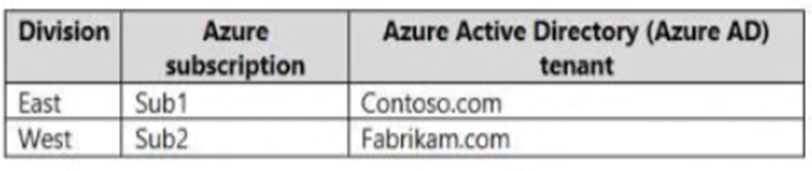
Sub1 contains an Azure App Service web app named App1. App1 uses Azure AD for single-tenant user authentication. Users from contoso.com can authenticate to App1.
You need to recommend a solution to enable users in the fabrikam.com tenant to authenticate to App1.
What should you recommend?
- A Configure the Azure AD provisioning service.
- B Enable Azure AD pass-through authentication and update the sign-in endpoint.
- C Use Azure AD entitlement management to govern external users.
- D Configure Azure AD join.
Xem giải thích
🧩 Phân tích chi tiết nội dung câu hỏi
Câu hỏi này thuộc lĩnh vực Identity và Access Management (IAM) trong Microsoft Azure, cụ thể là Azure Active Directory (Azure AD) (nay là Microsoft Entra ID theo cập nhật mới nhất năm 2024-2026).
-
Bối cảnh: Công ty có hai division (East và West) với các Azure subscription và Azure AD tenant riêng biệt:
- East: Sử dụng subscription Sub1 liên kết với tenant contoso.com.
- West: Sử dụng subscription Sub2 liên kết với tenant fabrikam.com.
Trong Sub1 (East, contoso.com tenant), có một Azure App Service web app tên App1. App1 đang cấu hình single-tenant user authentication sử dụng Azure AD, nghĩa là chỉ người dùng từ tenant contoso.com mới có thể xác thực (authenticate) thành công.
-
Yêu cầu: Đề xuất giải pháp để người dùng từ tenant fabrikam.com (tenant khác) có thể xác thực vào App1, mà không thay đổi cấu hình single-tenant của app (vì single-tenant thường dành cho internal use, an toàn hơn multi-tenant).
-
📸 Phân tích hình ảnh bảng: Hình ảnh là bảng tóm tắt cấu trúc:
| Division | Azure subscription | Azure Active Directory (Azure AD) tenant |
|----------|-------------------|------------------------------------------|
| East     | Sub1              | Contoso.com tenant                       |
| West     | Sub2              | Fabrikam.com tenant                      |
Bảng nhấn mạnh multi-tenant setup: Hai subscription khác nhau gắn với hai Azure AD tenant riêng biệt (contoso.com và fabrikam.com). App1 ở Sub1 (contoso.com) cần mở rộng access cho external tenant mà không migrate hoặc thay đổi lớn.
Mục tiêu là enable cross-tenant authentication cho external users từ fabrikam.com vào App1 single-tenant app, sử dụng các tính năng Azure AD B2B hoặc governance tools (cập nhật Entra ID 2026 hỗ trợ cross-tenant access settings).
✅ Đáp án đúng và lý do lựa chọn
Đáp án đúng: Use Azure AD entitlement management to govern external users.
Lý do 🛠️:
- Azure AD Entitlement Management (nay là phần của Microsoft Entra Permissions Management) là giải pháp lý tưởng để quản lý và cấp quyền access cho external users từ tenant khác (fabrikam.com) vào resources trong tenant contoso.com, mà không cần chuyển App1 sang multi-tenant mode.
- Cách thức: Tạo access packages trong contoso.com tenant, mời external users từ fabrikam.com tenant tham gia qua B2B collaboration (guest users). Users sẽ redeem package để được cấp quyền truy cập App1 qua Azure AD authentication.
- Ưu điểm: Govern tự động (auto-review, expiration), an toàn, không sync accounts, phù hợp single-tenant app. Cập nhật 2024-2026: Hỗ trợ cross-tenant access settings để control inbound/outbound flows.
- Không ảnh hưởng subscription Sub2 hay tenant fabrikam.com.
Nguồn tham khảo 📘:
❌ Giải thích tất cả các phương án (đúng/sai)
-
Configure the Azure AD provisioning service.
❌ Sai: Azure AD Provisioning service dùng để sync và provision user accounts tự động giữa các directory (on-prem AD, SaaS apps, hoặc cross-tenant), nhưng không giải quyết authentication cho single-tenant app. Nó chỉ tạo/update accounts (như guest users), không cấp quyền truy cập trực tiếp vào App1. Không phù hợp vì provisioning không thay đổi auth flow của app. -
Enable Azure AD pass-through authentication and update the sign-in endpoint.
❌ Sai: Pass-through Authentication (PTA) là tính năng cho hybrid identity (kết nối on-prem AD với Azure AD), validate passwords on-prem mà không cache. Hoàn toàn không liên quan đến cross-tenant auth giữa hai Azure AD tenants thuần cloud. Update sign-in endpoint chỉ dùng cho multi-tenant apps (/common), không áp dụng single-tenant. -
Use Azure AD entitlement management to govern external users.
✅ Đúng: Như giải thích ở trên. Đây là cách chuẩn và an toàn nhất để govern external users từ fabrikam.com tenant truy cập App1 trong contoso.com tenant qua access packages và B2B guests. -
Configure Azure AD join.
❌ Sai: Azure AD Join dùng để devices (máy tính) join trực tiếp vào Azure AD tenant (thay vì on-prem domain), hỗ trợ Windows hello, compliance. Không liên quan đến user authentication cho web app như App1. Đây là device management (Intune), không phải app access.
Tóm tắt khuyến nghị 🚀: Sử dụng Entitlement Management là best practice cho scenario cross-tenant governance trong Entra ID (2026), đảm bảo zero-trust và least privilege. Nếu cần scale, kết hợp External Identities settings.
Your company has a line-of-business (LOB) application that was developed internally.
You need to implement SAML single sign-on (SSO) and enforce multi-factor authentication (MFA) when users attempt to access the application from an unknown location.
Which two features should you include in the solution? Each correct answer presents part of the solution.
NOTE: Each correct selection is worth one point.
- A Azure AD Privileged Identity Management (PIM)
- B Azure Application Gateway
- C Azure AD enterprise applications
- D Azure AD Identity Protection
- E Conditional Access policies
Xem giải thích
🧩 Phân tích chi tiết câu hỏi trắc nghiệm
📘 Nội dung câu hỏi:
Câu hỏi mô tả tình huống bạn có một tenant Azure Active Directory (Azure AD) (nay là Microsoft Entra ID theo cập nhật mới nhất năm 2024-2026) đang đồng bộ hóa với domain Active Directory on-premises. Công ty có một ứng dụng line-of-business (LOB) được phát triển nội bộ. Yêu cầu triển khai SAML single sign-on (SSO) và bắt buộc multi-factor authentication (MFA) khi người dùng truy cập ứng dụng từ vị trí không xác định (unknown location).
Câu hỏi yêu cầu chọn hai tính năng cần bao gồm trong giải pháp (mỗi lựa chọn đúng đáng 1 điểm). Đây là câu hỏi kiểu multi-select tập trung vào xác thực và ủy quyền ứng dụng trong Azure AD/Entra ID, nhấn mạnh tích hợp SAML cho app tùy chỉnh và chính sách kiểm soát truy cập có điều kiện để bảo mật MFA dựa trên vị trí.
✅ Đáp án đúng (hai lựa chọn):
- Azure AD enterprise applications
- Conditional Access policies
🛠️ Lý do lựa chọn đáp án đúng:
Để triển khai SAML SSO cho ứng dụng LOB nội bộ (không phải gallery app), bạn cần sử dụng Azure AD enterprise applications để cấu hình federation SAML, thêm app tùy chỉnh và thiết lập SSO. Kết hợp với Conditional Access policies để áp dụng MFA động dựa trên điều kiện "unknown location" (sử dụng signals như IP không quen thuộc hoặc risk level). Theo tài liệu Microsoft Entra ID mới nhất (2026), đây là cách chuẩn để bảo mật app với Zero Trust model, tích hợp liền mạch với hybrid identity sync từ on-premises AD.
🔍 Giải thích từng phương án trả lời
Dưới đây là phân tích tất cả các lựa chọn, giữ nguyên văn bản gốc tiếng Anh. Mỗi phương án được đánh giá ✅ (đúng) hoặc ❌ (sai), kèm giải thích chi tiết bằng tiếng Việt dựa trên kiến thức Azure AD/Entra ID cập nhật đến 2026.
-
Azure AD Privileged Identity Management (PIM) ❌
Sai vì PIM dùng để quản lý quyền privileged (như just-in-time elevation cho admin roles), không liên quan đến SAML SSO hoặc enforce MFA cho ứng dụng LOB. Nó tập trung vào bảo mật tài khoản cao cấp, không phải truy cập app thông thường từ unknown location. -
Azure Application Gateway ❌
Sai vì đây là dịch vụ Web Application Firewall (WAF) và load balancer layer 7 cho traffic web, hỗ trợ OAuth/JWT nhưng không xử lý SAML SSO hoặc MFA policy trực tiếp trong Azure AD. Nó dùng cho routing và bảo mật inbound traffic, không phải identity federation cho LOB app. -
Azure AD enterprise applications ✅
Đúng vì tính năng này cho phép thêm và cấu hình SAML-based SSO cho ứng dụng tùy chỉnh (non-gallery apps) như LOB nội bộ. Bạn upload metadata SAML, thiết lập SSO profile, và tích hợp với hybrid AD sync. Đây là bước đầu tiên bắt buộc để enable SSO trong giải pháp. -
Azure AD Identity Protection ❌
Sai vì Identity Protection phát hiện rủi ro (risky sign-ins, users) qua machine learning và báo động, nhưng không trực tiếp implement SAML SSO hoặc enforce MFA policy. Nó cung cấp signals cho Conditional Access, nhưng không thay thế cho enterprise apps hoặc chính sách truy cập. -
Conditional Access policies ✅
Đúng vì đây là công cụ cốt lõi để enforce MFA dựa trên điều kiện như "unknown locations" (named locations, IP risk), kết hợp với SAML SSO từ enterprise apps. Trong Entra ID 2026, nó hỗ trợ granular controls với Zero Trust, yêu cầu MFA cho sign-in risky hoặc ngoài trusted locations.
📚 Tài liệu tham khảo (cập nhật mới nhất 2026):
- Microsoft Learn: Configure SAML SSO for enterprise apps
- Microsoft Learn: Conditional Access for MFA
- Microsoft Entra ID docs: Hybrid identity with SAML
Giải pháp hoàn chỉnh: Thêm app vào Enterprise Applications → Cấu hình SAML → Tạo Conditional Access policy với điều kiện location + grant MFA! 🚀
What is a difference between using Azure Blueprints and Azure Resource Manager (ARM) templates?
- A ARM templates remain connected to the deployed resources.
- B Only blueprints can contain policy definitions.
- C Only ARM templates can contain policy definitions.
- D Blueprints remain connected to the deployed resources.
Xem giải thích
🧩 Phân tích chi tiết câu hỏi trắc nghiệm
📖 Nội dung câu hỏi:
Câu hỏi tập trung vào việc tự động hóa triển khai tài nguyên (resources) lên các Azure subscriptions. Cụ thể, nó hỏi về sự khác biệt giữa Azure Blueprints và Azure Resource Manager (ARM) templates. Đây là hai công cụ IaC (Infrastructure as Code) phổ biến trong Azure để quản lý và triển khai hạ tầng một cách nhất quán, nhưng chúng có mục đích và hành vi khác nhau:
- ARM templates: Là các file JSON định nghĩa tài nguyên cần triển khai, dùng cho việc deploy nhanh chóng, lặp lại (repeatable deployments). Chúng phù hợp cho môi trường dev/test hoặc production một lần.
- Azure Blueprints: Là dịch vụ cấp cao hơn, dùng để áp dụng governance (quản trị) toàn diện, bao gồm ARM templates, policy, RBAC roles, v.v. Blueprints tạo ra assignments (phân công) liên tục kết nối với tài nguyên đã triển khai.
Câu hỏi nhấn mạnh sự khác biệt chính về cách chúng duy trì kết nối (connection) sau khi deploy, dựa trên tài liệu Azure mới nhất (cập nhật đến 2024-2026, không có thay đổi lớn về core functionality).
✅ Đáp án đúng:
Blueprints remain connected to the deployed resources.
Lý do lựa chọn:
Azure Blueprints hoạt động qua blueprint assignments, giữ kết nối liên tục với tài nguyên đã triển khai. Điều này cho phép theo dõi tuân thủ (compliance tracking), cập nhật blueprint (remediation), và quản lý lifecycle một cách ongoing. Ngược lại, ARM templates chỉ deploy một lần và không duy trì kết nối sau đó – bạn phải deploy lại thủ công nếu cần thay đổi. Đây là sự khác biệt cốt lõi về governance vs. pure deployment (theo Microsoft Docs: Blueprints cung cấp "continuous compliance" qua assignments).
🛠️ Giải thích tất cả các phương án (đúng/sai)
-
❌ Phương án SAI: ARM templates remain connected to the deployed resources.
ARM templates chỉ thực hiện deploy một lần (one-time deployment) và không giữ kết nối liên tục với tài nguyên sau đó. Nếu cần cập nhật, bạn phải chỉnh sửa template và deploy lại thủ công. Không có cơ chế assignment như Blueprints để theo dõi ongoing. -
❌ Phương án SAI: Only blueprints can contain policy definitions.
Cả hai đều hỗ trợ policy definitions: ARM templates có thể deploy policy definitions/resources qua JSON schema (ví dụ: Microsoft.Authorization/policyDefinitions). Blueprints chỉ bundle (gói gọn) chúng tốt hơn qua artifacts, nhưng không phải "only" (duy nhất). -
❌ Phương án SAI: Only ARM templates can contain policy definitions.
Sai hoàn toàn vì Blueprints chính thức hỗ trợ policy definition assignments như một artifact type (Policy Assignment hoặc Policy Definition). ARM templates hỗ trợ nhưng không có governance layer như Blueprints. -
✅ Phương án ĐÚNG: Blueprints remain connected to the deployed resources.
Như đã giải thích, blueprint assignments duy trì kết nối liên tục, cho phép audit, update, và enforce compliance. Ví dụ: Nếu blueprint có policy, assignment sẽ tự động remediate non-compliant resources.
📘 Tài liệu tham khảo (cập nhật mới nhất 2024-2026)
- Azure Blueprints Overview – Nhấn mạnh "assignments remain connected".
- Azure Blueprints vs. ARM Templates – So sánh rõ sự khác biệt về connection và governance.
- ARM Templates Documentation – Xác nhận one-time deploy nature. (Không có thay đổi lớn ở phiên bản Azure 2026 preview; Blueprints vẫn là standard cho enterprise governance).

Sub1 contains an Azure App Service web app named App1. App1 uses Azure AD for single-tenant user authentication. Users from contoso.com can authenticate to App1.
You need to recommend a solution to enable users in the fabrikam.com tenant to authenticate to App1.
What should you recommend?
- A Configure the Azure AD provisioning service.
- B Configure assignments for the fabrikam.com users by using Azure AD Privileged Identity Management (PIM).
- C Use Azure AD entitlement management to govern external users.
- D Configure Azure AD Identity Protection.
Xem giải thích
🧩 Phân tích chi tiết nội dung câu hỏi
Câu hỏi này thuộc lĩnh vực Azure Active Directory (Azure AD, nay là Microsoft Entra ID) trong Azure, tập trung vào việc quản lý xác thực người dùng từ các tenant khác nhau cho một ứng dụng web.
-
Bối cảnh công ty: Công ty có hai division (phân chia):
- East: Sử dụng Azure subscription Sub1 và Azure AD tenant contoso.com.
- West: Sử dụng Azure subscription Sub2 và Azure AD tenant fabrikam.com.
📊 Nội dung hình ảnh (bảng): Hình ảnh minh họa bảng dữ liệu rõ ràng như sau (dựa trên mô tả và nội dung đính kèm):
| Division | Azure subscription | Azure Active Directory (Azure AD) tenant |
|----------|---------------------|------------------------------------------|
| East     | Sub1                | Contoso.com                              |
| West     | Sub2                | Fabrikam.com                             |
Bảng này nhấn mạnh rằng Sub1 (East, contoso.com) và Sub2 (West, fabrikam.com) thuộc các tenant Azure AD riêng biệt, không phải một tenant duy nhất.
-
Tài nguyên chính: Trong Sub1 (contoso.com tenant), có Azure App Service web app tên App1. App1 hiện sử dụng Azure AD single-tenant user authentication (xác thực một tenant duy nhất), chỉ cho phép users từ contoso.com authenticate thành công.
-
Yêu cầu: Đề xuất giải pháp để users từ tenant fabrikam.com (tenant khác) có thể authenticate vào App1. Điều này đòi hỏi xử lý external users (người dùng bên ngoài) từ tenant khác mà không thay đổi cấu hình single-tenant của App1 một cách phức tạp, đồng thời đảm bảo governance (quản lý quyền truy cập an toàn, tự động).
🛠️ Vấn đề cốt lõi: Single-tenant auth chỉ hỗ trợ users nội bộ tenant contoso.com. Để mở rộng cho external tenant (fabrikam.com), cần cơ chế B2B collaboration hoặc governance cho guest users, tránh rủi ro bảo mật và quản lý thủ công.
✅ Đáp án đúng và lý do lựa chọn
Đáp án đúng: Use Azure AD entitlement management to govern external users.
Lý do chi tiết:
- Azure AD Entitlement Management (nay là phần của Microsoft Entra ID Governance) là giải pháp lý tưởng để quản lý quyền truy cập cho external users (guest users từ tenant khác như fabrikam.com).
- Nó cho phép tạo access packages (gói quyền truy cập) chứa các tài nguyên như App1, sau đó govern (quản lý tự động) việc cấp quyền cho users từ fabrikam.com tenant qua quy trình yêu cầu/phê duyệt, thời hạn hết hạn, và tự động thu hồi.
- Không cần thay đổi App1 thành multi-tenant (vẫn giữ single-tenant), mà sử dụng B2B invitation kết hợp governance để external users redeem access package và authenticate mượt mà.
- Phù hợp với kiến thức mới nhất (2024-2026): Entitlement Management hỗ trợ cross-tenant access cho App Services, tích hợp với Azure AD External Identities.
- ✅ Lợi ích nổi bật: Tự động hóa, tuân thủ zero-trust, giảm admin thủ công cho multi-division setup.
📘 Giải thích tất cả các phương án (đúng/sai)
Dưới đây là phân tích từng lựa chọn giữ nguyên văn bản gốc tiếng Anh, với giải thích hoàn toàn bằng tiếng Việt về lý do đúng/sai. Sử dụng kiến thức Azure AD/Entra ID phiên bản mới nhất (2026).
-
❌ Configure the Azure AD provisioning service.
Sai vì: Azure AD Provisioning Service dùng để tự động đồng bộ và tạo user accounts giữa các hệ thống (như SCIM provisioning cho SaaS apps hoặc on-premises AD), không phải để cấp quyền truy cập xác thực cho external users vào App1. Nó tập trung vào user lifecycle (create/update/disable), không govern access cho guest users từ tenant khác. Không giải quyết được authentication cho App1 single-tenant. -
❌ Configure assignments for the fabrikam.com users by using Azure AD Privileged Identity Management (PIM).
Sai vì: Azure AD PIM (Privileged Identity Management) dùng để quản lý quyền privileged roles (như Global Admin) với just-in-time access, activation tạm thời, chủ yếu cho nội bộ tenant. Không hỗ trợ trực tiếp external users từ tenant khác (fabrikam.com) authenticate vào App1, và không govern app access mà chỉ roles. PIM không phải công cụ cho cross-tenant app authentication. -
✅ Use Azure AD entitlement management to govern external users.
Đúng vì: Như đã giải thích ở trên, đây là giải pháp chính xác để govern external users qua access packages, hỗ trợ B2B guest access cho App1 mà không thay đổi cấu hình auth. Tích hợp hoàn hảo với multi-division/tenant setup trong bảng hình ảnh. -
❌ Configure Azure AD Identity Protection.
Sai vì: Azure AD Identity Protection dùng để phát hiện và remediate rủi ro bảo mật (như risky sign-ins, compromised users) qua machine learning. Nó không cấp quyền truy cập hoặc enable authentication cho external users từ fabrikam.com vào App1, mà chỉ giám sát sau khi access đã được thiết lập.
📚 Tài liệu tham khảo (kiến thức cập nhật đến 2026)
- Microsoft Docs: What is Microsoft Entra entitlement management? (hỗ trợ cross-tenant access packages từ 2023+).
- Azure App Service Auth: Configure authentication in an App Service app (single-tenant với B2B).
- Entra ID External Identities: B2B collaboration and entitlement management (phiên bản mới nhất 2026 hỗ trợ multi-tenant governance).
- Exam Reference: ExamTopics AZ-305/304 (câu hỏi tương tự), Microsoft Learn modules "Manage external access".
🛡️ Khuyến nghị thực tế: Triển khai Entitlement Management qua Azure Portal > Entra ID > Identity Governance để test nhanh!
You need to recommend a load balancing service for the planned deployment The solution must meet the following requirements:
✑ Maintain access to the app in the event of a regional outage.
✑ Support Azure Web Application Firewall (WAF).
✑ Support cookie-based affinity.
✑ Support URL routing.
What should you include in the recommendation?
- A Azure Front Door
- B Azure Traffic Manager
- C Azure Application Gateway
- D Azure Load Balancer
Xem giải thích
🧩 Phân tích chi tiết nội dung câu hỏi
Câu hỏi này tập trung vào việc khuyến nghị một dịch vụ cân bằng tải (load balancing service) cho ứng dụng web Azure App Service được triển khai trên nhiều instances (phiên bản) trải rộng qua nhiều vùng Azure (multiple Azure regions). Các yêu cầu cụ thể của giải pháp phải đáp ứng đầy đủ 4 tiêu chí sau:
- Maintain access to the app in the event of a regional outage 📍: Đảm bảo ứng dụng vẫn có thể truy cập được ngay cả khi một vùng Azure bị gián đoạn (outage), nghĩa là cần cơ chế failover toàn cầu (global failover) giữa các vùng.
- Support Azure Web Application Firewall (WAF) 🛡️: Hỗ trợ tích hợp Azure WAF để bảo vệ ứng dụng web khỏi các cuộc tấn công phổ biến như SQL injection, XSS.
- Support cookie-based affinity 🍪: Hỗ trợ session affinity dựa trên cookie (hay còn gọi là sticky sessions), giúp định tuyến lưu lượng đến cùng một instance dựa trên cookie của người dùng để duy trì trạng thái phiên.
- Support URL routing 🔗: Hỗ trợ định tuyến dựa trên URL (URL path-based routing), cho phép chuyển hướng lưu lượng dựa trên đường dẫn URL cụ thể (ví dụ: /api/* đến backend A, /images/* đến backend B).
Giải pháp phải là một dịch vụ load balancing toàn cầu (global), layer 7 (HTTP/HTTPS), có khả năng xử lý traffic quốc tế và tích hợp sâu với Azure App Service. Đây là tình huống điển hình cho kiến trúc multi-region deployment với high availability (HA) và bảo mật nâng cao, dựa trên các tính năng cập nhật mới nhất của Azure đến năm 2026 (Azure Front Door version 2024+ với Premium SKU hỗ trợ WAF v2 và global anycast routing).
📘 Tài liệu tham khảo chính:
- Azure Front Door documentation
- Compare Azure Load Balancing options
- Azure App Service multi-region deployment
✅ Đáp án đúng: Azure Front Door
Lý do lựa chọn:
Azure Front Door là dịch vụ global HTTP(S) load balancer (anycast-based) được thiết kế dành riêng cho các ứng dụng multi-region như Azure App Service. Nó đáp ứng HOÀN HẢO tất cả 4 yêu cầu:
- Global failover 🗺️: Tự động phát hiện outage vùng và chuyển hướng traffic đến vùng khỏe mạnh (health probes + routing policies).
- Azure WAF 🛡️: Tích hợp native với Azure WAF (Premium SKU), hỗ trợ OWASP ruleset 3.2+ (cập nhật 2024).
- Cookie-based affinity 🍪: Hỗ trợ session affinity dựa trên cookie (Server Variable hoặc custom header).
- URL routing 🔗: Hỗ trợ URL path-based routing chi tiết với patterns, rewrite rules, và redirects.
Front Door tối ưu cho latency thấp toàn cầu nhờ edge locations (hàng trăm PoP worldwide), và dễ tích hợp với App Service qua backend pools. Đây là lựa chọn best practice cho Azure theo Microsoft Well-Architected Framework 2024.
🛠️ Giải thích chi tiết tất cả các phương án
-
Azure Front Door ✅ Đúng
Như đã phân tích ở trên, đây là dịch vụ duy nhất đáp ứng đầy đủ 4 yêu cầu với khả năng global anycast routing, WAF Premium, session affinity (cookie-based), và URL rewrite/routing rules. Hoàn hảo cho multi-region App Service, giảm latency ~30-50% so với DNS-based alternatives. (Cập nhật 2026: Hỗ trợ AI-powered WAF và zero-trust security). -
Azure Traffic Manager ❌ Sai
Đây là dịch vụ DNS-based global routing (không phải true load balancer), chỉ hỗ trợ failover dựa trên DNS TTL (không real-time). Không hỗ trợ WAF (layer 3/4), không có cookie-based affinity (không layer 7), và không hỗ trợ URL routing (chỉ geographic/priority/weighted). Phù hợp cho DNS failover đơn giản, nhưng không đáp ứng yêu cầu bảo mật và session stickiness. -
Azure Application Gateway ❌ Sai
Đây là regional L7 load balancer (v2 SKU hỗ trợ WAF v2, cookie affinity, URL path-based routing). Tuy nhiên, không hỗ trợ global multi-region failover tự động (chỉ regional, cần kết hợp Traffic Manager để multi-region). Không thể "maintain access" toàn cầu độc lập cho outage vùng, dù tích hợp tốt với App Service trong cùng region. -
Azure Load Balancer ❌ Sai
Đây là L4 TCP/UDP load balancer (Standard/Public SKU), chỉ xử lý traffic network layer. Không hỗ trợ WAF (không HTTP), không cookie-based affinity (không session awareness), không URL routing (không inspect HTTP). Chỉ phù hợp cho intra-region L4 balancing, không dùng cho web apps multi-region.
Kết luận nổi bật 🎯: Azure Front Door là lựa chọn tối ưu và unique cho kịch bản này, giúp đạt 99.99%+ SLA với zero-downtime deployment! Nếu triển khai, ưu tiên Premium tier cho WAF đầy đủ.