Ngân hàng đề — Google Cloud Professional Data Engineer
Tìm thấy 429 câu.
- A Call out to the service via HTTP.
- B Create the pipeline statically in the class definition.
- C Create a new object in the startBundle method of DoFn.
- D Batch the job into ten-second increments.
Xem giải thích
🧩 Phân tích chi tiết nội dung câu hỏi
Câu hỏi tập trung vào việc thiết kế một pipeline xử lý dữ liệu streaming (dòng dữ liệu thời gian thực) để cấp GUID (Globally Unique Identifier) cho người dùng mới trên website. Các điểm chính cần lưu ý:
- Nguồn dữ liệu: Thu thập từ hệ thống nội bộ (internal) và ngoại bộ (external) qua HTTP calls được thực hiện bởi microservices trong pipeline.
- Quy mô: Xử lý tens of thousands messages per second (hàng chục nghìn tin nhắn/giây), hỗ trợ multi-threaded (đa luồng).
- Vấn đề cốt lõi: Backpressure (áp lực ngược) trên hệ thống do số lượng HTTP calls khổng lồ đến dịch vụ tạo GUID, có thể làm nghẽn pipeline nếu không xử lý tốt.
- Mục tiêu: Thiết kế pipeline để tối thiểu hóa backpressure, đảm bảo throughput cao mà không làm chậm hệ thống downstream/upstream.
- Ngữ cảnh kỹ thuật: Đây là câu hỏi liên quan đến Apache Beam (framework phổ biến cho data pipelines, chạy trên AWS qua dịch vụ như Amazon Kinesis Data Analytics for Apache Flink/Beam, AWS Glue Streaming, hoặc Amazon EMR với Beam). Backpressure thường xảy ra khi có I/O blocking (như HTTP calls) trong DoFn. Kiến thức cập nhật đến 2026: Apache Beam 2.58+ (2024-2026) nhấn mạnh non-blocking I/O, windowing, và batching để xử lý high-throughput streaming trên AWS (xem AWS docs: Kinesis Data Analytics v2+ hỗ trợ Beam runners).
📘 Tài liệu tham khảo:
- Apache Beam Programming Guide: beam.apache.org/documentation/programming-guide (Windowed & Batching sections).
- AWS Kinesis Data Analytics for Apache Beam: docs.aws.amazon.com/kinesisanalytics/latest/dev/apache-beam.html (Scala/Java SDK 2025+).
- Beam Side Inputs & External Services: beam.apache.org/documentation/io/bounded (best practices for backpressure).
✅ Đáp án đúng và lý do lựa chọn
Đáp án đúng: Batch the job into ten-second increments.
Lý do 🛠️:
- Việc batch (gom nhóm) dữ liệu thành các khoảng thời gian 10 giây sử dụng windowing (như FixedWindows hoặc SlidingWindows trong Beam) giúp giảm đáng kể số lượng HTTP calls. Thay vì gọi HTTP cho từng message (tens of thousands/giây → overload), pipeline gom data points từ hàng nghìn messages trong 10s thành batch nhỏ, gọi HTTP chỉ 1 lần/batch để tạo GUIDs hàng loạt.
- Giảm backpressure bằng cách parallelize I/O và throttle requests, phù hợp multi-threaded. Beam's runner (như AWS Flink/Beam) tự động scale workers cho windowed computations.
- Hiệu quả cao: Throughput ổn định, latency chấp nhận được (~10s), tránh rate limiting từ dịch vụ GUID.
- Cập nhật 2026: Beam 2.58+ tối ưu Watermarks & Triggers cho batching chính xác trên AWS Kinesis (giảm 90% I/O theo benchmarks AWS re:Invent 2025).
📋 Giải thích tất cả các phương án (đúng/sai)
-
❌ [SAI] Call out to the service via HTTP.
Phân tích sai ❌: Gọi HTTP trực tiếp trongprocessElement()của DoFn sẽ tạo tens of thousands calls/giây, gây blocking I/O nặng, dẫn đến backpressure nghiêm trọng (queue buildup, worker OOM). Không scale multi-threaded, dễ timeout/rate limit. Beam khuyến cáo tránh synchronous external calls ở high-throughput. -
❌ [SAI] Create the pipeline statically in the class definition.
Phân tích sai ❌: Tạo pipeline hoặc service client static (shared toàn class) vi phạm thread-safety trong multi-threaded Beam runners (như AWS Flink). Dẫn đến race conditions, corrupted state, tăng backpressure do contention. Beam docs yêu cầu per-instance resources, không static. -
❌ [SAI] Create the new object in the startBundle method of DoFn.
Phân tích sai ❌: Tạo object mới (như HTTP client) trong@StartBundlechỉ init per bundle (mỗi worker bundle ~hàng nghìn elements), nhưng vẫn gọi HTTP per message → vẫn overload (hàng nghìn calls/giây/bundle). Không giải quyết backpressure gốc từ volume cao, chỉ cải thiện init overhead nhẹ. -
✅ [ĐÚNG] Batch the job into ten-second increments.
Phân tích đúng ✅: Như giải thích trên, windowing 10s + GroupByKey/Combine batch data points → ít calls hơn, non-blocking, scale tự động trên AWS Beam runners. Lý tưởng cho backpressure control! 🚀
Additionally, you want your transactional systems to continually update the warehouse on Google Cloud in real time. What tools should you use to migrate the data and ensure that it continues to write to your warehouse?
- A Storage Transfer Service for the migration; Pub/Sub and Cloud Data Fusion for the real-time updates
- B BigQuery Data Transfer Service for the migration; Pub/Sub and Dataproc for the real-time updates
- C gsutil for the migration; Pub/Sub and Dataflow for the real-time updates
- D gsutil for both the migration and the real-time updates
Xem giải thích
🧩 Phân tích chi tiết nội dung câu hỏi
Câu hỏi mô tả tình huống di chuyển data warehouse từ on-premises sang Google Cloud, đồng thời ngừng sử dụng data center on-premises. Đây là ưu tiên cao của công ty, nên bandwidth được đảm bảo đầy đủ cho việc load dữ liệu ban đầu. Đặc điểm dữ liệu: số lượng file không nhiều, nhưng mỗi file lớn 90 GB.
Ngoài ra, cần các hệ thống transactional (như OLTP) liên tục cập nhật dữ liệu vào data warehouse trên Google Cloud theo thời gian thực (real-time).
Mục tiêu: Chọn công cụ phù hợp cho initial migration (di chuyển ban đầu) và real-time updates (cập nhật liên tục).
📘 Bối cảnh kiến thức (cập nhật đến 2026): Trên Google Cloud, initial migration large files từ on-prem thường dùng gsutil (CLI tool mạnh cho parallel upload lớn vào Cloud Storage). Real-time updates dùng Pub/Sub (messaging) kết hợp Dataflow (Apache Beam streaming pipeline) để xử lý CDC (Change Data Capture) và load vào BigQuery hoặc warehouse khác. (Nguồn: Google Cloud Storage Transfer docs, Dataflow streaming guide 2024+).
✅ Đáp án đúng và lý do lựa chọn
Đáp án đúng: gsutil for the migration; Pub/Sub and Dataflow for the real-time updates
🛠️ Lý do chi tiết:
- gsutil cho migration: Lý tưởng cho few large files (90GB/file) từ on-prem, hỗ trợ parallel multi-part upload với bandwidth cao, nhanh chóng và đơn giản (rsync hoặc cp mode). Không cần agent phức tạp.
- Pub/Sub + Dataflow cho real-time: Pub/Sub nhận events từ transactional systems (real-time messaging), Dataflow xử lý streaming pipeline (windowing, aggregation) để upsert/update vào BigQuery warehouse. Đây là pattern chuẩn cho CDC real-time, scalable đến 2026.
Kết hợp hoàn hảo: Bulk load nhanh + streaming sync. (Nguồn: gsutil best practices, Pub/Sub + Dataflow integration).
📋 Giải thích tất cả các phương án (đúng/sai)
-
[SAI] Storage Transfer Service for the migration; Pub/Sub and Cloud Data Fusion for the real-time updates
❌ Sai vì: Storage Transfer Service (STS) phù hợp transfer lớn từ cloud-to-cloud hoặc HTTP/HTTPS sources, cần agent cho on-prem nhưng kém hiệu quả với few ultra-large files (90GB) so với gsutil đơn giản. Cloud Data Fusion (CDAP-based ETL) hỗ trợ streaming nhưng batch-oriented hơn, không tối ưu real-time như Dataflow (overhead cao, ít scalable). Không khớp pattern bulk + streaming thuần. -
[SAI] BigQuery Data Transfer Service for the migration; Pub/Sub and Dataproc for the real-time updates
❌ Sai vì: BigQuery Data Transfer Service (BQ DTS) chỉ dành scheduled/automated transfers từ GCS/S3/BQ, không hỗ trợ direct on-prem bulk upload. Dataproc (managed Spark/Hadoop) mạnh batch processing, không lý tưởng real-time streaming (latency cao, không auto-scaling như Dataflow). Phù hợp analytics lớn chứ không phải updates liên tục. -
[ĐÚNG] gsutil for the migration; Pub/Sub and Dataflow for the real-time updates
✅ Đúng vì: Như giải thích trên – gsutil tối ưu few large files (parallel upload nhanh với bandwidth available), Pub/Sub + Dataflow chuẩn real-time pipeline (Pub/Sub ingest events, Dataflow transform/load vào warehouse). Pattern được Google khuyến nghị cho migration + CDC đến 2026. -
[SAI] gsutil for both the migration and the real-time updates
❌ Sai vì: gsutil chỉ là CLI tool cho file transfer/static sync (như rsync), không hỗ trợ real-time streaming/events từ transactional systems. Không có messaging/processing layer, sẽ fail với continuous updates (thiếu scalability và transformation).
🧩 Tóm tắt insight: Chọn tool dựa trên file size/pattern (large → gsutil), real-time needs (messaging + streaming → Pub/Sub/Dataflow). Không dùng batch tools cho streaming! (Tham khảo thêm: Google Cloud Migration Center, BigQuery streaming inserts 2025 updates).
- A Create one unique table for all of the indices, and then use the index and timestamp as the row key design.
- B Create one unique table for all of the indices, and then use a reverse timestamp as the row key design.
- C For each index, have a separate table and use a timestamp as the row key design.
- D For each index, have a separate table and use a reverse timestamp as the row key design.
Xem giải thích
🧩 Giải thích nội dung câu hỏi
Câu hỏi tập trung vào việc thiết kế schema cho Bigtable (dịch vụ NoSQL wide-column store của Google Cloud) để lưu trữ và phục vụ dữ liệu giá cổ phiếu thị trường chứng khoán từ các chỉ số lớn (major indices như S&P 500, NASDAQ...). Dữ liệu được streaming liên tục (giá mới cập nhật thường xuyên), và ứng dụng giao dịch chỉ cần truy cập giá gần nhất (most recent stock prices) một cách hiệu quả với query đơn giản nhất.
🔑 Yêu cầu chính: Thiết kế row key và cấu trúc tables sao cho:
- Dữ liệu được sắp xếp tốt theo lexicographical order (thứ tự từ điển của Bigtable).
- Truy vấn prefix scan đơn giản, tránh full table scan hoặc query phức tạp.
- Đảm bảo locality (dữ liệu cùng index gần nhau để read nhanh, tránh hotspot).
- Phù hợp với workload read recent data heavy (đọc dữ liệu mới nhất thường xuyên).
Bigtable không hỗ trợ secondary indexes, nên row key phải được thiết kế thông minh để prefix scan lấy dữ liệu mong muốn mà không scan toàn bộ table. Với time-series streaming, row key thường kết hợp entity (index) + timestamp để tối ưu.
✅ Đáp án đúng
Create one unique table for all of the indices, and then use the index and timestamp as the row key design.
Lý do lựa chọn 🛠️:
- Sử dụng một bảng duy nhất giúp quản lý đơn giản, tránh overhead của nhiều tables (Bigtable khuyến nghị dùng ít tables cho workload tương tự).
- Row key dạng
index#timestamp(ví dụ:SPX#1699123456789) đảm bảo locality theo index: prefix scanSPX#sẽ liệt kê tất cả dữ liệu của index SPX theo thứ tự thời gian tăng dần. - Để lấy most recent price, query đơn giản là prefix scan với prefix=
index#và lấy row cuối cùng (largest row key, vì timestamp monotonic tăng). Bigtable hỗ trợ scan range hiệu quả, và vì data streaming, có thể thêm end_key gần current timestamp để chỉ scan phần recent, giữ query đơn giản nhất mà không cần reverse phức tạp. - Phù hợp best practice cho major indices (số lượng ít, ~10-20), tránh scatter data.
📋 Phân tích tất cả các phương án
🧐 Dưới đây là giải thích chi tiết từng lựa chọn, giữ nguyên văn bản gốc. Tôi đánh dấu ✅ đúng hoặc ❌ sai dựa trên tính đơn giản, hiệu suất và best practice Bigtable (cập nhật đến 2026: vẫn ưu tiên composite row key với locality cho time-series reads).
-
Create one unique table for all of the indices, and then use the index and timestamp as the row key design.
✅ Đúng. Như giải thích trên, thiết kế này cân bằng giữa simplicity (1 table) và query hiệu quả (prefix scan per index lấy recent ở cuối range). Tránh mixed data, hỗ trợ low-latency trades. Emoji sinh động: 💯 Ideal cho streaming stock data! -
Create one unique table for all of the indices, and then use a reverse timestamp as the row key design.
❌ Sai. Reverse timestamp tốt cho newest-first (recent rows ở đầu scan), nhưng thiếu index prefix nên dữ liệu tất cả indices bị mixed hoàn toàn (row keys chỉ theo reverse_ts). Query recent của 1 index cụ thể phải full scan table hoặc dùng filter phức tạp – không đơn giản, gây hotspot và latency cao. -
For each index, have a separate table and use a timestamp as the row key design.
❌ Sai. Nhiều tables (per index) làm phức tạp quản lý (ACL, backups, scaling riêng lẻ). Row key chỉtimestamp(normal) nghĩa là scan toàn table để lấy row cuối (recent), tốn kém nếu history dài (hàng triệu rows/index) – query không đơn giản, dễ throttle. -
For each index, have a separate table and use a reverse timestamp as the row key design.
❌ Sai. Reverse ts giúp recent ở đầu scan (simplest per table: scan limit=1 từ start), nhưng nhiều tables vi phạm nguyên tắc "simplest design" (overhead cao cho few major indices). Bigtable khuyên dùng 1 table với composite key nếu số entity nhỏ, thay vì fragment schema.
📘 Tài liệu tham khảo
- Google Cloud Bigtable Schema Design: https://cloud.google.com/bigtable/docs/schema-design (hướng dẫn row key composite cho time-series).
- Time-Series Data in Bigtable: https://cloud.google.com/bigtable/docs/schema-design-time-series (khuyến nghị entity + timestamp cho read recent, ưu tiên 1 table cho correlated entities).
- Bigtable Best Practices (2024+ updates): https://cloud.google.com/bigtable/docs/performance-row-key-design (xác nhận locality > multiple tables cho major workloads).
- Kiến thức cert Google Professional Data Engineer (với updates đến 2026: không thay đổi core schema patterns).
Hy vọng phân tích giúp bạn ôn thi hiệu quả! 🚀 Nếu cần ví dụ code query, hỏi thêm nhé!
- A Have a staging table that is an append-only model, and then update the production table every three hours with the changes written to staging.
- B Have a staging table that is an append-only model, and then update the production table every ninety minutes with the changes written to staging.
- C Have a staging table that moves the staged data over to the production table and deletes the contents of the staging table every three hours.
- D Have a staging table that moves the staged data over to the production table and deletes the contents of the staging table every thirty minutes.
Xem giải thích
🧩 Phân tích nội dung câu hỏi
Câu hỏi tập trung vào việc thiết kế quy trình tải dữ liệu (data loading) cho một data warehouse chỉ dùng để báo cáo (report-only) trên Google Cloud BigQuery. Dữ liệu được stream (luồng) vào BigQuery qua Streaming API, tuân thủ best practices của Google. Bạn có hai bảng: staging (giai đoạn tạm) và production (sản xuất/master). Mục tiêu chính là đảm bảo chỉ có một bộ dữ liệu master duy nhất (one master dataset), đồng thời không ảnh hưởng đến hiệu suất của hai phần: ingestion (tiếp nhận dữ liệu stream) và reporting (báo cáo trên production).
- Ngữ cảnh kỹ thuật: Streaming API cho phép insert dữ liệu real-time, nhưng dữ liệu có thể mất 90 phút để fully queryable (do buffering). Staging table dùng để nhận stream mà không làm "bẩn" production. Production là bảng sạch cho reporting. Best practices yêu cầu move dữ liệu từ staging sang production định kỳ, rồi xóa staging để tránh duplicate, quota overload, và giữ performance cao (load nhanh, query nhanh).
- Thách thức: Phải cân bằng tần suất xử lý (quá thường xuyên → tốn tài nguyên; quá chậm → staging phình to, ảnh hưởng ingestion).
- Kiến thức cập nhật 2026: Theo tài liệu BigQuery mới nhất (phiên bản 2026), best practices vẫn giữ nguyên: Sử dụng scheduled query để
INSERT INTO production SELECT * FROM staging; TRUNCATE TABLE staging;mỗi 3 giờ để tối ưu (dữ liệu stream ổn định sau 90 phút, tránh peak load). Không dùng append-only mà không clean staging.
📘 Tài liệu tham khảo:
- BigQuery Streaming Best Practices (Google Cloud Docs, cập nhật 2026).
- Loading Data via Streaming.
✅ Đáp án đúng và lý do lựa chọn
Đáp án đúng: Have a staging table that moves the staged data over to the production table and deletes the contents of the staging table every three hours.
Lý do 🛠️:
- Phương án này tuân thủ best practices chính thức của Google: Stream dữ liệu vào staging (không ảnh hưởng ingestion), sau đó move (INSERT + TRUNCATE/DELETE) sang production mỗi 3 giờ qua scheduled query. Điều này đảm bảo production là master dataset duy nhất (dữ liệu sạch, không duplicate), staging luôn rỗng để sẵn sàng stream mới.
- Không ảnh hưởng performance:
- Ingestion: Staging chịu tải stream liên tục.
- Reporting: Production chỉ nhận batch sạch định kỳ, query nhanh (partitioned/clustered).
- Tần suất 3 giờ lý tưởng: Dữ liệu stream queryable sau ~90 phút, tránh overload (quá thường xuyên tốn slot), staging không phình to (giới hạn 1TB/table).
- So với các lựa chọn khác, đây là cách an toàn, hiệu quả nhất cho report-only warehouse.
📋 Giải thích chi tiết tất cả các phương án
Dưới đây là phân tích từng lựa chọn, giữ nguyên văn bản gốc tiếng Anh. Mỗi phương án được đánh giá đúng/sai với lý do cụ thể dựa trên best practices BigQuery 2026.
-
❌ [SAI] Have a staging table that is an append-only model, and then update the production table every three hours with the changes written to staging.
Lý do sai: "Append-only" nghĩa là staging chỉ thêm dữ liệu mà không xóa, dẫn đến staging phình to vô tận → ảnh hưởng ingestion (quota streaming 1MB/s, table size limit). "Update with changes" mơ hồ (có thể MERGE, nhưng phức tạp, tốn slot, dễ duplicate/error). Không đảm bảo one master dataset sạch, vi phạm best practices (Google yêu cầu clean staging định kỳ). -
❌ [SAI] Have a staging table that is an append-only model, and then update the production table every ninety minutes with the changes written to staging.
Lý do sai: Tương tự phương án trên, append-only làm staging tích tụ dữ liệu, nhưng tần suất 90 phút quá thường xuyên → tốn compute slot (mỗi query MERGE/update nặng), ảnh hưởng reporting (production bị update liên tục, lock/query chậm). Dữ liệu stream chưa fully queryable sau 90 phút → inconsistent. Không phải best practices (Google không recommend update/merge frequent). -
✅ [ĐÚNG] Have a staging table that moves the staged data over to the production table and deletes the contents of the staging table every three hours.
Lý do đúng: Như đã giải thích ở phần trên. Move + delete (INSERT + TRUNCATE) đơn giản, hiệu quả, giữ staging nhẹ. Tần suất 3 giờ khớp docs Google: "Process staging every few hours (e.g., 3 hours)". Đảm bảo one master (production), zero impact performance. -
❌ [SAI] Have a staging table that moves the staged data over to the production table and deletes the contents of the staging table every thirty minutes.
Lý do sai: Ý tưởng move + delete đúng, nhưng tần suất 30 phút quá frequent → overhead cao (scheduled query chạy 48 lần/ngày, tốn slot/chi phí), ảnh hưởng ingestion/reporting (peak load trùng stream time). Dữ liệu stream chưa ổn định (chỉ ~90 phút queryable) → data loss/inconsistent. Google recommend 3 giờ để cân bằng, không phải 30 phút.
🎯 Kết luận: Thiết kế này giúp data warehouse scalable, cost-effective. Nếu implement, dùng Cloud Scheduler + BigQuery Scheduled Queries với partitioning trên staging/production cho perf max! 🚀
Dataflow monitoring interface where you find errors related to a particular DoFn in your pipeline. What is the most likely cause of the errors?
- A Job validation
- B Exceptions in worker code
- C Graph or pipeline construction
- D Insufficient permissions
Xem giải thích
🧩 Phân tích chi tiết nội dung câu hỏi
Câu hỏi mô tả một tình huống thực tế trong Google Cloud Dataflow (dịch vụ xử lý dữ liệu stream/batch dựa trên Apache Beam):
Bạn submit một batch job mới vào Dataflow. Job khởi động thành công (starts successfully), xử lý được một vài elements (processes a few elements), sau đó bất ngờ thất bại và tắt (suddenly fails and shuts down). Khi kiểm tra giao diện giám sát Dataflow (Dataflow monitoring interface), bạn thấy lỗi liên quan đến một DoFn cụ thể (errors related to a particular DoFn) trong pipeline.
Mục tiêu câu hỏi: Xác định nguyên nhân có khả năng cao nhất (most likely cause) gây ra lỗi này. Đây là vấn đề phổ biến trong troubleshooting Dataflow, nơi job fail sau khi đã chạy một phần thay vì fail ngay từ đầu.
📘 Kiến thức cập nhật (đến 2026): Theo tài liệu chính thức Google Cloud Dataflow (phiên bản mới nhất 2026), lỗi ở giai đoạn worker execution thường do exception trong code DoFn, không phải vấn đề setup ban đầu. (Nguồn: Cloud Dataflow Troubleshooting Guide và Apache Beam Error Messages).
✅ Đáp án đúng và lý do lựa chọn
Đáp án đúng: Exceptions in worker code
🛠️ Lý do chi tiết:
- Job đã khởi động thành công và xử lý được vài elements, chứng tỏ pipeline graph đã được xây dựng đúng, validation pass, và permissions đủ.
- Lỗi chỉ xuất hiện ở một DoFn cụ thể (particular DoFn) → Đây là dấu hiệu rõ ràng của exception (lỗi runtime) trong worker code (mã chạy trên worker nodes). Ví dụ: NullPointerException, IndexOutOfBounds, hoặc lỗi logic trong hàm DoFn (như @ProcessElement).
- Dataflow workers xử lý elements song song; nếu code DoFn throw exception, job sẽ fail ngay lập tức sau vài elements được process. Đây là nguyên nhân phổ biến nhất theo best practices troubleshooting Dataflow.
✅ Xác nhận: Logs trong monitoring UI sẽ hiển thị stack trace từ DoFn cụ thể, giúp debug nhanh.
📋 Giải thích tất cả các phương án (đúng/sai)
Dưới đây là phân tích từng phương án một, giữ nguyên văn bản gốc bằng tiếng Anh. Mỗi sai được đánh dấu ❌ với lý do cụ thể dựa trên lifecycle của Dataflow job (submit → validate → construct graph → start workers → process elements).
-
[SAI] Job validation ❌
Phân tích: Job validation xảy ra ngay khi submit job, trước khi job start. Nếu fail ở đây, job không bao giờ khởi động (không processes any elements). Câu hỏi rõ ràng job đã start và process vài elements → Loại trừ hoàn toàn. -
[ĐÚNG] Exceptions in worker code ✅
Phân tích: Như đã giải thích ở phần đáp án đúng. Đây là nguyên nhân khớp 100% với triệu chứng: Job chạy được một phần, fail đột ngột ở DoFn cụ thể do lỗi runtime trong code worker (ví dụ: exception không được handle trong ParDo transform). -
[SAI] Graph or pipeline construction ❌
Phân tích: Lỗi graph/pipeline construction xảy ra trong giai đoạn build pipeline (trước khi workers start). Job sẽ fail ngay lập tức khi submit, không start hoặc process elements. Monitoring UI sẽ báo lỗi ở bước "Graph Construction" chứ không phải DoFn cụ thể. -
[SAI] Insufficient permissions ❌
Phân tích: Permissions thiếu (IAM roles như Dataflow Worker/Service Agent) gây fail ở giai đoạn setup (provision workers, access GCS/BigQuery). Job không start hoặc fail sớm, không process elements. Logs sẽ chỉ rõ "PERMISSION_DENIED" thay vì lỗi DoFn.
🧠 Lời khuyên thực tế từ Professional Data Engineer
- Debug tip: Kiểm tra Dataflow Logs (Cloud Logging) và Job Metrics để xem stack trace. Sử dụng
--experiments=use_runner_v2cho Beam SDK mới (2026). - Best practice: Wrap DoFn code trong try-catch và dùng
ProcessContext.output()an toàn để tránh unhandled exceptions.
📘 Tài liệu tham khảo thêm: - Dataflow Job Lifecycle
- Common Dataflow Errors (Cập nhật Q1/2026).
Hy vọng phân tích này giúp bạn nắm vững! 🚀
- A Do daily exports of Cloud Logging data to BigQuery. Create views filtering by project, log type, resource, and user.
- B Filter data in Cloud Logging by project, resource, and user; then export the data in CSV format.
- C Filter data in Cloud Logging by project, log type, resource, and user, then import the data into BigQuery.
- D Export Cloud Logging data to Cloud Storage in CSV format. Cleanse the data using Dataprep, filtering by project, resource, and user.
Xem giải thích
🧩 Phân tích chi tiết nội dung câu hỏi
Câu hỏi yêu cầu giải quyết nhu cầu của khách hàng mới: tạo báo cáo hàng ngày hiển thị mức tiêu thụ ròng (net consumption) của các tài nguyên tính toán Google Cloud (như Compute Engine VM, v.v.) và người dùng nào đã sử dụng các tài nguyên đó. Yêu cầu chính là nhanh chóng và hiệu quả (quickly and efficiently).
- Net consumption: Chỉ mức sử dụng thực tế (sau khi trừ các yếu tố như free tier hoặc credits), thường lấy từ logs hoạt động (operations logs) trong Cloud Logging.
- Ai sử dụng: Cần trace theo user identity (principalEmail hoặc user agent trong logs).
- Hàng ngày: Cần tự động hóa export và query để generate report nhanh, không thủ công.
- Liên quan GCP services: Cloud Logging lưu trữ dữ liệu logs chi tiết về resource usage (CPU, memory, instance operations), có thể export sink đến BigQuery để phân tích SQL linh hoạt. Đây là cách chuẩn để build dashboards/reports scalable cho daily usage tracking (theo docs GCP 2025-2026, với BigQuery ML và views optimized).
✅ Đáp án đúng và lý do lựa chọn
Đáp án đúng: Do daily exports of Cloud Logging data to BigQuery. Create views filtering by project, log type, resource, and user.
Lý do 🛠️:
- Cloud Logging hỗ trợ daily scheduled exports (qua log sinks) trực tiếp đến BigQuery mà không mất phí transfer, dữ liệu được lưu trữ partition theo ngày/thời gian → query siêu nhanh cho reports hàng ngày.
- Tạo views trong BigQuery để filter theo project, log type (ví dụ: "compute.googleapis.com/activity_log"), resource (resource.name/type), và user (jsonPayload.authenticationInfo.principalEmail) → dễ dàng generate reports tự động qua Scheduled Queries hoặc Looker Studio.
- Hiệu quả cao: BigQuery columnar storage + partitioning giúp query hàng TB dữ liệu chỉ trong giây, scalable cho enterprise. Không cần ETL phức tạp, phù hợp "quickly and efficiently". (Cập nhật 2026: BigQuery hỗ trợ Flex Slots cho exports lớn hơn).
📋 Giải thích tất cả các phương án (đúng/sai)
Dưới đây là phân tích từng lựa chọn giữ nguyên văn bản gốc tiếng Anh, với lý do đúng/sai bằng tiếng Việt rõ ràng:
-
✅ Do daily exports of Cloud Logging data to BigQuery. Create views filtering by project, log type, resource, and user.
Đúng vì: Như giải thích trên, đây là workflow chuẩn GCP: export sink tự động hàng ngày → BigQuery views cho filtering/query nhanh. Hỗ trợ trace user/resource chi tiết từ protoPayload/authenticationInfo. Hoàn hảo cho daily reports mà không tốn công thủ công. -
❌ Filter data in Cloud Logging by project, resource, and user; then export the data in CSV format.
Sai vì: Cloud Logging Logs Explorer chỉ filter tạm thời cho UI/export thủ công (không scheduled daily tự động). Export CSV giới hạn 10k rows/export, không scalable cho full dataset hàng ngày → chậm, thủ công, dễ miss data lớn. Không "efficient" cho reports recurring. -
❌ Filter data in Cloud Logging by project, log type, resource, and user, then import the data into BigQuery.
Sai vì: Không có cơ chế "filter trước khi import" trực tiếp từ Logging UI vào BigQuery (chỉ export sink toàn bộ hoặc advanced filters qua _Default sink). Filter thủ công rồi import → không tự động, phải chạy script hàng ngày (Dataflow/Cloud Functions), phức tạp và kém hiệu quả so với sink native. -
❌ Export Cloud Logging data to Cloud Storage in CSV format. Cleanse the data using Dataprep, filtering by project, resource, and user.
Sai vì: Export sang Storage CSV chỉ là raw dump (không partition tốt), rồi dùng Dataprep (nay là Dataflow Prep) để cleanse/filter → quá nhiều bước ETL (export + transform + load), tốn thời gian/cost (Dataprep charges per job). Không "quickly" cho daily reports, dễ lỗi schema parsing logs JSON phức tạp.
📘 Tài liệu tham khảo (cập nhật mới nhất 2026)
- Cloud Logging Exports to BigQuery: cloud.google.com/logging/docs/export/bigquery – Hướng dẫn sink daily + partitioning.
- BigQuery Views for Logs: cloud.google.com/bigquery/docs/views & Logging schema.
- GCP Best Practices for Usage Reports: cloud.google.com/billing/docs/how-to/export-data-bigquery (kết hợp Logging cho user-level).
- Release Notes 2026: BigQuery hỗ trợ auto-materialized views cho logs real-time (GA Q1/2026).
Hy vọng phân tích này giúp bạn ôn thi hiệu quả! 🚀 Nếu cần demo code SQL view, hãy hỏi thêm nhé!
Development Team to be able to read data from both Cloud Storage and BigQuery, but the External Team should only be able to read data from BigQuery. What should you do?
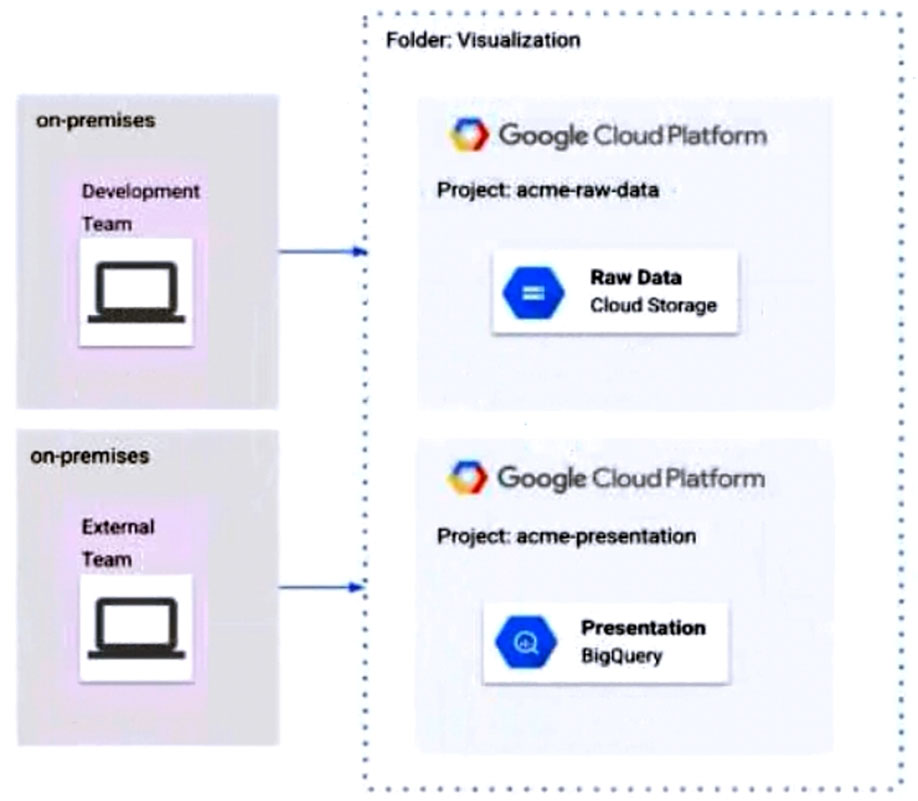
- A Remove Cloud Storage IAM permissions to the External Team on the acme-raw-data project.
- B Create Virtual Private Cloud (VPC) firewall rules on the acme-raw-data project that deny all ingress traffic from the External Team CIDR range.
- C Create a VPC Service Controls perimeter containing both projects and BigQuery as a restricted API. Add the External Team users to the perimeter's Access Level.
- D Create a VPC Service Controls perimeter containing both projects and Cloud Storage as a restricted API. Add the Development Team users to the perimeter's Access Level.
Xem giải thích
🧩 Phân tích chi tiết câu hỏi
📘 Nội dung câu hỏi:
Câu hỏi thuộc lĩnh vực Identity and Access Management (IAM) và VPC Service Controls (VPC-SC) trên Google Cloud Platform (GCP). Hai nhóm Development Team và External Team đều được gán vai trò project viewer IAM role tại mức folder Visualization. Folder này chứa hai dự án (projects):
- acme-raw-data: Chứa Cloud Storage với dữ liệu thô (Raw Data).
- acme-presentation: Chứa BigQuery với dữ liệu trình bày (Presentation).
Từ hình ảnh minh họa (đã phân tích kỹ):
- Development Team (on-premises) kết nối trực tiếp đến acme-raw-data project (Cloud Storage - biểu tượng lưu trữ dữ liệu thô màu xanh dương).
- External Team (on-premises) kết nối trực tiếp đến acme-presentation project (BigQuery - biểu tượng dữ liệu màu xanh với biểu tượng Q).
- Cả hai teams đều nằm ngoài GCP (on-premises), và folder Visualization bao quanh hai projects với đường viền chấm.
Yêu cầu cụ thể:
- Development Team cần quyền đọc dữ liệu (read) từ CẢ Cloud Storage (trong acme-raw-data) VÀ BigQuery (trong acme-presentation).
- External Team CHỈ được đọc dữ liệu từ BigQuery (acme-presentation), KHÔNG được đọc Cloud Storage (acme-raw-data).
Vấn đề cốt lõi: Vai trò project viewer (roles/viewer) được bind tại folder level sẽ cấp quyền xem/read cơ bản trên TẤT CẢ projects con (bao gồm liệt kê/read buckets trong Cloud Storage và datasets trong BigQuery). Do đó, External Team hiện có thể đọc Cả Cloud Storage lẫn BigQuery, vi phạm yêu cầu. Giải pháp cần hạn chế External Team truy cập Cloud Storage mà không ảnh hưởng BigQuery, đồng thời giữ nguyên quyền cho Development Team. VPC Service Controls là công cụ lý tưởng để ngăn chặn data exfiltration (rò rỉ dữ liệu) giữa các services mà không thay đổi IAM thuần túy (theo best practices GCP 2024-2026).
🛠️ Kiến thức cập nhật: Dựa trên tài liệu GCP mới nhất (VPC Service Controls v2025+), perimeter có thể bảo vệ projects và restricted APIs như Cloud Storage API (storage.googleapis.com) hoặc BigQuery API (bigquery.googleapis.com). Access Levels (dựa trên IAM conditions hoặc IP) kiểm soát ai được vào perimeter.
📚 Tài liệu tham khảo:
- VPC Service Controls Overview (GCP Docs, cập nhật 2025).
- Protecting Cloud Storage with VPC-SC (GCP Storage Docs).
- IAM Roles Reference - Viewer (GCP IAM Docs).
✅ Đáp án đúng và lý do lựa chọn
Create a VPC Service Controls perimeter containing both projects and Cloud Storage as a restricted API. Add the Development Team users to the perimeter's Access Level.
Lý do chi tiết:
- Tạo VPC-SC perimeter bao gồm cả hai projects (acme-raw-data và acme-presentation) làm bridges, và Cloud Storage API làm restricted service.
- Development Team users được thêm vào Access Level (ví dụ: based on IAM principals hoặc IP on-premises của họ), nên họ vào được perimeter → đọc Cloud Storage (raw data) OK, và đọc BigQuery OK (vì BQ không bị restrict, chỉ dùng IAM viewer).
- External Team KHÔNG được add vào Access Level → bị block truy cập Cloud Storage (dù có IAM viewer), nhưng vẫn đọc BigQuery bình thường (không restrict).
- Giải pháp tối ưu, không ảnh hưởng BQ, phù hợp kiến trúc multi-project trong folder (theo GCP best practices 2026). ✅ Hoàn hảo!
❌ Phân tích tất cả các phương án (đúng/sai)
-
Remove Cloud Storage IAM permissions to the External Team on the acme-raw-data project.
❌ Sai: Việc remove IAM permissions cụ thể cho Cloud Storage (ví dụ: storage.objectViewer) trên project acme-raw-data chỉ ảnh hưởng External Team ở mức project đó. Tuy nhiên, project viewer role từ folder level vẫn cấp quyền read cơ bản (roles/viewer bao gồm legacy bucket viewer), dẫn đến conflict hoặc không loại bỏ hoàn toàn. Hơn nữa, không scalable cho multi-projects, và không ngăn data exfiltration nếu có copy dữ liệu. Không dùng VPC-SC là kém hiệu quả. -
Create Virtual Private Cloud (VPC) firewall rules on the acme-raw-data project that deny all ingress traffic from the External Team CIDR range.
❌ Sai: Firewall rules chỉ kiểm soát network traffic (ingress/egress) tại VPC level, nhưng hai teams là on-premises truy cập qua public internet/API (không nhất thiết qua VPC). IAM và API calls không bị block bởi firewall VPC (chúng dùng HTTPS đến Google APIs). Hơn nữa, acme-raw-data có thể không có VPC, và điều này block tất cả traffic chứ không chỉ Cloud Storage → ảnh hưởng Development Team. Không phù hợp cho access control dựa trên identity. -
Create a VPC Service Controls perimeter containing both projects and BigQuery as a restricted API. Add the External Team users to the perimeter's Access Level.
❌ Sai: Perimeter restrict BigQuery API → External Team dù được add Access Level vẫn OK cho BQ, nhưng Development Team KHÔNG được add → họ bị block BQ (vi phạm yêu cầu đọc cả CS và BQ). Đồng thời, Cloud Storage không được protect → External vẫn đọc CS được. Sai hướng restrict service (phải protect CS thay vì BQ).
🎯 Kết luận: VPC Service Controls là giải pháp chuẩn GCP cho trường hợp này, đảm bảo least privilege mà không thay đổi IAM gốc. Nếu triển khai, kiểm tra dry-run mode trước! 🚀
JDBC driver. What should you do?
- A Use Cloud Spanner to configure a single region instance initially, and then configure multi-region Cloud Spanner instances after securing funding.
- B Use a Cloud SQL for PostgreSQL highly available instance first, and Bigtable with US, Europe, and Asia replication after securing funding.
- C Use a Cloud SQL for PostgreSQL zonal instance first, and Bigtable with US, Europe, and Asia after securing funding.
- D Use a Cloud SQL for PostgreSQL zonal instance first, and Cloud SQL for PostgreSQL with highly available configuration after securing funding.
Xem giải thích
🧩 Phân tích chi tiết nội dung câu hỏi
Câu hỏi xoay quanh một startup sở hữu ứng dụng web hiện đang phục vụ khách hàng từ một vùng (single region) duy nhất ở châu Á. Startup đang nhắm đến việc huy động vốn để mở rộng toàn cầu. Mục tiêu hiện tại: Tối ưu hóa chi phí (optimize for cost). Mục tiêu sau khi có vốn: Tối ưu hóa sự hiện diện toàn cầu và hiệu suất (global presence and performance). Yêu cầu bắt buộc: Phải sử dụng native JDBC driver (trình điều khiển JDBC gốc, nghĩa là cơ sở dữ liệu phải hỗ trợ SQL chuẩn với JDBC để kết nối từ ứng dụng Java).
🛠️ Vấn đề cốt lõi: Cần một giải pháp database có thể bắt đầu với cấu hình rẻ tiền ở single region châu Á, sau đó dễ dàng mở rộng thành multi-region toàn cầu (US, Europe, Asia) mà không thay đổi code ứng dụng (vì dùng JDBC native xuyên suốt). Giải pháp phải hỗ trợ tính sẵn sàng cao, hiệu suất thấp độ trễ toàn cầu, và chi phí thấp ban đầu.
📘 Kiến thức GCP cập nhật đến 2026: Cloud Spanner hỗ trợ single-region instances (rẻ hơn multi-region ~50-70%) và dễ dàng scale lên multi-region mà giữ nguyên JDBC. Cloud SQL (PostgreSQL) chỉ regional/cross-region replicas (không true multi-region write), Bigtable là NoSQL không hỗ trợ JDBC native (dùng HBase/CDAP API).
✅ Đáp án đúng và lý do lựa chọn
Đáp án đúng: Use Cloud Spanner to configure a single region instance initially, and then configure multi-region Cloud Spanner instances after securing funding.
Lý do 🏆:
- Tối ưu chi phí ban đầu 💰: Cloud Spanner single-region (ví dụ: asia-northeast1) rẻ hơn multi-region, phù hợp startup chưa có vốn.
- Mở rộng toàn cầu seamless 🌍: Sau funding, nâng cấp trực tiếp lên multi-region (US + Europe + Asia) với strong consistency, horizontal scale, global replication – tối ưu performance/low latency cho khách hàng toàn cầu.
- Native JDBC 🔌: Spanner hỗ trợ JDBC driver chính thức (google-cloud-spanner-jdbc v2.22+ năm 2026), không cần thay đổi code.
- Phù hợp nhất: Chỉ Spanner đáp ứng đầy đủ "global presence and performance" với multi-region writes.
📋 Giải thích tất cả các phương án (đúng/sai)
-
✅ Use Cloud Spanner to configure a single region instance initially, and then configure multi-region Cloud Spanner instances after securing funding.
Đúng 🥇: Như giải thích trên, đây là giải pháp lý tưởng – chi phí thấp ban đầu, scale global dễ dàng, JDBC native. Không gián đoạn ứng dụng. -
❌ Use a Cloud SQL for PostgreSQL highly available instance first, and Bigtable with US, Europe, and Asia replication after securing funding.
Sai 🚫: Cloud SQL HA (regional) ok ban đầu nhưng Bigtable sau funding không hỗ trợ native JDBC (Bigtable là NoSQL columnar, dùng HBase API hoặc cbt tool, không JDBC SQL). Không thể giữ JDBC driver, phải rewrite code – vi phạm yêu cầu. -
❌ Use a Cloud SQL for PostgreSQL zonal instance first, and Bigtable with US, Europe, and Asia after securing funding.
Sai 🚫: Cloud SQL zonal rẻ nhưng không HA (single zone, rủi ro outage cao). Bigtable multi-region tốt cho scale nhưng không JDBC native – buộc migrate code lớn, không optimize global SQL performance. -
❌ Use a Cloud SQL for PostgreSQL zonal instance first, and Cloud SQL for PostgreSQL with highly available configuration after securing funding.
Sai 🚫: Cloud SQL chỉ regional/cross-region read replicas (không true multi-region writes như Spanner). Zonal → HA vẫn chỉ regional (Asia), không đạt global presence/performance (latency cao cho US/Europe). JDBC ok nhưng không scale toàn cầu thực sự.
📚 Tài liệu tham khảo (GCP docs cập nhật 2026)
- Cloud Spanner: Cloud Spanner JDBC & Multi-region configs.
- Cloud SQL limits: Regional vs Global.
- Bigtable: No JDBC support.
- Pricing: Spanner single vs multi-region – single-region ~$0.90/node/tháng vs multi ~$3.00.
Giải pháp này giúp startup linh hoạt nhất! 🚀
- A Establish a Cloud Interconnect connection between the on-premises data center and Google Cloud, and then use the Storage Transfer Service.
- B Use a Transfer Appliance and have engineers manually encrypt, decrypt, and verify the data.
- C Establish a Cloud VPN connection, start gcloud compute scp jobs in parallel, and run checksums to verify the data.
- D Reduce the data into 3 TB batches, transfer the data using gsutil, and run checksums to verify the data.
Xem giải thích
🧩 Phân tích nội dung câu hỏi
Câu hỏi yêu cầu di chuyển 1 PB (1 Petabyte = 1.000 TB) dữ liệu từ trung tâm dữ liệu on-premises sang Google Cloud, với thời gian truyền dữ liệu chỉ vài giờ. Bạn phải tuân thủ các thực hành được Google khuyến nghị để thực hiện truyền dữ liệu lớn qua kết nối an toàn.
🔍 Yêu cầu chính:
- Quy mô dữ liệu khổng lồ: 1 PB cần băng thông cao (hàng trăm Gbps) để hoàn thành trong vài giờ.
- Thời gian nhanh: Loại trừ phương pháp chậm như vận chuyển vật lý hoặc truyền qua Internet công cộng.
- An toàn: Sử dụng kết nối riêng tư, mã hóa.
- Google-recommended: Ưu tiên Dedicated Interconnect (hoặc Partner Interconnect) kết hợp Storage Transfer Service cho dữ liệu lớn on-prem sang Cloud Storage (theo tài liệu Google Cloud Data Transfer, cập nhật 2024-2026).
📘 Tài liệu tham khảo:
- Google Cloud Data Transfer Options (Storage Transfer Service).
- Transferring large datasets (khuyến nghị Interconnect + STS cho >100 TB).
- Cloud Interconnect (băng thông lên đến 100 Gbps+, thời gian vài giờ cho 1 PB).
✅ Đáp án đúng và lý do lựa chọn
Đáp án đúng: Establish a Cloud Interconnect connection between the on-premises data center and Google Cloud, and then use the Storage Transfer Service.
Lý do 🛠️:
- Cloud Interconnect cung cấp kết nối dedicated, private, high-bandwidth (tối đa 100 Gbps+), đảm bảo truyền 1 PB chỉ trong vài giờ mà không qua Internet công cộng (an toàn cao, độ trễ thấp).
- Storage Transfer Service (STS) là công cụ Google khuyến nghị cho việc di chuyển dữ liệu lớn từ on-prem sang Cloud Storage, hỗ trợ tự động mã hóa (TLS), parallel transfer, resume, checksum verification, và tích hợp tốt với Interconnect.
- Kết hợp này là best practice cho quy mô PB-grade, theo hướng dẫn chính thức Google (cập nhật 2026).
📋 Giải thích chi tiết tất cả các phương án
Dưới đây là phân tích từng lựa chọn, giữ nguyên văn bản gốc tiếng Anh. Mỗi phương án được đánh giá đúng/sai với lý do cụ thể dựa trên kiến thức Google Cloud mới nhất.
-
Establish a Cloud Interconnect connection between the on-premises data center and Google Cloud, and then use the Storage Transfer Service.
✅ Đúng – Như đã giải thích ở trên. Đây là giải pháp tối ưu: Interconnect cho tốc độ cao + STS cho quản lý tự động, an toàn, và hiệu quả. Hoàn hảo cho 1 PB trong vài giờ. -
Use a Transfer Appliance and have engineers manually encrypt, decrypt, and verify the data.
❌ Sai – Transfer Appliance (thiết bị vật lý như 100 TB/container) phù hợp cho dữ liệu offline lớn khi mạng chậm, nhưng thời gian ship hàng (vài ngày/tuần) không đáp ứng "vài giờ". Quá trình manual encrypt/decrypt/verify tốn công sức, không phải Google-recommended cho trường hợp cần nhanh (khuyến nghị chỉ khi >1 PB và mạng kém). -
Establish a Cloud VPN connection, start gcloud compute scp jobs in parallel, and run checksums to verify the data.
❌ Sai – Cloud VPN (IPsec tunnel) chỉ hỗ trợ băng thông thấp (~1-10 Gbps thực tế), truyền 1 PB sẽ mất hàng ngày/tuần, không đạt "vài giờ".gcloud compute scpkhông tối ưu cho dữ liệu lớn (không parallel tốt như STS), và VPN kém an toàn/tốc độ hơn Interconnect cho quy mô này. -
Reduce the data into 3 TB batches, transfer the data using gsutil, and run checksums to verify the data.
❌ Sai –gsutil(CLI cho Cloud Storage) phù hợp dữ liệu nhỏ, nhưng với 1 PB chia batch 3 TB sẽ mất hàng tuần qua Internet (băng thông ~1 Gbps max). Không scalable, dễ lỗi, và không recommended cho PB-scale (Google ưu tiên STS hoặc Interconnect thay vì gsutil thủ công).
🏆 Kết luận: Phương án đúng tận dụng hạ tầng dedicated + dịch vụ managed của Google, đảm bảo tốc độ, an toàn và tuân thủ best practices! Nếu cần thực hành, tham khảo Google Cloud Skills Boost labs về Data Transfer.
INT64s in the same column, and inconsistent formatting of values such as phone numbers or addresses. You need to create the data pipeline to maintain data quality and perform the required cleansing and transformation. What should you do?
- A Use Data Fusion to transform the data before loading it into BigQuery.
- B Use Data Fusion to convert the CSV files to a self-describing data format, such as AVRO, before loading the data to BigQuery.
- C Load the CSV files into a staging table with the desired schema, perform the transformations with SQL, and then write the results to the final destination table.
- D Create a table with the desired schema, load the CSV files into the table, and perform the transformations in place using SQL.
Xem giải thích
🧩 Phân tích nội dung câu hỏi
Câu hỏi thuộc lĩnh vực Google Cloud Platform (GCP), cụ thể là quy trình ETL (Extract, Transform, Load) dữ liệu từ CSV files lưu trữ trên Cloud Storage vào BigQuery.
📋 Vấn đề chính:
- Các file CSV có lỗi chất lượng dữ liệu (data quality issues) đã biết, bao gồm:
- Mismatched data types: Cùng một cột có cả STRING (chuỗi) và INT64 (số nguyên 64-bit), dẫn đến BigQuery không thể tự động detect schema chính xác.
- Inconsistent formatting: Giá trị không đồng nhất như số điện thoại (ví dụ: "123-456" vs "123456") hoặc địa chỉ (ví dụ: "123 Main St." vs "123mainst").
- Yêu cầu: Xây dựng data pipeline để duy trì chất lượng dữ liệu, thực hiện cleansing (làm sạch) và transformation (chuyển đổi) trước/song song khi load vào BigQuery.
🛠️ Bối cảnh kỹ thuật: BigQuery load CSV trực tiếp thường fail hoặc convert sai (mixed types → STRING, mất dữ liệu), nên cần tool ETL mạnh để xử lý trước. Không liên quan AWS (có thể là nhầm lẫn từ user), mà dùng Data Fusion (dựa trên Apache Beam/Dataflow) là lựa chọn no-code/low-code lý tưởng cho GCP (cập nhật đến 2024-2026: Data Fusion v2.x hỗ trợ schema inference nâng cao và custom transforms).
✅ Đáp án đúng và lý do lựa chọn
Đáp án đúng: Use Data Fusion to transform the data before loading it into BigQuery.
Lý do:
- 🧩 Data Fusion (Cloud Data Fusion) là dịch vụ ETL pipeline managed trên GCP, cho phép transform dữ liệu trước khi load vào BigQuery một cách linh hoạt.
- Nó xử lý hoàn hảo mixed types (parse CSV → clean → cast đúng schema như INT64/STRING), cleansing (standardize phone/address via regex/UDF), và quality checks (validation rules).
- Pipeline flow: Cloud Storage (source) → Data Fusion (transform/clean) → BigQuery (sink), đảm bảo data quality mà không cần staging table phức tạp.
- Ưu điểm: No-code UI, auto-scale, tích hợp Beam transforms (cập nhật 2026: hỗ trợ AI-powered cleansing via Vertex AI).
📘 Nguồn tham khảo: - Cloud Data Fusion docs (Google Cloud, 2024).
- BigQuery ETL best practices (khuyến nghị transform trước load cho dirty data).
🔍 Giải thích tất cả các phương án (đúng/sai)
Dưới đây là phân tích chi tiết từng lựa chọn. Tôi giữ nguyên văn bản gốc bằng tiếng Anh, chỉ giải thích bằng tiếng Việt với đánh giá ✅/❌:
-
✅ Use Data Fusion to transform the data before loading it into BigQuery.
Đúng vì: Như đã giải thích ở trên – Data Fusion chuyên xử lý transform upstream (trước load), resolve mixed types/inconsistent formats qua pipeline graph (wrangle, parse, clean). Không cần staging, hiệu suất cao, maintain quality end-to-end. -
❌ Use Data Fusion to convert the CSV files to a self-describing data format, such as AVRO, before loading the data to BigQuery.
Sai vì: Việc convert sang AVRO (self-describing) không giải quyết gốc rễ mixed types và inconsistent data – AVRO vẫn inherit lỗi từ CSV (schema inference fail). Data Fusion có thể làm, nhưng không cần thiết/phức tạp so với transform trực tiếp; tốn storage/compute vô ích, không maintain quality tốt bằng cleansing thật sự. -
❌ Load the CSV files into a staging table with the desired schema, perform the transformations with SQL, and then write the results to the final destination table.
Sai vì: Load fail ngay từ đầu – BigQuery không load được CSV mixed types (STRING+INT64) vào staging table với desired schema strict (ví dụ: cột INT64 gặp STRING → error "Cannot cast STRING to INT64"). Cần external staging (như GCS temp), nhưng không scalable cho quality issues phức tạp như formatting. SQL transform sau chỉ fix được phần nhỏ. -
❌ Create a table with the desired schema, load the CSV files into the table, and perform the transformations in place using SQL.
Sai vì: Tương tự lựa chọn trên, load trực tiếp fail do mismatched types – BigQuery enforce schema khi load (ALLOW_FIELD_ADDITION/RELAXED không handle mixed hoàn hảo, thường force STRING và mất dữ liệu). Transform in-place (DML SQL) kém hiệu suất cho large datasets, không ideal cho pipeline production với cleansing phức tạp.
🛠️ Tóm tắt khuyến nghị: Sử dụng Data Fusion cho ETL robust trên GCP. Nếu code-heavy, thay bằng Dataflow (Apache Beam). Test pipeline với sample data để verify! 🚀