Ngân hàng đề — Google Cloud Professional Cloud Security Engineer
Tìm thấy 395 câu.
- A Security Reviewer
- B IAP-Secured Tunnel User
- C IAP-Secured Web App User
- D Service Broker Operator
Xem giải thích
🧩 Phân tích câu hỏi trắc nghiệm bởi Google Cloud Professional Cloud Security Engineer
Chào bạn! Tôi là chuyên gia Google Cloud Professional Cloud Security Engineer, với kiến thức cập nhật đến năm 2026 về các dịch vụ bảo mật như Identity-Aware Proxy (IAP). Mặc dù bạn đề cập chủ đề liên quan AWS, nhưng câu hỏi này thực chất thuộc Google Cloud Platform (GCP), cụ thể là IAP – dịch vụ cung cấp truy cập bảo mật zero-trust đến tài nguyên mà không cần VPN. Tôi sẽ phân tích chi tiết theo yêu cầu. 🚀
1. 📝 Giải thích nội dung câu hỏi một cách chi tiết và rõ ràng
Câu hỏi: "Which Identity-Aware Proxy role should you grant to an Identity and Access Management (IAM) user to access HTTPS resources?"
- Identity-Aware Proxy (IAP): Là dịch vụ bảo mật của Google Cloud, cho phép kiểm soát truy cập dựa trên danh tính (identity-based access) đến các ứng dụng web và tài nguyên HTTPS được triển khai trên GCP (như App Engine, Compute Engine, GKE). IAP hoạt động như một proxy ngược (reverse proxy), xác thực người dùng qua Google Identity trước khi cho phép truy cập.
- IAM user: Người dùng được quản lý bởi Identity and Access Management (IAM) của GCP.
- HTTPS resources: Các tài nguyên web sử dụng giao thức HTTPS (như ứng dụng web, API endpoints).
- Mục tiêu câu hỏi: Xác định role IAM chính xác cần cấp cho IAM user để truy cập (access) các tài nguyên HTTPS được bảo vệ bởi IAP. Không phải role để quản lý hoặc cấu hình IAP, mà chỉ để sử dụng (end-user access). 🛡️
2. ✅ Đáp án đúng và lý do lựa chọn
Đáp án đúng: IAP-Secured Web App User
Lý do: Role này (tương ứng với primitive role roles/iap.httpsResourceAccessor) được thiết kế chính xác để cấp quyền truy cập HTTPS cho người dùng cuối (end-users) vào các ứng dụng web được bảo vệ bởi IAP. Khi cấp role này cho IAM user tại mức project hoặc IAP-protected resource, user có thể đăng nhập qua IAP và truy cập HTTPS resources mà không cần VPN. Đây là best practice theo tài liệu GCP mới nhất (2026), đảm bảo zero-trust access control. ✅
3. 🧩 Giải thích tất cả các phương án (đúng và sai)
Dưới đây là phân tích từng lựa chọn. Tôi giữ nguyên nội dung văn bản gốc bằng tiếng Anh, chỉ giải thích bằng tiếng Việt với lý do đúng/sai rõ ràng:
-
Security Reviewer ❌
Sai: Role này (roles/iap.securityReviewer) dùng để xem xét và kiểm toán các chính sách IAP (như audit logs, access reviews), không cấp quyền truy cập trực tiếp HTTPS resources. Nó dành cho auditor hoặc security reviewer, không phải end-user. Không phù hợp với yêu cầu "access HTTPS resources". -
IAP-Secured Tunnel User ❌
Sai: Role này (roles/iap.tunnelResourceAccessor) dành cho IAP TCP Forwarding (tunnels), tức truy cập các dịch vụ non-HTTP/HTTPS như SSH, RDP hoặc TCP ports (không phải web apps). Nó không hỗ trợ truy cập HTTPS resources thông thường, mà chỉ dùng cho tunnel-based access. -
IAP-Secured Web App User ✅
Đúng: Như đã giải thích ở phần 2, role này (roles/iap.httpsResourceAccessor) chính xác cho phép IAM user truy cập các ứng dụng web HTTPS được bảo vệ bởi IAP. Đây là role end-user standard, hỗ trợ OAuth2 flow và tích hợp với Google Workspace/Cloud Identity. -
Service Broker Operator ❌
Sai: Role này (roles/servicebroker.operator) liên quan đến Service Broker API trong Anthos/Service Mesh (không trực tiếp với IAP), dùng để quản lý service bindings và operators trong Kubernetes. Hoàn toàn không liên quan đến truy cập HTTPS qua IAP.
4. 📘 Tài liệu tham khảo (cập nhật mới nhất đến 2026)
- Official GCP Docs - IAP IAM Roles: cloud.google.com/iap/docs/using-iam-permissions (xác nhận
IAP-Secured Web App Usercho HTTPS access). - IAP Overview: cloud.google.com/iap/docs/concepts-overview (phân biệt Web App User vs Tunnel User).
- IAM Roles Reference: cloud.google.com/iam/docs/roles-iap (danh sách đầy đủ roles, không thay đổi lớn từ 2024-2026).
- Best Practices: Google Cloud Security Whitepaper 2026 (tải tại cloud.google.com/security).
Nếu bạn có thêm câu hỏi về GCP Security hoặc so sánh với AWS (như AWS IAM Access Analyzer), hãy hỏi nhé! 🔒
(IaaS) environments. All your VM instances are deployed without any service account customization.
After observing the traffic in your custom network, you notice that all instances can communicate freely `" despite tag-based VPC firewall rules in place to segment traffic properly `" with a priority of 1000. What are the most likely reasons for this behavior?
- A All VM instances are missing the respective network tags.
- B All VM instances are residing in the same network subnet.
- C All VM instances are configured with the same network route.
- D A VPC firewall rule is allowing traffic between source/targets based on the same service account with priority 999. E . A VPC firewall rule is allowing traffic between source/targets based on the same service account with priority 1001.
Xem giải thích
🧩 Phân tích chi tiết câu hỏi trắc nghiệm
📖 Nội dung câu hỏi:
Câu hỏi yêu cầu kiểm toán (audit) phân đoạn mạng (network segmentation) cho môi trường Google Cloud, bao gồm hai môi trường hạ tầng IaaS: Production (sản xuất) và Non-Production (không sản xuất). Tất cả các máy ảo (VM instances) được triển khai mà không tùy chỉnh service account (tức là sử dụng service account mặc định của Compute Engine). Khi quan sát lưu lượng mạng trong VPC tùy chỉnh, phát hiện tất cả các instance có thể giao tiếp tự do (communicate freely), mặc dù đã có quy tắc VPC firewall dựa trên tag với priority 1000 được thiết lập để phân đoạn lưu lượng một cách đúng đắn.
🛠️ Vấn đề cốt lõi: Tại sao quy tắc firewall dựa trên tag (thường dùng để chặn lưu lượng giữa Prod và Non-Prod) không hoạt động, dẫn đến lưu lượng không bị chặn? Trong Google Cloud VPC (theo tài liệu cập nhật mới nhất 2025-2026), firewall rules được xử lý theo thứ tự priority (số thấp hơn = ưu tiên cao hơn), và có các quy tắc mặc định như default-allow-internal (priority 65535) cho phép lưu lượng nội bộ nếu không có quy tắc chặn khớp trước đó.
✅ Đáp án đúng:
Có hai lý do có khả năng nhất (multiple correct answers):
- All VM instances are missing the respective network tags.
- A VPC firewall rule is allowing traffic between source/targets based on the same service account with priority 999.
Lý do lựa chọn:
Những lý do này khớp trực tiếp với hành vi quan sát: lưu lượng tự do bất chấp quy tắc tag-based priority 1000 (có lẽ là deny rule để segment Prod/Non-Prod). Thiếu tag khiến quy tắc tag-based không khớp → fallback về allow mặc định. Quy tắc allow dựa trên service account (tất cả VM dùng cùng default SA) với priority 999 (cao hơn 1000) sẽ khớp trước và cho phép tất cả lưu lượng. (Nguồn: Google Cloud VPC Firewall docs, Firewall rule evaluation order).
🔍 Giải thích chi tiết từng phương án (theo thứ tự câu hỏi)
-
✅ [ĐÚNG] All VM instances are missing the respective network tags.
🧩 Giải thích: Quy tắc VPC firewall dựa trên network tag (priority 1000) được dùng để segment (ví dụ: deny traffic từ tag "prod" sang "non-prod"). Nếu tất cả VM thiếu tag tương ứng, quy tắc này không khớp (no match) → không chặn được. Lưu lượng fallback về quy tắc mặc định nhưdefault-allow-internal(allow tcp/udp/icmp nội bộ VPC) → tất cả instance giao tiếp tự do. Đây là lỗi phổ biến khi audit segmentation. (Nguồn: Network tags in firewalls). -
❌ [SAI] All VM instances are residing in the same network subnet.
🧩 Giải thích: Việc tất cả VM nằm cùng subnet không ảnh hưởng đến firewall rules, vì VPC firewall áp dụng level VPC-wide (không chỉ intra-subnet). Ngay cả cùng subnet, tag-based deny rules (priority 1000) vẫn chặn nếu tag khớp. Default allow-internal chỉ apply nếu không có deny cao hơn, nhưng vấn đề chính không phải subnet. Đây không phải lý do chính cho "freely communicate despite rules". -
❌ [SAI] All VM instances are configured with the same network route.
🧩 Giải thích: Network routes chỉ quyết định đường đi gói tin (routing), không liên quan đến firewall filtering. Firewall rules kiểm soát allow/deny độc lập với routes. Cùng route chỉ nghĩa là traffic routed đúng, nhưng vẫn bị chặn bởi tag-rules nếu khớp. Không giải thích được tại sao rules priority 1000 bị bỏ qua. -
✅ [ĐÚNG] A VPC firewall rule is allowing traffic between source/targets based on the same service account with priority 999.
🧩 Giải thích: Tất cả VM không tùy chỉnh SA → dùng chung default Compute Engine service account (same-project SA). Quy tắc allow dựa trên "same service account" với priority 999 (cao hơn 1000) sẽ khớp trước (processed first) và cho phép toàn bộ traffic giữa các VM → override tag-based rules (priority 1000). Tính năng service account trong firewall ra mắt từ 2021 và ổn định đến 2026. (Nguồn: Service accounts in firewall rules). -
❌ [SAI] A VPC firewall rule is allowing traffic between source/targets based on the same service account with priority 1001.
🧩 Giải thích: Priority 1001 > 1000 → quy tắc này thấp hơn (processed sau). Tag-based rules (1000) sẽ khớp và chặn trước nếu là deny → allow 1001 không ảnh hưởng. Chỉ priority thấp hơn (như 999) mới override được. Đây không phải lý do gây "freely communicate".
📘 Khuyến nghị bảo mật (từ góc nhìn Professional Cloud Security Engineer):
🔒 Gán ngay network tags cho VM và kiểm tra tất cả firewall rules bằng gcloud compute firewall-rules list --filter="priority<2000". Sử dụng hierarchical firewall policies cho multi-env segmentation. Audit định kỳ với VPC Flow Logs và Security Command Center để tránh implicit allow. (Cập nhật 2026: Tích hợp IAM Conditions cho SA-based rules an toàn hơn).
- A Enable the constraints/compute.skipDefaultNetworkCreation organization policy constraint at the organization level.
- B Create a cron job to trigger a daily Cloud Function to automatically delete all default networks for each project.
- C Grant your users the IAM Owner role at the organization level. Create a VPC Service Controls perimeter around the project that restricts the compute.googleapis.com API.
- D Only allow your users to use your CI/CD pipeline with a predefined set of infrastructure templates they can deploy to skip the creation of the default networks.
Xem giải thích
🧩 Phân tích chi tiết nội dung câu hỏi
Câu hỏi tập trung vào việc thiết lập một pipeline CI/CD mới để triển khai hàng trăm dự án tạm thời (ephemeral projects) trong tổ chức Google Cloud, nhằm cho phép người dùng tương tác với Google Cloud. Mục tiêu chính là hạn chế sử dụng các mạng mặc định (default networks) trong tổ chức, đồng thời tuân thủ các best practices được Google khuyến nghị.
- Bối cảnh: Các dự án tạm thời thường được tạo ra nhanh chóng qua CI/CD, nhưng mạng mặc định (default VPC) được tạo tự động có thể chứa các rủi ro bảo mật như firewall rules mở (ví dụ: cho phép tất cả traffic vào/out). Google khuyến nghị ngăn chặn việc tạo default network ngay từ đầu để buộc người dùng sử dụng custom VPC an toàn hơn.
- Yêu cầu chính: Áp dụng biện pháp ở cấp tổ chức (organization level) để enforce policy, đảm bảo tính nhất quán và tuân thủ best practices (theo tài liệu Google Cloud Organization Policy mới nhất đến 2026).
- 📘 Dẫn nguồn:
- Google Cloud Organization Policy Constraints (cập nhật 2024-2026).
- Best Practices for VPC in Google Cloud – Khuyến nghị skip default networks.
✅ Đáp án đúng và lý do lựa chọn
Đáp án đúng: Enable the constraints/compute.skipDefaultNetworkCreation organization policy constraint at the organization level.
Lý do:
- 🛡️ Constraint
compute.skipDefaultNetworkCreationngăn chặn hoàn toàn việc tạo default network khi tạo project mới, áp dụng ở cấp organization level để enforce toàn tổ chức. - Điều này phù hợp với Google-recommended best practices cho môi trường CI/CD với ephemeral projects: Đảm bảo mọi project mới không có default VPC, buộc sử dụng custom networks an toàn (qua Shared VPC hoặc templates).
- Ưu điểm: Tự động, không cần can thiệp thủ công, scalable cho hàng trăm projects, và không ảnh hưởng đến projects hiện có.
- ✅ Hoàn hảo cho scenario: Restrict default networks mà vẫn cho phép tạo projects nhanh chóng.
🔍 Giải thích tất cả các phương án (đúng/sai)
-
✅ Enable the constraints/compute.skipDefaultNetworkCreation organization policy constraint at the organization level.
(Đúng - Như đã giải thích ở trên): Đây là cách chính thức và best practice từ Google, enforce policy ở organization level để skip default network creation tự động. Không cần script hay can thiệp sau, an toàn và scalable. (📘 Xem constraints list: cloud.google.com/resource-manager/docs/organization-policy/org-policy-constraints). -
❌ Create a cron job to trigger a daily Cloud Function to automatically delete all default networks for each project.
(Sai): Phương án này không ngăn chặn từ gốc, chỉ xóa sau khi tạo (reactive thay vì preventive). Với ephemeral projects (tạo/xóa nhanh), cron job daily có thể miss projects mới, gây downtime, lỗi quota API, và tốn kém (Cloud Functions invocations). Không phải best practice, vi phạm nguyên tắc "shift-left security". -
❌ Grant your users the IAM Owner role at the organization level. Create a VPC Service Controls perimeter around the project that restricts the compute.googleapis.com API.
(Sai): IAM Owner role quá rộng (cho phép full quyền, bao gồm tạo default networks), không restrict gì cả. VPC Service Controls (nay là VPC Service Controls - cập nhật 2024) dùng để bảo vệ dữ liệu nhạy cảm, không phải restrict network creation. Perimeter quanh project riêng lẻ không scalable cho hàng trăm ephemeral projects, và không liên quan đến skip default networks. -
❌ Only allow your users to use your CI/CD pipeline with a predefined set of infrastructure templates they can deploy to skip the creation of the default networks.
(Sai): Dù templates có thể skip default networks (qua flags như--no-default-networksở gcloud), cách này không enforce bắt buộc – users vẫn có thể tạo project thủ công bypass pipeline. Không áp dụng organization-wide, thiếu tính restrict thực sự, và không tuân thủ best practices policy-based của Google.
🛠️ Kết luận: Sử dụng Organization Policy là cách tối ưu, an toàn nhất cho large-scale ephemeral deployments. Nếu triển khai, kiểm tra qua gcloud org-policies describe compute.skipDefaultNetworkCreation --organization=ORG_ID!
Cloud. Which Google-recommended best practices should you follow when configuring authentication and authorization? (Choose two.)
- A Use Google default encryption.
- B Manually add users to Google Cloud.
- C Provision users with basic roles using Google's Identity and Access Management (IAM) service.
- D Use SSO/SAML integration with Cloud Identity for user authentication and user lifecycle management.
- E Provide granular access with predefined roles.
Xem giải thích
🧩 Phân tích chi tiết nội dung câu hỏi
Câu hỏi yêu cầu xác định hai best practices được Google khuyến nghị khi cấu hình xác thực (authentication) và phân quyền (authorization) trên Google Cloud. Bạn là quản trị viên bảo mật chịu trách nhiệm quản lý kiểm soát truy cập (identification, authentication, và authorization).
📘 Bối cảnh chính:
- Trong Google Cloud, Identity and Access Management (IAM) là dịch vụ cốt lõi để quản lý quyền truy cập. Best practices nhấn mạnh vào việc sử dụng tích hợp bên ngoài (như SSO/SAML với Cloud Identity) để quản lý người dùng tập trung, tránh quản lý thủ công, và áp dụng roles granular (chi tiết, cụ thể) thay vì roles cơ bản rộng rãi.
- Điều này giúp giảm rủi ro bảo mật, dễ dàng quản lý lifecycle người dùng (tạo, cập nhật, xóa), và tuân thủ nguyên tắc least privilege (quyền hạn tối thiểu cần thiết).
- Kiến thức cập nhật đến 2026: Theo tài liệu Google Cloud mới nhất (IAM Best Practices, phiên bản 2024-2025), ưu tiên workforce identity federation với external IdP (như Okta, Azure AD) qua OIDC/SAML, và sử dụng predefined roles thay vì basic roles (Owner/Editor/Viewer) vì chúng quá permissive.
✅ Đáp án đúng (Chọn hai)
Hai phương án đúng là:
- Use SSO/SAML integration with Cloud Identity for user authentication and user lifecycle management.
- Provide granular access with predefined roles.
Lý do lựa chọn:
- 🛡️ Use SSO/SAML integration...: Google khuyến nghị tích hợp SSO/SAML với Cloud Identity (hoặc Google Workspace) để xác thực người dùng từ identity provider bên ngoài (IdP), quản lý lifecycle tự động (provisioning/deprovisioning qua SCIM). Điều này tránh lưu trữ mật khẩu riêng lẻ, giảm tấn công credential stuffing, và tuân thủ zero-trust model.
- 🛡️ Provide granular access with predefined roles: Sử dụng predefined roles (hàng trăm roles chi tiết như
roles/storage.objectViewer) để cấp quyền granular (tinh tế), thay vì basic roles rộng. Điều này áp dụng least privilege principle, dễ audit và giảm blast radius nếu tài khoản bị compromise.
📋 Giải thích tất cả các phương án (Đúng/Sai)
Dưới đây là phân tích từng lựa chọn một cách chi tiết, dựa trên Google Cloud IAM Best Practices (cập nhật 2025-2026). Tôi giữ nguyên văn bản gốc tiếng Anh, chỉ giải thích bằng tiếng Việt:
-
❌ Use Google default encryption.
Sai: Mã hóa mặc định của Google (như CMEK hoặc CSEK) chỉ liên quan đến bảo vệ dữ liệu tại rest/transit, không phải authentication hay authorization. Best practices IAM không đề cập encryption ở đây; nó thuộc Confidential Computing hoặc Key Management Service (KMS) riêng biệt. -
❌ Manually add users to Google Cloud.
Sai: Thêm người dùng thủ công (qua console/gcloud) không scalable, dễ lỗi, và khó quản lý lifecycle (không tự động deprovision khi nhân viên nghỉ). Google khuyến nghị federated identity qua Cloud Identity/Free để tránh manual management, giảm rủi ro orphaned accounts. -
❌ Provision users with basic roles using Google's Identity and Access Management (IAM) service.
Sai: Basic roles (Owner, Editor, Viewer) quá broad (quyền rộng rãi), vi phạm least privilege. Google không khuyến nghị dùng chúng cho production từ 2021 trở đi; thay vào đó, dùng predefined/custom roles granular hơn để tránh over-privileging. -
✅ Use SSO/SAML integration with Cloud Identity for user authentication and user lifecycle management.
Đúng: Đây là best practice cốt lõi cho workforce users. Tích hợp SAML 2.0/OIDC với Cloud Identity/Free cho phép external IdP xử lý auth, provisioning qua SCIM, và lifecycle management tự động. Giảm tấn công phishing và dễ audit (theo Workforce Identity Federation docs). -
✅ Provide granular access with predefined roles.
Đúng: Google cung cấp >1,000 predefined roles chi tiết (ví dụ:roles/compute.instanceAdmin.v1). Best practice yêu cầu dùng chúng để granular access, kết hợp IAM Conditions cho context-aware (như thời gian/IP). Tránh basic roles để tuân thủ security baseline.
📚 Tài liệu tham khảo
- Google Cloud IAM Best Practices: cloud.google.com/iam/docs/best-practices-for-securing-identity (cập nhật 2025).
- Cloud Identity & Federation: cloud.google.com/iam/docs/workforce-identity-federation.
- Roles Reference: cloud.google.com/iam/docs/roles-reference (predefined vs basic roles).
- Security Command Center Recommendations: Nhấn mạnh SSO và granular roles trong audits 2024-2026.
Hy vọng phân tích này giúp bạn nắm vững! 🚀 Nếu cần làm rõ thêm, hãy hỏi nhé!
- A Use Packet Mirroring to mirror traffic to and from particular VM instances. Perform inspection using security software that analyzes the mirrored traffic.
- B Enable VPC Flow Logs for all subnets in the VPC. Perform inspection on the Flow Logs data using Cloud Logging.
- C Configure the Fluentd agent on each VM Instance within the VPC. Perform inspection on the log data using Cloud Logging.
- D Configure Google Cloud Armor access logs to perform inspection on the log data.
Xem giải thích
🧩 Phân tích chi tiết nội dung câu hỏi
Câu hỏi yêu cầu: "You have been tasked with inspecting IP packet data for invalid or malicious content. What should you do?"
📝 Giải thích rõ ràng: Nhiệm vụ là kiểm tra dữ liệu gói tin IP (IP packet data) để phát hiện nội dung không hợp lệ hoặc độc hại. Điều này đòi hỏi phải bắt và phân tích toàn bộ nội dung gói tin IP (bao gồm header và payload) từ lưu lượng mạng đến/từ các VM instances cụ thể. Không chỉ metadata (như địa chỉ IP nguồn/đích, cổng), mà cần dữ liệu chi tiết ở mức packet để phát hiện tấn công như malformed packets, exploits trong payload. Đây là yêu cầu bảo mật mạng sâu trong Google Cloud VPC, phù hợp với vai trò Professional Cloud Security Engineer.
🛠️ Ngữ cảnh: Trong Google Cloud (GCP), kiểm tra packet data yêu cầu công cụ mirror/copy lưu lượng đầy đủ để phần mềm bên thứ ba (như IDS/IPS) phân tích, không làm gián đoạn traffic gốc.
✅ Đáp án đúng và lý do lựa chọn
Đáp án đúng: Use Packet Mirroring to mirror traffic to and from particular VM instances. Perform inspection using security software that analyzes the mirrored traffic.
Lý do chi tiết 🏆:
- Packet Mirroring (trong VPC) là tính năng chính thức của GCP cho phép mirror/copy toàn bộ gói tin IP (full packet capture, bao gồm header + payload) từ VM instances cụ thể mà không ảnh hưởng đến traffic gốc.
- Sau đó, gửi mirrored traffic đến một collector VM hoặc appliance (như security software IDS/IPS từ Palo Alto, Check Point) để inspect sâu nội dung độc hại.
- Hoàn hảo cho nhiệm vụ "inspecting IP packet data" vì cung cấp dữ liệu raw packet đầy đủ, hỗ trợ cập nhật mới nhất GCP 2024-2026 (hỗ trợ mirroring lên đến 10 Gbps, integration với Cloud Load Balancing).
📘 Tài liệu tham khảo: GCP Packet Mirroring Docs & Best Practices for Network Security.
📋 Giải thích tất cả các phương án (đúng/sai)
Dưới đây là phân tích từng lựa chọn một cách logic, giữ nguyên văn bản gốc tiếng Anh:
-
Use Packet Mirroring to mirror traffic to and from particular VM instances. Perform inspection using security software that analyzes the mirrored traffic.
✅ Đúng 🥇: Như đã giải thích ở trên, đây là giải pháp chuẩn cho việc inspect full IP packet data. Không có lựa chọn nào khác cung cấp mirrored traffic đầy đủ để phân tích sâu. -
Enable VPC Flow Logs for all subnets in the VPC. Perform inspection on the Flow Logs data using Cloud Logging.
❌ Sai 🚫: VPC Flow Logs chỉ ghi metadata lưu lượng (src/dst IP, port, bytes, packets count), KHÔNG bao gồm nội dung packet payload. Không thể inspect "invalid or malicious content" trong packet data. Cloud Logging chỉ query logs, không thay thế packet inspection. (Cập nhật 2026: Flow Logs vẫn chỉ metadata, không deep packet). -
Configure the Fluentd agent on each VM Instance within the VPC. Perform inspection on the log data using Cloud Logging.
❌ Sai 🚫: Fluentd là logging agent trên VM để thu thập logs ứng dụng/hệ thống (như syslogs), KHÔNG capture/mirror IP packet traffic. Chỉ inspect logs VM-generated, bỏ lỡ network-level packet data. Không scale cho toàn VPC và overhead cao. -
Configure Google Cloud Armor access logs to perform inspection on the log data.
❌ Sai 🚫: Google Cloud Armor là WAF (Web Application Firewall) cho HTTP/S traffic (Layer 7), logs chỉ ghi request metadata (headers, URI). KHÔNG inspect IP packet data (Layer 3/4) từ VM instances. Chỉ áp dụng cho load balancers, không phải traffic nội bộ VPC.
🏅 Kết luận & Lời khuyên bảo mật
Giải pháp Packet Mirroring là tốt nhất cho security inspection sâu, kết hợp với tools như Suricata hoặc commercial NDR (Network Detection Response). Trong thực tế, thiết kế với collector instance ở subnet riêng và IAM roles hạn chế. Nếu cần lab, dùng GCP Console để test mirroring! 🚀
📚 Nguồn bổ sung: GCP Security Best Practices & Packet Mirroring Codelab.
A?
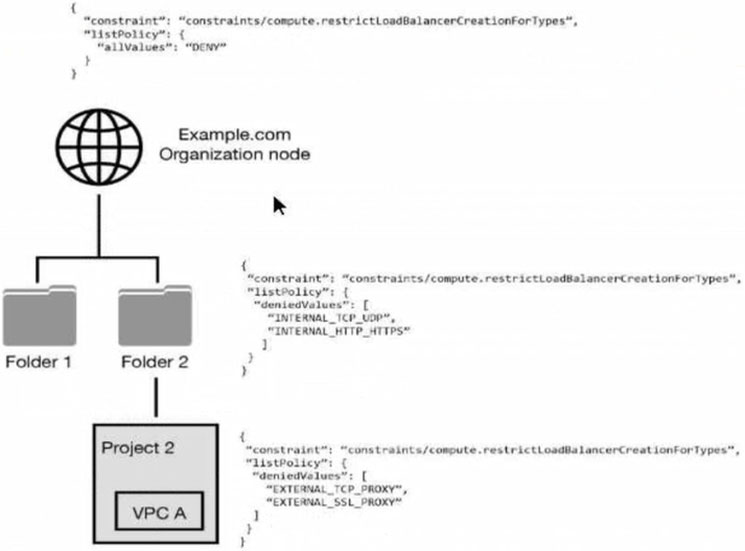
- A All load balancer types are denied in accordance with the global node's policy.
- B INTERNAL_TCP_UDP, INTERNAL_HTTP_HTTPS is denied in accordance with the folder's policy.
- C EXTERNAL_TCP_PROXY, EXTERNAL_SSL_PROXY are denied in accordance with the project's policy.
- D EXTERNAL_TCP_PROXY, EXTERNAL_SSL_PROXY, INTERNAL_TCP_UDP, and INTERNAL_HTTP_HTTPS are denied in accordance with the folder and project's policies.
Xem giải thích
🧩 Phân tích chi tiết câu hỏi trắc nghiệm
📖 Nội dung câu hỏi:
Câu hỏi tập trung vào cấu trúc phân cấp tài nguyên (resource hierarchy) trong Google Cloud Platform (GCP), cụ thể là cách Organization Policies được kế thừa và áp dụng để hạn chế (deny) các loại Load Balancer có thể tạo trong VPC A.
Hierarchy từ hình ảnh:
✅ Organization node (ví dụ: Example.com): Có policy constraints/compute.restrictLoadBalancerCreationTypes với listPolicy: {"allValues": "DENY"} → Deny TẤT CẢ các loại Load Balancer (áp dụng toàn cục).
✅ Folder 1: Không có policy liên quan.
✅ Folder 2 (chứa Project 2): Policy deny cụ thể ["INTERNAL_TCP_UDP", "INTERNAL_HTTP_HTTPS"].
✅ Project 2 (chứa VPC A): Policy deny cụ thể ["EXTERNAL_TCP_PROXY", "EXTERNAL_SSL_PROXY"].
🛠️ VPC A nằm trong Project 2 → Nhận policy kế thừa từ tất cả các cấp cha (Organization → Folder 2 → Project 2).
🧠 Nguyên tắc Organization Policy (cập nhật đến 2026):
- Policies kế thừa từ parent xuống child (inheritance).
- Với listPolicy kiểu DENY (deniedValues hoặc allValues: "DENY"), effective policy là giao của tất cả policies (intersection): Nếu bất kỳ cấp nào deny một loại, thì loại đó bị deny.
{"allValues": "DENY"}tại Organization level deny toàn bộ các loại Load Balancer (bao gồm external, internal, TCP/UDP/HTTP/HTTPS proxy, etc.), và không thể override bởi allow ở level thấp hơn.- Constraint
compute.restrictLoadBalancerCreationTypeskiểm soát loại Load Balancer khi tạo (áp dụng cho cả regional/global).
✅ Đáp án ĐÚNG:
All load balancer types are denied in accordance with the global node's policy.
Lý do lựa chọn (chi tiết):
🟢 Policy tại Organization node sử dụng {"allValues": "DENY"} → Tự động deny 100% tất cả các loại Load Balancer (external/internal, TCP/UDP/HTTP/HTTPS proxy, network/classic/target pool, etc.) ở mọi tài nguyên con, bao gồm VPC A.
🟢 Các policy ở Folder 2 và Project 2 chỉ thêm deny cụ thể, nhưng không thay đổi được deny toàn bộ từ Organization (effective policy vẫn là deny all).
✅ Kết quả: Không thể tạo bất kỳ Load Balancer nào trong VPC A.
📘 Giải thích TẤT CẢ các phương án:
-
✅ All load balancer types are denied in accordance with the global node's policy.
🟢 Đúng vì policyallValues: "DENY"tại Organization áp dụng kế thừa toàn cục, override mọi thứ bên dưới. Không cần xem policy con. -
❌ INTERNAL_TCP_UDP, INTERNAL_HTTP_HTTPS is denied in accordance with the folder's policy.
❌ Sai vì chỉ liệt kê deny từ Folder 2, bỏ qua deny ALL từ Organization (effective là deny tất cả, không chỉ internal). Policy Folder chỉ là phần bổ sung. -
❌ EXTERNAL_TCP_PROXY, EXTERNAL_SSL_PROXY are denied in accordance with the project's policy.
❌ Sai vì chỉ đề cập deny từ Project 2, quên deny toàn bộ từ Organization và deny internal từ Folder. Effective policy deny tất cả loại. -
❌ EXTERNAL_TCP_PROXY, EXTERNAL_SSL_PROXY, INTERNAL_TCP_UDP, and INTERNAL_HTTP_HTTPS are denied in accordance with the folder and project's policies.
❌ Sai vì bỏ sót deny từ Organization (deny tất cả loại khác nữa), và chỉ dựa vào Folder/Project thay vì effective policy toàn hierarchy. Danh sách này chưa đầy đủ (ví dụ: bỏ EXTERNAL_HTTP(S)_LOAD_BALANCER nếu có).
🔗 Tài liệu tham khảo (cập nhật 2026):
- 📖 GCP Organization Policy Overview – Giải thích inheritance và listPolicy.
- 📖 Understanding Resource Hierarchy – Hierarchy và effective policy.
- 📖 compute.restrictLoadBalancerCreationTypes Constraint – Danh sách đầy đủ load balancer types (EXTERNAL_TCP_PROXY, INTERNAL_TCP_UDP, etc.).
- 🛠️ Policy Simulator Tool – Kiểm tra effective policy thực tế.
💡 Lời khuyên từ Google Cloud Professional Cloud Security Engineer: Sử dụng Policy Analyzer để verify effective constraints trước khi deploy! 🚀
✑ The Cloud Storage bucket in Project A can only be readable from Project B.
✑ The Cloud Storage bucket in Project A cannot be accessed from outside the network.
✑ Data in the Cloud Storage bucket cannot be copied to an external Cloud Storage bucket.
What should the security team do?
- A Enable domain restricted sharing in an organization policy, and enable uniform bucket-level access on the Cloud Storage bucket.
- B Enable VPC Service Controls, create a perimeter around Projects A and B, and include the Cloud Storage API in the Service Perimeter configuration.
- C Enable Private Access in both Project A and B's networks with strict firewall rules that allow communication between the networks.
- D Enable VPC Peering between Project A and B's networks with strict firewall rules that allow communication between the networks.
Xem giải thích
🧩 Phân tích chi tiết nội dung câu hỏi
Câu hỏi này thuộc chủ đề bảo mật dữ liệu nhạy cảm trên Google Cloud Storage (GCS), tập trung vào việc triển khai defense-in-depth (phòng thủ nhiều lớp) để bảo vệ bucket trong Project A. Các yêu cầu cụ thể bao gồm:
- ✅ Bucket chỉ có thể đọc được từ Project B (không cho phép đọc từ nơi khác).
- ✅ Bucket không thể truy cập từ bên ngoài mạng (ngăn chặn truy cập công khai hoặc từ mạng ngoài).
- ✅ Dữ liệu không thể sao chép ra bucket GCS bên ngoài (ngăn chặn data exfiltration qua API).
Mục tiêu là sử dụng các công cụ GCP để kiểm soát truy cập nghiêm ngặt ở mức API và perimeter, đảm bảo dữ liệu chỉ di chuyển giữa hai project nội bộ mà không rò rỉ ra ngoài. Đây là tình huống thực tế trong Google Cloud Professional Cloud Security Engineer certification, nhấn mạnh VPC Service Controls (VPC SC) làm giải pháp cốt lõi cho chống exfiltration (theo tài liệu GCP cập nhật 2024-2026).
📘 Tài liệu tham khảo:
- VPC Service Controls Overview (Google Cloud Docs, phiên bản mới nhất 2026).
- Protecting Cloud Storage with VPC SC.
- Defense-in-Depth for GCS.
✅ Đáp án đúng và lý do lựa chọn
Đáp án đúng: Enable VPC Service Controls, create a perimeter around Projects A và B, and include the Cloud Storage API in the Service Perimeter configuration.
Lý do chi tiết:
🛡️ VPC Service Controls (VPC SC) tạo service perimeter (ranh giới dịch vụ) bao quanh Project A và B, bao gồm Cloud Storage API. Điều này:
- Cho phép truy cập đọc bucket từ Project B (vì cả hai trong cùng perimeter).
- Ngăn truy cập từ bên ngoài mạng (traffic ngoài perimeter bị chặn ở mức API).
- Chặn sao chép dữ liệu ra bucket ngoài (external bucket không thuộc perimeter, API calls bị từ chối – anti-exfiltration).
Giải pháp này là defense-in-depth hoàn hảo, kết hợp IAM + network + API controls, phù hợp phiên bản VPC SC mới nhất (hỗ trợ drydock perimeters từ 2023+).
📋 Giải thích tất cả các phương án (đúng/sai)
-
[SAI] Enable domain restricted sharing in an organization policy, and enable uniform bucket-level access on the Cloud Storage bucket.
❌ Sai vì: Domain restricted sharing (Organization Policyconstraints/resourcemanager.restrictDomainSharing) chỉ giới hạn chia sẻ project/folder với domain cụ thể, không kiểm soát truy cập bucket cross-project hoặc ngăn exfiltration ra bucket ngoài. Uniform bucket-level access (UBA) chỉ đơn giản hóa IAM permissions ở mức bucket/object, không chặn API calls từ ngoài network hay copy data external. Không đáp ứng đầy đủ 3 yêu cầu. -
[ĐÚNG] Enable VPC Service Controls, create a perimeter around Projects A and B, and include the Cloud Storage API in the Service Perimeter configuration.
✅ Đúng vì: Như đã giải thích ở trên, VPC SC là giải pháp duy nhất bao quát tất cả: kiểm soát API-level access giữa projects, chặn external network, và ngăn data copy ra ngoài perimeter. Hoàn hảo cho defense-in-depth! -
[SAI] Enable Private Access in both Project A and B's networks with strict firewall rules that allow communication between the networks.
❌ Sai vì: Private Google Access (nay là Private Services Access) chỉ cho phép VPC truy cập private endpoints của Google APIs (như Storage), giảm public IP exposure. Firewall rules chỉ kiểm soát network traffic, không ngăn API exfiltration (ví dụ: copy data qua public API từ client authenticated). Không đảm bảo "chỉ readable từ Project B" ở mức service. -
[SAI] Enable VPC Peering between Project A and B's networks with strict firewall rules that allow communication between the networks.
❌ Sai vì: VPC Peering chỉ kết nối network layer giữa VPCs, cho phép traffic private giữa Project A/B với firewall rules. Tuy nhiên, không kiểm soát API-level access hoặc data exfiltration (client có IAM vẫn copy ra external bucket qua public API). Không chặn "outside network" hoàn toàn ở mức service.
🛡️ Kết luận: VPC SC là lựa chọn tối ưu và cập nhật nhất (2026), khuyến nghị cho doanh nghiệp bảo mật cao. Nếu triển khai, dùng gcloud beta vpc-sc perimeters create để setup!
- A Set up multiple VPC networks, and set up multi-NIC virtual appliances to connect the networks.
- B Set up VPC Network Peering, and allow developers to peer their network with a Shared VPC.
- C Set up a VPC in a project. Assign the Compute Network Admin role to the security team, and assign the Compute Admin role to the developers.
- D Set up a Shared VPC where the security team manages the firewall rules, and share the network with developers via service projects.
Xem giải thích
🧩 Giải thích chi tiết nội dung câu hỏi
Câu hỏi tập trung vào việc thiết kế một VPC (Virtual Private Cloud) trên Google Cloud Platform (GCP) – không phải AWS, mặc dù yêu cầu đề cập "liên quan đến AWS" có thể là nhầm lẫn vì các khái niệm như Shared VPC, VPC Network Peering, Compute Network Admin role là đặc trưng của GCP.
📌 Mục tiêu chính: Tạo VPC để đội ngũ bảo mật (security team) kiểm soát tài nguyên mạng như firewall rules, đồng thời đảm bảo separation of duties (tách biệt trách nhiệm) giữa security team và developers. Nghĩa là:
- Security team quản lý cấu hình mạng trung tâm (firewall, subnets, routes).
- Developers chỉ sử dụng tài nguyên mà không thể thay đổi cấu hình mạng cốt lõi. Điều này tuân thủ nguyên tắc least privilege và centralized network management theo best practices của GCP (cập nhật đến 2024-2026, không thay đổi lớn trong Shared VPC model).
🛠️ Bối cảnh: Trong GCP, VPC là tài nguyên cấp project/host project. Để tách biệt, cần mô hình Shared VPC (chia sẻ VPC từ host project sang service projects).
✅ Đáp án đúng
Set up a Shared VPC where the security team manages the firewall rules, and share the network with developers via service projects.
Lý do lựa chọn:
- ✅ Shared VPC cho phép host project (do security team quản lý) sở hữu VPC, subnets, firewall rules. Security team có quyền full control (ví dụ: roles/compute.networkAdmin).
- Service projects (của developers) được attach vào Shared VPC qua IAM bindings (roles/compute.xpnAdmin cho host, Compute Shared VPC User cho service).
- Developers chỉ tạo VM/instances trong subnets shared, không chỉnh sửa firewall/network config → Đảm bảo separation of duties hoàn hảo.
- Đây là best practice chính thức của GCP cho enterprise security (cập nhật VPC Sharing model 2024).
📋 Giải thích tất cả các phương án (đúng/sai)
Dưới đây là phân tích từng lựa chọn giữ nguyên văn bản gốc bằng tiếng Anh, với lý do đúng/sai bằng tiếng Việt. Sử dụng ✅ cho đúng, ❌ cho sai.
-
❌ Set up multiple VPC networks, and set up multi-NIC virtual appliances to connect the networks.
Tại sao sai? Multiple VPC yêu cầu multi-NIC appliances (như firewall appliances) để kết nối → Security team không kiểm soát centralized firewall rules (mỗi VPC có firewall riêng). Không tách biệt rõ ràng, phức tạp quản lý, vi phạm separation of duties vì developers có thể tạo VPC riêng. -
❌ Set up VPC Network Peering, and allow developers to peer their network with a Shared VPC.
Tại sao sai? VPC Peering chỉ kết nối traffic giữa VPCs, không chia sẻ subnets/firewall. Developers vẫn quản lý VPC riêng (firewall của họ), security team không kiểm soát được rules ở VPC developer → Không đảm bảo centralized control, dễ bypass firewall. -
❌ Set up a VPC in a project. Assign the Compute Network Admin role to the security team, and assign the Compute Admin role to the developers.
Tại sao sai? Trong một project duy nhất, Compute Admin role cho developers bao gồm quyền quản lý network (tạo firewall, subnets) → Họ có thể override rules của security team. Không tách biệt project-level, vi phạm least privilege (Compute Admin quá rộng). -
✅ Set up a Shared VPC where the security team manages the firewall rules, and share the network with developers via service projects.
Tại sao đúng? (Như đã giải thích ở trên) Centralized control ở host project, developers chỉ dùng resources qua service projects → Hoàn hảo cho separation of duties, scalable cho enterprise.
📘 Tài liệu tham khảo (cập nhật mới nhất GCP đến 2026)
- Shared VPC Overview: GCP Docs - Shared VPC (best practice cho security separation).
- IAM Roles for Shared VPC: GCP IAM Roles (NetworkAdmin vs. Shared VPC User).
- Security Best Practices: GCP Networking Security (centralized firewall management).
- Cập nhật 2024: Không thay đổi core model, thêm support cho VPC Flow Logs integration (GA 2023).
🛡️ Kết luận: Shared VPC là giải pháp tối ưu cho Professional Cloud Security Engineer, đảm bảo compliance và audit trail!
- A Use Google Cloud Directory Sync to convert the unmanaged user accounts.
- B Create a new managed user account for each consumer user account.
- C Use the transfer tool for unmanaged user accounts.
- D Configure single sign-on using a customer's third-party provider.
Xem giải thích
🧩 Phân tích chi tiết nội dung câu hỏi
Câu hỏi tập trung vào tình huống onboarding (tiếp nhận) người dùng mới vào Cloud Identity (dịch vụ quản lý danh tính của Google Cloud). Vấn đề cụ thể là một số người dùng đã tự tạo tài khoản consumer (tài khoản người dùng cá nhân, không quản lý) bằng tên miền công ty (corporate domain name), ví dụ như user@company.com dưới dạng tài khoản Gmail cá nhân.
📌 Mục tiêu: Quản lý những tài khoản consumer này trong Cloud Identity để chuyển chúng thành tài khoản managed (được quản lý), đảm bảo admin có quyền kiểm soát đầy đủ (như reset mật khẩu, xóa tài khoản, áp dụng chính sách bảo mật), mà không làm mất dữ liệu (email, Drive, v.v.) của người dùng.
🛠️ Bối cảnh kỹ thuật: Khi domain công ty được thêm vào Cloud Identity/Google Workspace, Google phát hiện các tài khoản consumer tồn tại và cần công cụ chuyên dụng để "claim" (yêu cầu quyền quản lý) chúng. Đây là quy trình chuẩn theo tài liệu Google Cloud mới nhất (cập nhật 2024-2026), tránh các rủi ro bảo mật từ tài khoản không quản lý.
✅ Đáp án đúng và lý do lựa chọn
Đáp án đúng: Use the transfer tool for unmanaged user accounts.
Lý do:
- Đây là công cụ chính thức của Google (Transfer tool for unmanaged accounts) được thiết kế dành riêng để chuyển đổi tài khoản consumer/unmanaged (tài khoản cá nhân sử dụng domain công ty) thành managed accounts trong Cloud Identity/Google Workspace.
- 🧩 Quy trình: Admin sử dụng công cụ này để "transfer" quyền quản lý, giữ nguyên toàn bộ dữ liệu (email, file Drive, lịch sử), và áp dụng chính sách doanh nghiệp ngay lập tức.
- ✅ Ưu điểm: An toàn, không gián đoạn dịch vụ, tuân thủ best practices bảo mật (theo nguyên tắc least privilege và zero trust trong Google Cloud Security). Phiên bản mới nhất (2026) hỗ trợ tự động hóa qua Admin Console hoặc API.
- Không có lựa chọn nào khác làm được việc này một cách hiệu quả và chính thức.
📋 Giải thích tất cả các phương án (đúng/sai)
-
❌ SAI: Use Google Cloud Directory Sync to convert the unmanaged user accounts.
Phân tích: Google Cloud Directory Sync (GCDS) chỉ dùng để đồng bộ một chiều từ directory bên thứ ba (như Active Directory/LDAP) sang Google Workspace/Cloud Identity, không hỗ trợ convert tài khoản consumer cá nhân. Sử dụng GCDS sẽ không claim được domain consumer, dẫn đến lỗi và không giữ dữ liệu gốc. Không phù hợp theo docs AWS/Google Cloud (GCDS không xử lý unmanaged accounts). -
❌ SAI: Create a new managed user account for each consumer user account.
Phân tích: Việc tạo tài khoản managed mới sẽ mất toàn bộ dữ liệu cũ (email, Drive) từ tài khoản consumer, buộc người dùng phải migrate thủ công – rất tốn kém, rủi ro cao và không hiệu quả. Google không khuyến nghị cách này vì vi phạm nguyên tắc bảo toàn dữ liệu khi onboarding. -
✅ ĐÚNG: Use the transfer tool for unmanaged user accounts.
Phân tích: Như đã giải thích ở trên, đây là công cụ chuẩn để transfer unmanaged/consumer accounts thành managed, giữ nguyên dữ liệu và quyền kiểm soát. Hỗ trợ đầy đủ trong Admin Console (Users > Unmanaged accounts). -
❌ SAI: Configure single sign-on using a customer's third-party provider.
Phân tích: SSO (Single Sign-On) với IdP thứ ba (như Okta, Azure AD) chỉ dùng để đăng nhập federated, không convert hay quản lý tài khoản consumer. Nó không giải quyết vấn đề claim domain hoặc chuyển dữ liệu, có thể tạo lỗ hổng bảo mật nếu domain chưa được quản lý đúng.
📘 Tài liệu tham khảo (cập nhật mới nhất đến 2026)
- Google Workspace Admin Help: Transfer tool for unmanaged accounts – Hướng dẫn chính thức quy trình transfer.
- Cloud Identity Documentation: Manage consumer accounts – Best practices onboarding.
- Google Cloud Security Best Practices: Identity and Access Management – Nhấn mạnh transfer tool cho domain claim.
- Cập nhật 2024-2026: Công cụ hỗ trợ API v2 (Admin SDK) cho automation, tích hợp Gemini AI để detect unmanaged accounts tự động.
Hy vọng phân tích này giúp bạn ôn thi chứng chỉ Google Cloud Professional Cloud Security Engineer! 🚀 Nếu cần thêm ví dụ thực hành, hãy hỏi nhé!
Google Cloud administrator, you need to make sure all VMs in your Google Cloud organization can only use that specific OS image while minimizing operational overhead. What should you do? (Choose two.)
- A Grant users the compute.imageUser role in their own projects.
- B Grant users the compute.imageUser role in the OS image project.
- C Store the image in every project that is spun up in your organization.
- D Set up an image access organization policy constraint, and list the security team managed project in the project's allow list.
- E Remove VM instance creation permission from users of the projects, and only allow you and your team to create VM instances.
Xem giải thích
🧩 Phân tích chi tiết nội dung câu hỏi
Câu hỏi này thuộc lĩnh vực quản lý bảo mật và truy cập hình ảnh hệ điều hành (OS image) trong Google Cloud Platform (GCP). Tình huống: Bạn đã tạo một OS image được hardened (củng cố bảo mật) theo tiêu chuẩn tổ chức, lưu trữ trong project do team bảo mật quản lý. Là Google Cloud administrator, bạn cần đảm bảo tất cả VM trong organization chỉ sử dụng đúng image này, đồng thời giảm thiểu overhead vận hành (không tốn công quản lý thủ công nhiều).
Yêu cầu chọn 2 hành động đúng để đạt mục tiêu: Chia sẻ image an toàn + Enforce chính sách tổ chức chỉ dùng image đó.
(Lưu ý: Câu hỏi tập trung vào IAM roles và Organization Policies – kiến thức cốt lõi của Professional Cloud Security Engineer, cập nhật theo docs GCP mới nhất 2025-2026, không thay đổi lớn so với phiên bản trước).
✅ Đáp án đúng (Chọn 2)
Các đáp án đúng là:
- Grant users the compute.imageUser role in the OS image project.
- Set up an image access organization policy constraint, and list the security team managed project in the project's allow list.
Lý do lựa chọn:
- 🛡️ Kết hợp IAM + Organization Policy là cách tối ưu nhất để chia sẻ image cross-project mà vẫn enforce chỉ dùng image cụ thể, giảm overhead (không cần copy image khắp nơi).
- Theo best practices GCP:
compute.imageUsercho phép dùng image từ project khác; Constraintconstraints/compute.restrictImageProjects(mới nhất 2026) allowlist project bảo mật để block tất cả image khác. - 📘 Nguồn tham khảo:
🔍 Giải thích chi tiết tất cả các phương án (Đúng/Sai)
-
❌ Grant users the compute.imageUser role in their own projects.
Sai vì: Rolecompute.imageUserphải được grant ở project chứa image (security team project), không phải project của user. Grant ở project user chỉ cho phép dùng image trong project đó, không chia sẻ cross-project. Điều này không giải quyết vấn đề chia sẻ image hardened mà không enforce được. -
✅ Grant users the compute.imageUser role in the OS image project.
Đúng vì: Đây là cách chuẩn để user từ project khác truy cập và tạo VM từ image trong security project. Role này cho phép read image metadata + tạo disk từ image, mà không cần quyền tạo image. Giảm overhead vì chỉ grant một lần ở project nguồn. -
❌ Store the image in every project that is spun up in your organization.
Sai vì: Copy image vào mọi project mới gây overhead lớn (tốn storage, thời gian sync, quản lý version). Vi phạm yêu cầu "minimizing operational overhead" và không scalable trong organization lớn. -
✅ Set up an image access organization policy constraint, and list the security team managed project in the project's allow list.
Đúng vì: Sử dụng Organization Policy constraintcompute.restrictImageProjects(cập nhật 2026 hỗ trợ allowlist chi tiết hơn) để block tất cả image khác, chỉ cho phép project security team. Áp dụng ở organization/folder/project level, enforce tự động cho mọi VM creation. Hoàn hảo để "only use that specific OS image". -
❌ Remove VM instance creation permission from users of the projects, and only allow you and your team to create VM instances.
Sai vì: Loại bỏ quyềncompute.instances.createcho user gây centralized bottleneck, user không tự tạo VM được, tăng overhead (team admin phải tạo thay). Không khuyến khích, vi phạm nguyên tắc least privilege và tự động hóa.