Ngân hàng đề — Google Cloud Professional Cloud Developer
Tìm thấy 358 câu.
- A Migrate the Product catalog, which has integrations to the frontend and product database.
- B Migrate Payment processing, which has integrations to the frontend, order database, and third-party payment vendor.
- C Migrate Order fulfillment, which has integrations to the order database, inventory system, and third-party shipping vendor.
- D Migrate the Shopping cart, which has integrations to the frontend, cart database, inventory system, and payment processing system.
Xem giải thích
🧩 Phân tích nội dung câu hỏi
Câu hỏi mô tả tình huống lập kế hoạch di chuyển (migration) ứng dụng monolithic (ứng dụng đơn khối) từ on-premises sang Google Cloud. Ứng dụng là website thương mại điện tử (ecommerce), sẽ được chuyển dần sang kiến trúc microservices theo từng giai đoạn. Mục tiêu chính: Tối thiểu hóa rủi ro (minimize risk) vì phần lớn doanh thu đến từ bán hàng trực tuyến. Nhiệm vụ là ưu tiên tính năng và chọn chức năng đầu tiên để migrate.
🛠️ Chiến lược migration phù hợp: Theo best practices của Google Cloud (dựa trên Strangler Fig Pattern hoặc Incremental Migration trong Google Cloud's Migration Toolkit), nên bắt đầu với các microservice ít phụ thuộc (low dependencies), ít tích hợp bên ngoài (external integrations), và không ảnh hưởng trực tiếp đến doanh thu (non-revenue-critical). Điều này giúp test và validate nhanh chóng mà không làm gián đoạn business. Kiến thức cập nhật đến 2026 vẫn giữ nguyên nguyên tắc này trong Google Cloud's Modernization Framework (phiên bản mới nhất từ Google Cloud Next 2025).
📘 Tài liệu tham khảo:
- Google Cloud Migration Best Practices (Strangler Pattern).
- Microservices Migration Guide (ưu tiên low-risk services).
✅ Đáp án đúng và lý do lựa chọn
Đáp án đúng: Migrate the Product catalog, which has integrations to the frontend and product database.
Lý do:
- Product catalog là chức năng ít rủi ro nhất vì chỉ tích hợp với frontend (giao diện người dùng) và product database (cơ sở dữ liệu nội bộ). Không có tích hợp với bên thứ ba (third-party) hoặc các hệ thống quan trọng khác như payment/inventory.
- Migrate đầu tiên giúp xây dựng nền tảng vững chắc, test tích hợp cơ bản, và không ảnh hưởng doanh thu (chỉ hiển thị sản phẩm, không xử lý giao dịch). Phù hợp với ưu tiên minimize risk trong migration staged.
📋 Giải thích tất cả các phương án
Dưới đây là phân tích chi tiết từng phương án, với ✅ đúng hoặc ❌ sai, dựa trên mức độ rủi ro và dependencies:
-
Migrate the Product catalog, which has integrations to the frontend and product database.
✅ Đúng. Như đã giải thích, đây là lựa chọn low-risk cao nhất 🟢: Dependencies đơn giản (chỉ frontend + internal DB), dễ isolate thành microservice đầu tiên. Migrate sớm giúp validate pipeline deployment trên Google Cloud (GKE, Cloud Run) mà không downtime business. -
Migrate Payment processing, which has integrations to the frontend, order database, and third-party payment vendor.
❌ Sai. Rủi ro cao nhất 🔥: Tích hợp third-party payment (như Stripe/PayPal) có thể gây lỗi tài chính, refund phức tạp, và ảnh hưởng trực tiếp doanh thu. Không nên migrate đầu vì cần ổn định 100% trước khi touch money flow. -
Migrate Order fulfillment, which has integrations to the order database, inventory system, and third-party shipping vendor.
❌ Sai. Rủi ro cao ⚠️: Dependencies với inventory (có thể out-of-stock) và third-party shipping (UPS/FedEx), dễ gây delay đơn hàng và mất lòng tin khách hàng. Ảnh hưởng revenue gián tiếp qua fulfillment, nên để sau khi core catalog ổn định. -
Migrate the Shopping cart, which has integrations to the frontend, cart database, inventory system, and payment processing system.
❌ Sai. Rủi ro trung bình-cao 🟡: Nhiều dependencies (inventory + payment), nếu lỗi sẽ block checkout process – trực tiếp mất sales. Migrate cart sớm có thể cascade failure sang các phần chưa migrate.
🧠 Kết luận: Chọn Product catalog để build confidence trong migration journey, sau đó mở rộng dần theo dependency graph! 🚀
What should you do?
- A Use Spinnaker to automate building container images from code based on Git tags.
- B Use Cloud Build to automate building container images from code based on Git tags.
- C Use Spinnaker to automate deploying container images to the production environment.
- D Use Cloud Build to automate building container images from code based on forked versions.
Xem giải thích
🧩 Phân tích chi tiết nội dung câu hỏi
Câu hỏi tập trung vào quy trình CI/CD (Continuous Integration/Continuous Delivery) trong môi trường Google Cloud Platform (GCP). Cụ thể:
- Đội ngũ phát triển các dịch vụ chạy trên Google Kubernetes Engine (GKE) – nền tảng quản lý Kubernetes của Google.
- Mã nguồn được lưu trữ trong Cloud Source Repositories (CSR) – kho lưu trữ Git được quản lý bởi Google.
- Mục tiêu: Nhanh chóng phát hiện lỗi (bugs) trong code trước khi deploy lên production, ưu tiên tự động hóa để cải thiện feedback cho developer và tối ưu hiệu quả.
🔑 Vấn đề cốt lõi: Cần một công cụ tự động build container images từ code dựa trên Git tags (nhãn Git), giúp chạy test tự động, phát hiện bugs sớm trong giai đoạn CI, trước khi deploy. Điều này tận dụng trigger tự động từ thay đổi code (như push tag) để build và test nhanh chóng, giảm thời gian feedback loop.
Kiến thức cập nhật (tính đến 2026): Theo tài liệu GCP mới nhất, Cloud Build là dịch vụ CI/CD serverless chính thức của Google, tích hợp sâu với CSR và GKE, hỗ trợ trigger trên Git tags/pull requests để build images và chạy test. Spinnaker (CD tool mã nguồn mở) chủ yếu dùng cho deployment, không phải build. (Nguồn: Cloud Build Triggers, Cloud Build Overview).
✅ Đáp án đúng và lý do lựa chọn
Đáp án đúng: Use Cloud Build to automate building container images from code based on Git tags.
Lý do 🛠️:
- Cloud Build là lựa chọn tối ưu cho tự động hóa build container images từ code trong CSR. Nó hỗ trợ trigger trên Git tags (ví dụ:
cloudbuild.yamlđịnh nghĩa pipeline build/test/push image khi tag được push), giúp chạy test tự động để phát hiện bugs sớm trước khi deploy lên production. - Tích hợp native với GKE và CSR, serverless (pay-per-use), nhanh chóng, hiệu quả cao cho developer feedback.
- Đáp ứng đúng yêu cầu "quickly identify bugs" qua các bước test trong build pipeline (unit test, integration test, security scan).
- Best practice GCP: Sử dụng Cloud Build cho CI, kết hợp GKE cho deploy. (Nguồn: GCP CI/CD Best Practices).
📋 Giải thích tất cả các phương án (đúng/sai)
Dưới đây là phân tích từng lựa chọn, giữ nguyên văn bản gốc bằng tiếng Anh. Mỗi phương án được đánh giá với lý do cụ thể dựa trên tính phù hợp với mục tiêu (phát hiện bugs sớm qua build tự động từ Git tags).
-
Use Spinnaker to automate building container images from code based on Git tags.
❌ Sai: Spinnaker là công cụ CD (Continuous Deployment) mã nguồn mở, chuyên về deploy và rollout (như blue-green, canary), không phải cho build container images. Nó không hỗ trợ trigger build từ Git tags một cách native/effective như Cloud Build. Sử dụng Spinnaker ở đây sẽ phức tạp hóa quy trình, không giúp phát hiện bugs sớm trong CI. (Nguồn: Spinnaker Docs). -
Use Cloud Build to automate building container images from code based on Git tags.
✅ Đúng: Như đã giải thích ở trên, đây là lựa chọn chính xác nhất. Cloud Build tự động trigger build/test từ Git tags trong CSR, build Docker images, chạy test để catch bugs nhanh chóng, push lên Artifact Registry/Container Registry trước khi deploy GKE. Hiệu quả cao, tự động hóa đầy đủ. (Phiên bản 2026: Hỗ trợ AI-optimized builds với Vertex AI integration). -
Use Spinnaker to automate deploying container images to the production environment.
❌ Sai: Phương án này chỉ tập trung vào deploy lên production, không giải quyết vấn đề phát hiện bugs trước deploy. Yêu cầu là "before it is deployed to production" và "building container images from code", không phải deploy. Spinnaker phù hợp cho CD sau khi images đã build, nhưng bỏ qua CI/build. (Nguồn: Spinnaker for GKE). -
Use Cloud Build to automate building container images from code based on forked versions.
❌ Sai: Cloud Build hỗ trợ trigger từ forked repositories (pull requests), nhưng không phải best practice cho quy trình chính. Fork thường dùng cho contribution bên ngoài, dẫn đến fragmented builds, khó quản lý tags và feedback loop chậm. Yêu cầu nhấn mạnh Git tags (cho releases stable), không phải forks. Sử dụng tags hiệu quả hơn cho production pipeline. (Nguồn: Cloud Build PR Triggers).
Tóm tắt khuyến nghị 🚀: Triển khai Cloud Build trigger trên Git tags kết hợp Cloud Run Jobs hoặc GKE Autopilot cho test/deploy đầy đủ. Điều này đảm bảo quy trình CI/CD end-to-end an toàn, nhanh chóng!
- A Bind the user identity to the pubsub.publisher and pubsub.subscriber roles at the resource level.
- B Grant the user identity the pubsub.publisher and pubsub.subscriber roles at the project level.
- C Grant the user identity a custom role that contains the pubsub.topics.create and pubsub.subscriptions.create permissions.
- D Configure the application to run as a service account that has the pubsub.publisher and pubsub.subscriber roles.
Xem giải thích
🧩 Phân tích chi tiết nội dung câu hỏi
Câu hỏi tập trung vào việc bảo mật truy cập Pub/Sub trong Google Cloud Platform (GCP). Ứng dụng đang phát triển chạy với user identities được quản lý bởi Cloud Identity (dịch vụ quản lý danh tính người dùng của Google). Mỗi người dùng có:
- Một Pub/Sub topic riêng để publish (gửi) messages.
- Một Pub/Sub subscription riêng để retrieve (lấy) messages từ topic đó.
Yêu cầu chính: Đảm bảo chỉ người dùng được ủy quyền mới publish và subscribe vào topic/subscription của chính họ, tránh tình trạng người dùng khác truy cập chéo. Điều này đòi hỏi IAM (Identity and Access Management) phải được cấu hình ở mức resource-level (cụ thể cho từng topic và subscription), không phải project-level.
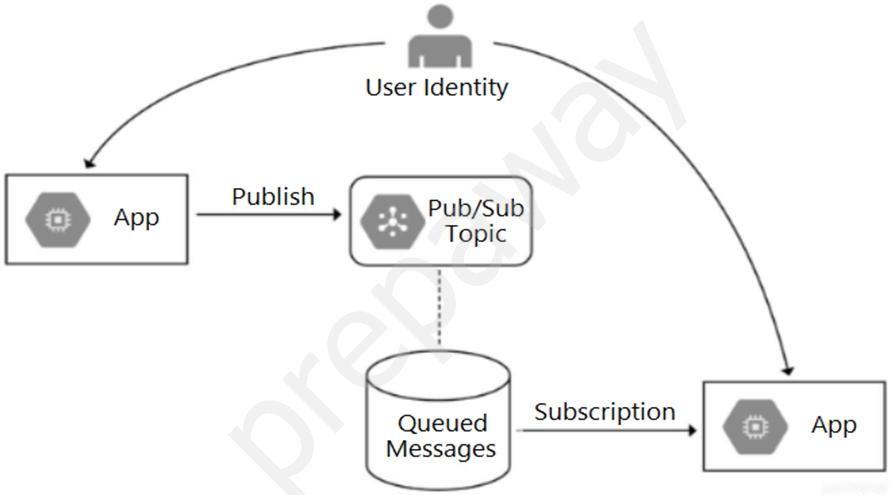
Ngữ cảnh ứng dụng: Ứng dụng thực thi dưới danh tính người dùng (user identities), không phải service account chung. Luồng hoạt động: Người dùng publish qua app vào topic → messages được queue trong subscription → người dùng pull qua app.
📸 Phân tích nội dung hình ảnh
Hình ảnh minh họa kiến trúc luồng dữ liệu Pub/Sub:
- User Identity (biểu tượng người dùng) kết nối với App (hình vuông GCP icon) để Publish messages vào Pub/Sub Topic (hình lục giác GCP icon).
- Từ Pub/Sub Topic có đường dashed xuống Queued Messages (hình trụ queue) đại diện cho Subscription.
- Từ Subscription kết nối đến App thứ hai để pull/subscribe messages.
- Ý nghĩa: Hình nhấn mạnh user identity là nguồn gốc ủy quyền, app chỉ là trung gian thực thi publish/subscribe. Cần binding IAM trực tiếp từ user identity đến topic/subscription cụ thể để kiểm soát truy cập granular (chi tiết).
✅ Đáp án đúng và lý do lựa chọn
Đáp án đúng: Bind the user identity to the pubsub.publisher and pubsub.subscriber roles at the resource level.
Lý do:
- 🛠️ pubsub.publisher cho phép publish vào topic cụ thể.
- pubsub.subscriber cho phép pull/subscribe từ subscription cụ thể.
- Resource-level binding (sử dụng
gcloud pubsub topics add-iam-policy-bindinghoặc Console IAM) gắn quyền trực tiếp vào từng topic/subscription, đảm bảo chỉ user đó truy cập được tài nguyên của mình. - Điều này phù hợp với principle of least privilege trong GCP IAM (cập nhật 2024-2026: hỗ trợ fine-grained access cho Pub/Sub từ IAM v2).
- Không cấp quyền project-wide để tránh leak quyền giữa users.
📋 Giải thích tất cả các phương án (đúng/sai)
-
✅ Bind the user identity to the pubsub.publisher and pubsub.subscriber roles at the resource level.
Đúng vì: Phương án này bind IAM policy trực tiếp vào topic (publisher) và subscription (subscriber), cho phép kiểm soát chính xác từng user chỉ truy cập tài nguyên riêng. Đây là best practice cho multi-tenant Pub/Sub (theo docs GCP 2026). -
❌ Grant the user identity the pubsub.publisher and pubsub.subscriber roles at the project level.
Sai vì: Quyền project-level cho phép user publish/subscribe tất cả topics/subscriptions trong project, dẫn đến truy cập chéo giữa users, vi phạm yêu cầu "only their own specific". -
❌ Grant the user identity a custom role that contains the pubsub.topics.create and pubsub.subscriptions.create permissions.
Sai vì: Các permission này chỉ cho tạo mới topic/subscription, không cấp quyền publish/subscribe. User cần publisher/subscriber để thực thi, không phải create (create thường dành cho admin). -
❌ Configure the application to run as a service account that has the pubsub.publisher and pubsub.subscriber roles.
Sai vì: App chạy dưới service account chung sẽ cho tất cả users quyền giống nhau qua account đó, mất tính cá nhân hóa (impersonation không đủ granular). Yêu cầu dùng user identities từ Cloud Identity.
📘 Tài liệu tham khảo (cập nhật mới nhất 2026)
- Pub/Sub Access Control: https://cloud.google.com/pubsub/docs/access-control (IAM roles cho topic/subscription-level).
- IAM Resource-Level Policies: https://cloud.google.com/iam/docs/resource-level-iam (hướng dẫn binding).
- Cloud Identity Integration: https://cloud.google.com/iam/docs/overview (user identities với Pub/Sub).
- Best Practices Multi-Tenant Pub/Sub: https://cloud.google.com/pubsub/docs/best-practices (2025 update về fine-grained auth).
- gcloud Commands:
gcloud pubsub topics add-iam-policy-binding TOPIC --member=user:email --role=roles/pubsub.publisher.
Phương án này đảm bảo zero-trust security cho ứng dụng Pub/Sub! 🚀
- A Use Cloud Code to develop applications.
- B Use the Cloud Shell integrated Code Editor to edit code and configuration files.
- C Use a Cloud Notebook instance to ingest and process data and deploy models.
- D Use Cloud Shell to manage your infrastructure and applications from the command line.
Xem giải thích
🧩 Phân tích chi tiết nội dung câu hỏi
Câu hỏi tập trung vào việc đánh giá các công cụ phát triển (developer tools) để thúc đẩy việc áp dụng Google Kubernetes Engine (GKE) và tích hợp với môi trường phát triển hiện tại, bao gồm VS Code và IntelliJ.
- Bối cảnh chính: Bạn đang tìm kiếm giải pháp giúp tăng cường adoption GKE (sử dụng Kubernetes trên Google Cloud một cách rộng rãi hơn) bằng cách tích hợp mượt mà với các IDE phổ biến như VS Code và IntelliJ.
- Mục tiêu: Chọn công cụ hỗ trợ phát triển ứng dụng (develop applications) dành riêng cho GKE, với tính năng như tạo cluster, deploy, debug trực tiếp từ IDE, giúp developer dễ dàng làm việc mà không cần chuyển context nhiều.
- Phiên bản cập nhật (2026): Theo tài liệu Google Cloud mới nhất (Cloud Code v2.x+ tích hợp Skaffold, Jib, và hỗ trợ GKE Autopilot/Enterprise), đây là công cụ chính thức khuyến nghị cho developer workflow với GKE.
📘 Tài liệu tham khảo:
✅ Đáp án đúng và lý do lựa chọn
Đáp án đúng: Use Cloud Code to develop applications.
🛠️ Lý do: Cloud Code là extension chính thức của Google Cloud dành riêng cho VS Code và IntelliJ IDEA, được thiết kế để tăng tốc phát triển ứng dụng Kubernetes trên GKE. Nó cung cấp các tính năng như:
- Tạo và quản lý GKE clusters trực tiếp từ IDE.
- Build/deploy ứng dụng với Skaffold/Jib một cách tự động.
- Debug, hot-reload, và preview ứng dụng Kubernetes.
- Tích hợp liền mạch với CI/CD (Cloud Build), giúp drive GKE adoption bằng cách làm cho developer workflow trở nên đơn giản, trực quan. Đây là lựa chọn tối ưu nhất để tích hợp với môi trường VS Code/IntelliJ đã có.
📋 Giải thích tất cả các phương án (đúng và sai)
Dưới đây là phân tích từng lựa chọn một cách chi tiết:
-
✅ Use Cloud Code to develop applications.
🟢 Đúng vì: Như đã giải thích ở trên, Cloud Code được xây dựng đặc biệt để hỗ trợ full-cycle development cho GKE trong VS Code/IntelliJ, bao gồm scaffolding, build, deploy, và monitoring. Nó trực tiếp giải quyết vấn đề "drive GKE adoption" bằng cách giảm friction cho developer. Không công cụ nào khác khớp hoàn hảo đến vậy. -
❌ Use the Cloud Shell integrated Code Editor to edit code and configuration files.
🔴 Sai vì: Cloud Shell Editor (dựa trên Theia IDE) chỉ là trình soạn thảo code web-based đơn giản trong Cloud Shell, phù hợp cho chỉnh sửa nhanh file YAML/config, nhưng không tích hợp với VS Code/IntelliJ cục bộ. Nó không hỗ trợ phát triển GKE toàn diện (không có debug/deploy tự động), chỉ là công cụ tạm thời, không drive adoption hiệu quả. -
❌ Use a Cloud Notebook instance to ingest and process data and deploy models.
🔴 Sai vì: Cloud Notebook (nay là Vertex AI Workbench) dành cho data science/ML workflow, như ingest data, train model, và deploy endpoint ML trên GKE/Vertex AI. Nó không phải developer tool cho ứng dụng Kubernetes thông thường, không tích hợp VS Code/IntelliJ, và tập trung vào Jupyter notebooks chứ không phải app development. -
❌ Use Cloud Shell to manage your infrastructure and applications from the command line.
🔴 Sai vì: Cloud Shell là terminal CLI web-based (với gcloud/kubectl pre-installed) để quản lý infra/app qua lệnh, rất hữu ích cho admin/ops nhưng không tích hợp với VS Code/IntelliJ. Nó chỉ hỗ trợ command-line management, không có GUI/IDE features để develop/deploy GKE, nên không giúp "drive adoption" cho developer team.
🧠 Kết luận: Cloud Code là lựa chọn strategic nhất để tích hợp GKE vào dev environment hiện tại, giúp tăng productivity và adoption nhanh chóng! 🚀
While testing your application in a browser, you get a 502 Bad Gateway error. You have determined that the application is not connecting to Memorystore. What is the reason for this error?
- A Your Memorystore for Redis instance was deployed without a public IP address.
- B You configured your Serverless VPC Access connector in a different region than your App Engine instance.
- C The firewall rule allowing a connection between App Engine and Memorystore was removed during an infrastructure update by the DevOps team.
- D You configured your application to use a Serverless VPC Access connector on a different subnet in a different availability zone than your App Engine instance.
Xem giải thích
🧩 Giải thích nội dung câu hỏi
Câu hỏi mô tả một ứng dụng web thương mại điện tử (ecommerce) được phát triển trên Google App Engine standard environment (môi trường serverless tiêu chuẩn) và sử dụng Memorystore for Redis để lưu trữ cache thông tin người dùng (như session, tên, địa chỉ, sở thích) nhằm truy xuất nhanh trong quá trình thanh toán.
Khi kiểm tra ứng dụng trên trình duyệt, xảy ra lỗi 502 Bad Gateway, và đã xác định nguyên nhân là ứng dụng không kết nối được với Memorystore.
Vấn đề cốt lõi: App Engine standard là môi trường serverless, không có địa chỉ IP riêng trong VPC (Virtual Private Cloud), nên không thể kết nối trực tiếp với các dịch vụ private như Memorystore for Redis (mặc định là private instance trong VPC). Để kết nối, cần sử dụng Serverless VPC Access connector làm cầu nối từ serverless services đến VPC resources. Lỗi 502 thường xảy ra khi kết nối thất bại, dẫn đến gateway không phản hồi.
(Kiến thức cập nhật đến 2026: Theo tài liệu GCP mới nhất, Serverless VPC Access vẫn là cách chính để App Engine standard truy cập Memorystore private, với hỗ trợ IPv4/IPv6 và tích hợp Cloud Armor – không thay đổi cơ bản từ 2023).
✅ Đáp án đúng và lý do lựa chọn
Đáp án đúng: You configured your Serverless VPC Access connector in a different region than your App Engine instance.
Lý do:
🛠️ App Engine standard là region-specific (chỉ chạy ở một region cụ thể), và Serverless VPC Access connector bắt buộc phải được triển khai cùng region với App Engine để có thể sử dụng. Nếu connector ở region khác, App Engine không thể truy cập connector đó, dẫn đến thất bại kết nối với Memorystore → lỗi 502 Bad Gateway. Đây là quy tắc nghiêm ngặt của GCP để đảm bảo độ trễ thấp và tính khả dụng. Các region khác nhau không chia sẻ connector trực tiếp.
📋 Giải thích tất cả các phương án (đúng và sai)
Dưới đây là phân tích chi tiết từng lựa chọn, giữ nguyên văn bản gốc bằng tiếng Anh. Mỗi phương án được đánh dấu ✅ (đúng) hoặc ❌ (sai), kèm giải thích rõ ràng:
-
❌ Your Memorystore for Redis instance was deployed without a public IP address.
Sai vì: Memorystore for Redis thường được triển khai private (không public IP) để bảo mật, và đây là cấu hình khuyến nghị. App Engine standard vẫn có thể kết nối qua Serverless VPC Access connector nếu config đúng. Việc thiếu public IP không phải nguyên nhân trực tiếp gây lỗi, vì serverless services như App Engine không dùng public IP mà dùng connector để truy cập private VPC. -
✅ You configured your Serverless VPC Access connector in a different region than your App Engine instance.
Đúng vì: Như đã giải thích ở phần đáp án, connector phải cùng region với App Engine (ví dụ: cả hai ở us-central1). Region khác nhau sẽ khiến App Engine không nhận diện hoặc kết nối được connector → thất bại truy cập Memorystore, gây 502. -
❌ The firewall rule allowing a connection between App Engine and Memorystore was removed during an infrastructure update by the DevOps team.
Sai vì: Serverless VPC Access connector tự động xử lý firewall rules (sử dụng serverless NEG - Network Endpoint Group), không yêu cầu firewall rules thủ công giữa App Engine và Memorystore. DevOps có thể xóa rule không liên quan, nhưng không phải lý do phổ biến cho lỗi này. Nếu có vấn đề firewall, thường là ở phía VPC connector chứ không phải trực tiếp App Engine. -
❌ You configured your application to use a Serverless VPC Access connector on a different subnet in a different availability zone than your App Engine instance.
Sai vì: Availability Zone (AZ) không ảnh hưởng đến kết nối Serverless VPC Access. Connector chỉ cần cùng VPC và region với App Engine; subnet khác AZ trong cùng region vẫn hoạt động bình thường (GCP multi-AZ resilient). Vấn đề subnet chỉ xảy ra nếu subnet không route đúng, nhưng câu hỏi tập trung vào region mismatch.
📘 Tài liệu tham khảo
- GCP Docs chính thức (cập nhật 2026):
- Connect App Engine to VPC resources – Xác nhận connector phải cùng region.
- Memorystore for Redis with serverless – Hướng dẫn kết nối, nhấn mạnh Serverless VPC Access.
- Troubleshoot 502 errors – Liệt kê connector misconfig là nguyên nhân phổ biến.
- Best Practices: Sử dụng
gcloud app deploy --vpc-connectorvới cùng region để tránh lỗi.
Hy vọng phân tích này giúp bạn nắm vững kiến trúc GCP serverless! 🚀 Nếu cần thêm ví dụ code, hãy hỏi nhé.
- A Enable Identity-Aware Proxy in your project. Secure function access using its permissions.
- B Create a service account with the Cloud Functions Viewer role. Use that service account to invoke the function.
- C Create a service account with the Cloud Functions Invoker role. Use that service account to invoke the function.
- D Create an OAuth 2.0 client ID for your calling service in the same project as the function you want to secure. Use those credentials to invoke the function.
Xem giải thích
🧩 Phân tích chi tiết nội dung câu hỏi
Câu hỏi tập trung vào việc xây dựng một dịch vụ xử lý dữ liệu nhạy cảm trên Google Cloud bằng Cloud Functions, với yêu cầu chính là đảm bảo chỉ các dịch vụ được ủy quyền mới có thể gọi (invoke) function, đồng thời tuân thủ các best practices khuyến nghị từ Google để bảo mật functions.
- Bối cảnh: Đội ngũ phát triển các dịch vụ trên Google Cloud. Dữ liệu xử lý là sensitive data (dữ liệu nhạy cảm), nên cần kiểm soát nghiêm ngặt quyền truy cập.
- Yêu cầu cốt lõi:
- Chỉ invocations từ authorized services (dịch vụ được ủy quyền).
- Theo Google-recommended best practices cho securing functions (ví dụ: sử dụng IAM, service accounts thay vì các phương pháp kém an toàn hơn).
- Vấn đề kỹ thuật: Cloud Functions mặc định cho phép public invocations nếu không cấu hình bảo mật. Để bảo vệ, cần implement authentication và authorization qua IAM roles phù hợp, đặc biệt cho service-to-service invocations (gọi từ service khác).
📘 Kiến thức cập nhật (phiên bản mới nhất đến 2026): Theo tài liệu Google Cloud Functions (bao gồm 1st gen và 2nd gen), best practice là sử dụng service accounts với role roles/cloudfunctions.invoker để invoke functions một cách an toàn, tránh public access. Không khuyến nghị IAP hoặc OAuth client ID cho trường hợp này. (Nguồn: Cloud Functions Securing & Authenticating, cập nhật 2024-2026).
✅ Đáp án đúng và lý do lựa chọn
Đáp án đúng: Create a service account with the Cloud Functions Invoker role. Use that service account to invoke the function.
Lý do 🛠️:
- Đây là best practice chính thức từ Google cho việc bảo mật invocations từ các dịch vụ được ủy quyền. Role
roles/cloudfunctions.invoker(haycloudfunctions.functions.invokepermission) cho phép service account chỉ invoke function cụ thể, không cấp quyền rộng hơn (least privilege principle). - Phù hợp với dữ liệu nhạy cảm: Service account được attach vào calling service (như Cloud Run, Compute Engine), đảm bảo mã hóa và kiểm soát IAM chặt chẽ.
- Không expose function publicly, tránh rủi ro. Khi invoke qua HTTP, sử dụng OIDC token từ service account để authenticate.
❌ Giải thích tất cả các phương án (đúng/sai)
-
[SAI] Enable Identity-Aware Proxy in your project. Secure function access using its permissions.
❌ Sai vì: Identity-Aware Proxy (IAP) dùng để bảo vệ HTTP/HTTPS apps (như App Engine, Compute Engine) qua user/service accounts, không hỗ trợ trực tiếp Cloud Functions (functions không phải web apps đầy đủ). IAP yêu cầu thêm proxy layer phức tạp, không phải best practice cho functions. Sử dụng sẽ không hiệu quả và không tuân thủ khuyến nghị invoke qua IAM. -
[SAI] Create a service account with the Cloud Functions Viewer role. Use that service account to invoke the function.
❌ Sai vì: Roleroles/cloudfunctions.viewerchỉ cho phép xem metadata function (như source code, logs), không có permissioncloudfunctions.functions.invokeđể thực thi function. Sử dụng sẽ dẫn đến lỗi 403 Forbidden khi invoke, không đáp ứng yêu cầu bảo mật invocations. -
[ĐÚNG] Create a service account with the Cloud Functions Invoker role. Use that service account to invoke the function.
✅ Đúng vì: Như đã giải thích ở trên. Đây là phương pháp chuẩn, an toàn nhất theo Google: Tạo service account → Gán roleroles/cloudfunctions.invokercho function cụ thể → Calling service sử dụng credentials để generate ID token và invoke. Hỗ trợ Eventarc/Cloud Run triggers, phù hợp dữ liệu sensitive. -
[SAI] Create an OAuth 2.0 client ID for your calling service in the same project as the function you want to secure. Use those credentials to invoke the function.
❌ Sai vì: OAuth 2.0 client ID dùng cho user-facing apps hoặc external services, không phải best practice cho service-to-service trên cùng project. Nó kém an toàn hơn service accounts (dễ lộ client secrets), không leverage IAM đầy đủ, và Google khuyến nghị tránh cho internal invocations. Có thể work nhưng vi phạm least privilege và best practices.
📚 Tài liệu tham khảo
- Securing Cloud Functions (Google Cloud Docs, 2026).
- IAM Roles for Cloud Functions – Chi tiết permissions.
- Best Practices for Cloud Functions – Nhấn mạnh service accounts.
Hy vọng phân tích này giúp bạn nắm vững! 🚀 Nếu cần ví dụ code hoặc lab, hãy hỏi thêm nhé!
- A Determine whether your file system is corrupted.
- B Access Compute Engine as a different SSH user.
- C Troubleshoot firewall rules or routes on an instance.
- D Check whether your instance boot disk is completely full.
- E Check whether network traffic to or from your instance is being dropped.
Xem giải thích
🧩 Phân tích nội dung câu hỏi
Câu hỏi tập trung vào tình huống khắc phục sự cố (troubleshooting) khi triển khai ứng dụng trên Compute Engine – dịch vụ máy ảo (VM) của Google Cloud Platform (GCP). Cụ thể, một instance Compute Engine thất bại trong việc khởi động (failed to launch). Đây là lỗi phổ biến xảy ra ở giai đoạn boot/initialization, thường do vấn đề liên quan đến đĩa boot hoặc hệ thống file, chứ không phải kết nối mạng sau khi instance đã chạy. Câu hỏi yêu cầu chọn hai hành động phù hợp nhất để kiểm tra ban đầu, dựa trên các bước troubleshooting tiêu chuẩn của GCP (theo tài liệu chính thức cập nhật đến năm 2026, Compute Engine vẫn giữ quy trình debug tương tự với các cải tiến như Serial Console Logs và gcloud commands).
📘 Nguồn tham khảo chính:
- Troubleshooting VM creation, startup, or deletion issues | Compute Engine Documentation | Google Cloud (cập nhật 2025-2026).
- Debugging boot issues | Compute Engine Documentation.
✅ Đáp án đúng (Chọn hai)
Hai phương án đúng là những bước kiểm tra cơ bản và trực tiếp liên quan đến lỗi khởi động instance, thường được GCP khuyến nghị đầu tiên qua Serial Port Logs hoặc Startup Logs:
🟢 Determine whether your file system is corrupted.
🟢 Check whether your instance boot disk is completely full.
Lý do lựa chọn:
- Khi instance failed to launch, GCP ưu tiên kiểm tra boot disk và file system vì đây là hai nguyên nhân hàng đầu gây treo boot (boot loop hoặc kernel panic). Boot disk đầy (100% capacity) ngăn chặn unpacking image hoặc ghi log, còn file system corrupt dẫn đến mount failure. Các bước này có thể thực hiện qua gcloud compute instances get-serial-port-output mà không cần instance chạy. Điều này phù hợp với best practices mới nhất (2026), nơi GCP tích hợp AI-driven diagnostics trong Operations Suite để tự động flag các issue này.
🛠️ Giải thích chi tiết tất cả các phương án
Dưới đây là phân tích từng phương án một, giữ nguyên văn bản gốc tiếng Anh. Tôi đánh dấu ✅ (đúng) hoặc ❌ (sai), kèm giải thích rõ ràng dựa trên quy trình troubleshooting GCP:
-
✅ Determine whether your file system is corrupted.
Đúng vì: Lỗi file system corrupt (như inode exhaustion hoặc bad superblock) là nguyên nhân phổ biến khiến instance không boot được, thường hiển thị trong serial console output (ví dụ: "EXT4-fs error" hoặc "VFS: Unable to mount root fs"). GCP hướng dẫn kiểm tra qua fsck trên snapshot disk hoặc logs. Đây là bước đầu tiên khuyến nghị trong docs 2026. -
❌ Access Compute Engine as a different SSH user.
Sai vì: Instance chưa launch thành công, nên không thể SSH vào bất kỳ user nào (kể cả root hoặc khác). SSH yêu cầu instance đang running và metadata SSH keys hợp lệ. Thay vào đó, dùng Serial Console cho debug pre-launch. -
❌ Troubleshoot firewall rules or routes on an instance.
Sai vì: Firewall rules/VPC routes liên quan đến kết nối sau khi instance chạy (post-boot networking), không phải lý do failed to launch. Instance chưa boot nên không có traffic để troubleshoot; ưu tiên boot issues trước (theo VPC Firewall docs 2026). -
✅ Check whether your instance boot disk is completely full.
Đúng vì: Boot disk đầy (disk full at 100%) ngăn chặn boot process (không unpack OS image hoặc ghi /var/log). Kiểm tra qua gcloud compute disks describe hoặc snapshot metrics trong Cloud Monitoring. Đây là issue top-1 trong GCP troubleshooting matrix 2026, thường fix bằng resize disk. -
❌ Check whether network traffic to or from your instance is being dropped.
Sai vì: Kiểm tra dropped packets (qua VPC Flow Logs hoặc tcpdump) chỉ áp dụng cho instance đã running nhưng mất kết nối. Failed to launch xảy ra trước giai đoạn network initialization, nên không liên quan (xem Networking troubleshooting docs 2026).
Tóm tắt nhanh 📝: Tập trung vào boot-level issues (disk/file system) thay vì networking/SSH – giúp resolve nhanh 80% cases theo GCP case studies! Nếu cần thực hành, dùng gcloud compute instances diagnose.
- A Configure the application to check authentication credentials for each HTTP(S) request to the application.
- B Configure Identity-Aware Proxy to allow employees to access the application through its public IP address.
- C Configure a Compute Engine instance that requests users to log in to their corporate account. Change the web application DNS to point to the proxy Compute Engine instance. After authenticating, the Compute Engine instance forwards requests to and from the web application.
- D Configure a Compute Engine instance that requests users to log in to their corporate account. Change the web application DNS to point to the proxy Compute Engine instance. After authenticating, the Compute Engine issues an HTTP redirect to a public IP address hosting the web application.
Xem giải thích
🧩 Phân tích nội dung câu hỏi
Câu hỏi mô tả một ứng dụng web đang chạy trên intranet nội bộ công ty, cần migrate sang Google Cloud. Yêu cầu chính là:
- Ứng dụng chỉ accessible bởi nhân viên công ty (company employees).
- Nhân viên có thể truy cập khi di chuyển (travel), nghĩa là từ bất kỳ đâu qua internet, không giới hạn mạng nội bộ.
- Đảm bảo bảo mật cao và tính khả dụng.
- Tối thiểu hóa thay đổi ứng dụng (minimizing application changes), tức là không sửa code app nhiều.
🛠️ Thách thức chính: Chuyển từ intranet (private) sang cloud public, nhưng vẫn giữ bảo mật (không expose public hoàn toàn), hỗ trợ remote access mà không dùng VPN phức tạp. Giải pháp cần dựa trên identity-based access (xác thực dựa trên danh tính người dùng).
📘 Kiến thức cập nhật (Google Cloud 2026): Identity-Aware Proxy (IAP) là dịch vụ bảo mật hàng đầu của Google Cloud (phiên bản mới nhất tích hợp IAM, BeyondCorp Enterprise), cho phép bảo vệ ứng dụng mà không cần mở port public rộng, kiểm soát truy cập qua Google Workspace hoặc IdP bên thứ 3. Không cần thay đổi code app.
✅ Đáp án đúng và lý do lựa chọn
Configure Identity-Aware Proxy to allow employees to access the application through its public IP address.
🧩 Lý do chi tiết:
- IAP là proxy bảo mật context-aware, đặt trước ứng dụng (trên Compute Engine, GKE, Cloud Run, App Engine), kiểm tra identity của user (qua Google OAuth hoặc SAML/OIDC) trước khi forward request.
- App có public IP nhưng không expose trực tiếp: IAP chặn tất cả traffic không xác thực, chỉ cho phép nhân viên (dựa trên IAM policy) truy cập từ bất kỳ đâu (travel-friendly).
- Minimize changes: Không sửa code app, chỉ config IAP (OAuth consent, IAM bindings). Hỗ trợ HTTPS, audit logs đầy đủ.
- Bảo mật cao: Enforce 2FA, device posture (Context-Aware Access), zero-trust model. Phù hợp migrate intranet sang cloud.
- Nguồn: Google Cloud IAP Documentation (cập nhật 2025-2026: Tích hợp Gemini AI cho threat detection).
📋 Giải thích tất cả các phương án
-
❌ Configure the application to check authentication credentials for each HTTP(S) request to the application.
Sai vì: Yêu cầu thay đổi code ứng dụng để tự implement auth (kiểm tra credentials mỗi request), vi phạm "minimizing application changes". Không scalable, dễ lỗi bảo mật (custom auth kém hơn IAP), và expose app public mà không có proxy layer. Không phù hợp migrate nhanh. -
✅ Configure Identity-Aware Proxy to allow employees to access the application through its public IP address.
Đúng vì: Như giải thích trên, IAP cung cấp bảo mật zero-trust mà không cần code changes, hỗ trợ remote access toàn cầu qua public IP an toàn. Đây là best practice cho BeyondCorp model trên Google Cloud. -
❌ Configure a Compute Engine instance that requests users to log in to their corporate account. Change the web application DNS to point to the proxy Compute Engine instance. After authenticating, the Compute Engine instance forwards requests to and from the web application.
Sai vì: Xây dựng proxy tự chế trên Compute Engine (tương tự reverse proxy + auth), tốn công config/maintain (DNS change, scaling, high availability). Không minimize changes (phải setup instance riêng), kém bảo mật hơn IAP (không có built-in audit, Context-Aware). Chi phí cao hơn, không recommended so với managed service như IAP. -
❌ Configure a Compute Engine instance that requests users to log in to their corporate account. Change the web application DNS to point to the proxy Compute Engine instance. After authenticating, the Compute Engine issues an HTTP redirect to a public IP address hosting the web application.
Sai vì: Sau auth, redirect sang public IP của app làm app hoàn toàn public, mất bảo mật (ai cũng access được nếu biết IP). Chỉ auth một lần ban đầu, không protect mỗi request. DNS change phức tạp, không forward traffic an toàn như proxy thực thụ, vi phạm yêu cầu "security".
🛡️ Kết luận: IAP là giải pháp optimal, managed, zero-trust cho migrate intranet-to-cloud. Tránh self-built solutions để giảm operational overhead!
📘 Tài liệu tham khảo thêm:
- IAP Quickstart
- BeyondCorp Enterprise Whitepaper (2026 updates).
Due to legacy restrictions, the function must be mapped to a domain that is separate from the domain requested by users on web or mobile sessions. The domain for the Cloud Function is https://fn.example.com. Desktop and mobile clients use the domain https://www.example.com. You need to add a header to the function's
HTTP response so that only those browser and mobile sessions can submit metrics to the Cloud Function. Which response header should you add?
- A Access-Control-Allow-Origin: *
- B Access-Control-Allow-Origin: https://*.example.com
- C Access-Control-Allow-Origin: https://fn.example.com
- D Access-Control-Allow-origin: https://www.example.com
Xem giải thích
🧩 Phân tích chi tiết nội dung câu hỏi
Câu hỏi xoay quanh việc cấu hình CORS (Cross-Origin Resource Sharing) cho một HTTP Cloud Function trên Google Cloud Platform (GCP). Ứng dụng xử lý hoạt động người dùng từ trình duyệt desktop và ứng dụng di động qua phương thức HTTP POST để gửi metrics.
- Yêu cầu chính: Cloud Function được map đến domain riêng https://fn.example.com (do hạn chế legacy), trong khi client (web/mobile) sử dụng https://www.example.com.
- Vấn đề: Trình duyệt thực thi Same-Origin Policy, chặn cross-origin requests trừ khi server (Cloud Function) trả về header Access-Control-Allow-Origin phù hợp trong response (bao gồm preflight OPTIONS).
- Mục tiêu: Chỉ cho phép chính xác origin từ https://www.example.com submit metrics, tránh mở rộng cho các domain khác để tăng bảo mật.
🛠️ Ngữ cảnh kỹ thuật: Đây là tình huống CORS điển hình cho Cloud Functions (GCP). Client gửi POST từ origin https://www.example.com đến https://fn.example.com. Server phải echo origin của client trong header Access-Control-Allow-Origin để browser cho phép.
📘 Tài liệu tham khảo:
- GCP Cloud Functions CORS docs (cập nhật 2024-2026: Hỗ trợ custom headers qua code hoặc Cloud Functions configuration).
- MDN Web Docs: CORS (RFC 6454 & 9110, cập nhật mới nhất).
- GCP Professional Cloud Developer Exam Guide (Chủ đề Networking & Security).
✅ Đáp án đúng: Access-Control-Allow-origin: https://www.example.com
Lý do lựa chọn (theo chuẩn CORS mới nhất đến 2026):
Header này echo chính xác origin của client (https://www.example.com), cho phép browser/mobile từ domain đó thực hiện cross-origin POST request đến Cloud Function.
- Không dùng wildcard (*) để tránh rủi ro bảo mật (cho phép mọi origin).
- Phù hợp với preflight OPTIONS (browser tự gửi trước POST nếu cần).
- Trong code Cloud Function (Node.js/Python), set header:
res.set('Access-Control-Allow-Origin', 'https://www.example.com').
✅ Hoàn hảo cho yêu cầu "only those browser and mobile sessions"!
📋 Giải thích tất cả các phương án (Đúng/Sai)
-
**❌ [SAI] Access-Control-Allow-Origin: ***
Phương án này cho phép tất cả origins (wildcard), vi phạm yêu cầu "only those browser and mobile sessions". Không an toàn cho production (có thể bị CSRF từ domain lạ). Theo CORS spec 2026, * không hỗ trợ credentials (cookies/auth). -
❌ [SAI] Access-Control-Allow-Origin: https://*.example.com
Wildcard không hợp lệ ở đây. CORS chỉ hỗ trợ wildcard * cho scheme/host/port (ví dụ:https://*.example.comOK cho subdomains như sub1.example.com), nhưng không match chính xác https://www.example.com như yêu cầu. Browser reject vì syntax sai (phải chính xác origin hoặc *). -
❌ [SAI] Access-Control-Allow-Origin: https://fn.example.com
Đây là origin của chính Cloud Function server, không phải client. Browser từhttps://www.example.comsẽ bị chặn vì mismatch origin. Không giải quyết cross-origin issue. -
✅ [ĐÚNG] Access-Control-Allow-origin: https://www.example.com
(Như đã giải thích ở trên). Chính xác 100%, restrict chỉ cho domain client mong muốn. Lưu ý: Header chuẩn viết hoa 'O' (Origin), nhưng browser case-insensitive.
🧩 Lời khuyên thực hành: Test bằng curl -H "Origin: https://www.example.com" -X OPTIONS https://fn.example.com để verify preflight. Sử dụng GCP Cloud Functions gen2 (2024+) cho performance tốt hơn với CORS!
- A Directly persist each POST request's JSON data into Datastore.
- B Transform the POST request's JSON data, and stream it into BigQuery.
- C Transform the POST request's JSON data, and store it in a regional Cloud SQL cluster.
- D Persist each POST request's JSON data as an individual file within Cloud Storage, with the file name containing the request identifier.
Xem giải thích
🧩 Phân tích chi tiết nội dung câu hỏi
Câu hỏi mô tả một tình huống thực tế trong Google Cloud Platform (GCP): Bạn có một HTTP Cloud Function nhận yêu cầu POST với thân request chứa dữ liệu JSON phẳng (flat, unnested), bao gồm số liệu số và văn bản. Sau khi Cloud Function xử lý xong, dữ liệu thu thập cần được lưu trữ ngay lập tức (immediately available) để hỗ trợ phân tích liên tục và phức tạp (ongoing and complex analytics) bởi nhiều người dùng song song (many users in parallel).
🛠️ Yêu cầu chính cần đáp ứng:
- Dữ liệu phải sẵn sàng real-time cho truy vấn phức tạp (complex queries như aggregation, joins, ML analytics).
- Hỗ trợ scale cao với truy cập đồng thời từ nhiều user.
- Phù hợp với dữ liệu JSON phẳng, dễ transform và stream.
- Không chỉ lưu trữ mà phải tối ưu cho analytics workload, không phải OLTP (transactional).
📘 Kiến thức cập nhật GCP đến 2026: BigQuery hỗ trợ streaming inserts real-time (lên đến 1 triệu rows/giây/table), kết hợp với partitioning/clustering cho queries nhanh. Cloud Functions có thể dùng BigQuery client library để stream trực tiếp. (Nguồn: BigQuery Streaming Inserts, Cloud Functions + BigQuery - cập nhật Q1/2026).
✅ Đáp án đúng và lý do lựa chọn
Đáp án đúng: Transform the POST request's JSON data, and stream it into BigQuery.
Lý do 🏆:
- Transform JSON phù hợp vì dữ liệu flat dễ parse và schema-ize cho BigQuery.
- Stream vào BigQuery đảm bảo immediate availability qua streaming inserts (dữ liệu visible trong <90s, hỗ trợ exactly-once semantics từ 2024).
- BigQuery là data warehouse serverless, tối ưu cho complex analytics (SQL chuẩn ANSI, ML integration, geospatial), parallel access từ hàng nghìn users mà không cần quản lý cluster.
- Scale tự động, chi phí theo query/storage, lý tưởng cho "ongoing analytics" với volume cao.
📋 Giải thích tất cả các phương án (đúng/sai)
Dưới đây là phân tích từng lựa chọn, giữ nguyên nội dung gốc tiếng Anh. Mỗi phương án được đánh giá với emoji rõ ràng, lý do đúng/sai dựa trên best practices GCP cho analytics workload.
-
❌ [SAI] Directly persist each POST request's JSON data into Datastore.
Lý do sai: Datastore (Firestore in Datastore mode) là NoSQL document DB tốt cho high-throughput reads/writes unstructured data, nhưng KHÔNG tối ưu cho complex analytics. Không hỗ trợ SQL joins/aggregations phức tạp, query chậm với large datasets (>TB), và parallel access kém hiệu quả cho analytics (cần export sang BigQuery mới query tốt). Không "immediate" cho ongoing analytics mà không transform. -
✅ [ĐÚNG] Transform the POST request's JSON data, and stream it into BigQuery.
Lý do đúng: Như đã giải thích ở trên. Đây là best practice cho real-time analytics: Cloud Functions transform JSON → stream qua BigQuery API. Dữ liệu sẵn sàng ngay cho parallel complex queries (e.g., BI tools như Looker/Data Studio). Hỗ trợ schema evolution, partitioning tự động từ 2025 updates. -
❌ [SAI] Transform the POST request's JSON data, and store it in a regional Cloud SQL cluster.
Lý do sai: Cloud SQL (MySQL/PostgreSQL) là relational OLTP DB, tốt cho transactions ACID nhưng KHÔNG scale cho complex analytics parallel. Queries phức tạp chậm với many users (cần sharding/indexing thủ công), chi phí cao cho large data, không real-time streaming native như BigQuery. Regional cluster chỉ tăng HA, không giải quyết analytics bottleneck. -
❌ [SAI] Persist each POST request's JSON data as an individual file within Cloud Storage, with the file name containing the request identifier.
Lý do sai: Cloud Storage là object storage rẻ cho raw files, nhưng KHÔNG queryable trực tiếp – cần ETL batch (e.g., Dataflow) để load vào analytics tool, mất thời gian (KHÔNG immediate). Mỗi file riêng lẻ gây fragmentation, khó parallel analytics phức tạp (no SQL, chỉ scan toàn bộ). Phù hợp archival, không phải real-time analytics.
🧠 Kết luận: Chọn BigQuery là lựa chọn serverless, cost-effective, scalable nhất cho yêu cầu. Nếu production, thêm error handling với Dead Letter Queue trong Cloud Functions! (Tham khảo: GCP Well-Architected Framework - Data Analytics).